
Desktop Shaman
New Participant
August 2, 2022
Question

How to open smart objects links panel

  • August 2, 2022
  • 3 replies
  • 2967 views

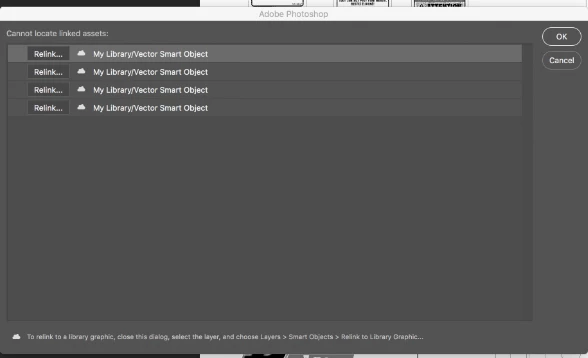
Hello there, have a question about belowed panel. Is there a way (shortcut or something) to open this panel manualy? I know it appears when some of the smart objects links are missing, but I'm almost pretty sure that once I was able to open it manualy but can't remember how I did it. Great thanks for all help!
 

This topic has been closed for replies.

3 replies

Tom Winkelmann
Inspiring
August 3, 2022
var idfixMissingLinkedAssets = stringIDToTypeID( "fixMissingLinkedAssets" );
    var d = new ActionDescriptor();
    var idnull = charIDToTypeID( "null" );
        var r = new ActionReference();
        var idDcmn = charIDToTypeID( "Dcmn" );
        var idOrdn = charIDToTypeID( "Ordn" );
        var idTrgt = charIDToTypeID( "Trgt" );
        r.putEnumerated( idDcmn, idOrdn, idTrgt );
    d.putReference( idnull, r );
executeAction( idfixMissingLinkedAssets, d, DialogModes.ALL );
Conrad_C
Inspiring
August 3, 2022

OK this is sort of non-obvious and totally out of left field, but the way you can get a links list for a Photoshop document is to select it in Adobe Bridge, and then look in the Metadata panel.


This isn’t just for Photoshop files. Bridge has the ability to dig into certain Adobe file types and list things in those files such as links, color swatches, fonts, and so on. What it lists is different for various file types, so it doesn’t always show you what you want, but when it works, it’s useful.

davescm
Brainiac
August 2, 2022

Could you be thinking of InDesign which, unlike Photoshop, has a links panel?


Dave

jane-e
Brainiac
August 2, 2022


@davescm wrote:

Could you be thinking of InDesign which, unlike Photoshop, has a links panel?


... as does Illustrator. It would be a nice feature request @Desktop Shaman .


Jane