Inspiring
January 6, 2024
Answered

How to record the current eraser settings in an action

  • January 6, 2024
  • 2 replies
  • 699 views

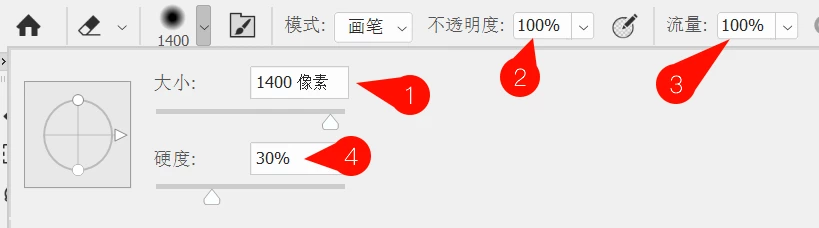
Please tell me, I recorded an erasing action with the eraser tool, but the parameters of the eraser tool were not recorded in the action. The eraser size is 1400px, the flow rate is 100%, the opacity is 100%, and the hardness is 30%. How should I write the script code?


This topic has been closed for replies.
Correct answer h4ste338468947qjm

I found a usable script. This script successfully allows me to select the eraser tool and then set the flow and opacity. However, there is a problem with setting the eraser size and hardness. Can you help me modify it?


if (documents.length == 0) {
    var d = documents.add();
} else {
    var d = activeDocument;
}

// 创建两个图层以便启用背景和透明
if (d.layers.length == 1) {
    d.artLayers.add(); 
}

// 选择橡皮擦工具
var idslct = stringIDToTypeID( "select" );
var desc226 = new ActionDescriptor();
var idnull = stringIDToTypeID( "null" );
var ref170 = new ActionReference();
var idErTl = stringIDToTypeID( "eraserTool" );  // 橡皮擦工具
ref170.putClass( idErTl );
desc226.putReference( idnull, ref170 );
executeAction( idslct, desc226, DialogModes.NO );

// 设置透明度为50%、流量为50%、画笔大小为1400、硬度为100%
var idset = stringIDToTypeID( "set" );
var desc226 = new ActionDescriptor();
var idnull = stringIDToTypeID( "null" );
var ref170 = new ActionReference();
var idErTl = stringIDToTypeID( "eraserTool" );  // 橡皮擦工具
ref170.putClass( idErTl );
desc226.putReference( idnull, ref170 );

var id12 = stringIDToTypeID( "to" );
var desc5 = new ActionDescriptor();
var id13 = stringIDToTypeID( "opacity" );
var id14 = stringIDToTypeID( "percentUnit" );
desc5.putUnitDouble( id13, id14, 50 );  // 设置透明度为50%

var id19 = stringIDToTypeID( "flow" );
desc5.putUnitDouble( id19, id14, 50 );  // 设置流量为50%

var id20 = stringIDToTypeID( "diameter" );
desc5.putUnitDouble( id20, id14, 1400 );  // 设置画笔大小为1400

var id21 = stringIDToTypeID( "hardness" );
desc5.putUnitDouble( id21, id14, 100 );  // 设置硬度为100%

desc226.putObject( id12, idnull, desc5 );
executeAction( idset, desc226, DialogModes.NO );

'DONE';

2 replies

h4ste338468947qjmAuthorCorrect answer
Inspiring
January 6, 2024

I found a usable script. This script successfully allows me to select the eraser tool and then set the flow and opacity. However, there is a problem with setting the eraser size and hardness. Can you help me modify it?


if (documents.length == 0) {
    var d = documents.add();
} else {
    var d = activeDocument;
}

// 创建两个图层以便启用背景和透明
if (d.layers.length == 1) {
    d.artLayers.add(); 
}

// 选择橡皮擦工具
var idslct = stringIDToTypeID( "select" );
var desc226 = new ActionDescriptor();
var idnull = stringIDToTypeID( "null" );
var ref170 = new ActionReference();
var idErTl = stringIDToTypeID( "eraserTool" );  // 橡皮擦工具
ref170.putClass( idErTl );
desc226.putReference( idnull, ref170 );
executeAction( idslct, desc226, DialogModes.NO );

// 设置透明度为50%、流量为50%、画笔大小为1400、硬度为100%
var idset = stringIDToTypeID( "set" );
var desc226 = new ActionDescriptor();
var idnull = stringIDToTypeID( "null" );
var ref170 = new ActionReference();
var idErTl = stringIDToTypeID( "eraserTool" );  // 橡皮擦工具
ref170.putClass( idErTl );
desc226.putReference( idnull, ref170 );

var id12 = stringIDToTypeID( "to" );
var desc5 = new ActionDescriptor();
var id13 = stringIDToTypeID( "opacity" );
var id14 = stringIDToTypeID( "percentUnit" );
desc5.putUnitDouble( id13, id14, 50 );  // 设置透明度为50%

var id19 = stringIDToTypeID( "flow" );
desc5.putUnitDouble( id19, id14, 50 );  // 设置流量为50%

var id20 = stringIDToTypeID( "diameter" );
desc5.putUnitDouble( id20, id14, 1400 );  // 设置画笔大小为1400

var id21 = stringIDToTypeID( "hardness" );
desc5.putUnitDouble( id21, id14, 100 );  // 设置硬度为100%

desc226.putObject( id12, idnull, desc5 );
executeAction( idset, desc226, DialogModes.NO );

'DONE';
Inspiring
January 6, 2024

If you're going to use the same exact settings every time, you can just set up a new tool preset with the eraser then call it from your action. You may have to enable "Show All Tool Presets" to make this work. This is how I do it.


Then if you need to call this tool within a script, you can make an action with a single step that calls that preset and within your script, run that action.


What your script is doing is basically running an action as a javascript (ActionScript) which does the same thing. The only thing this allows you to do beyond using the action is dynamically modify the eraser settings.


To answer your question, without actually trying it myself, it looks like the diameter setting is the 1400 and the hardness is the 100 a few lines below that. If you change those to what you want it to be it should work for you.

Inspiring
January 6, 2024

Two great gods, I have to ask you for help again 🙂 .  @c.pfaffenbichler @Stephen_A_Marsh 

Inspiring
January 6, 2024

Are you trying to save that specific eraser as an action to be used over and over or be able to record whatever the current eraser settings are to be used later in an action?


Basically, are you going to want to use those specific settings every time or do you want the action to capture whatever the settings happen to be when it runs and save them for future use?

Inspiring
January 6, 2024

Yeah, so I'd like to have a script that I can execute to make the eraser use my specific settings