Inspiring
January 25, 2019
Question

How to Reduce Size of Adjustment Panel - CS5

  • January 25, 2019
  • 2 replies
  • 389 views

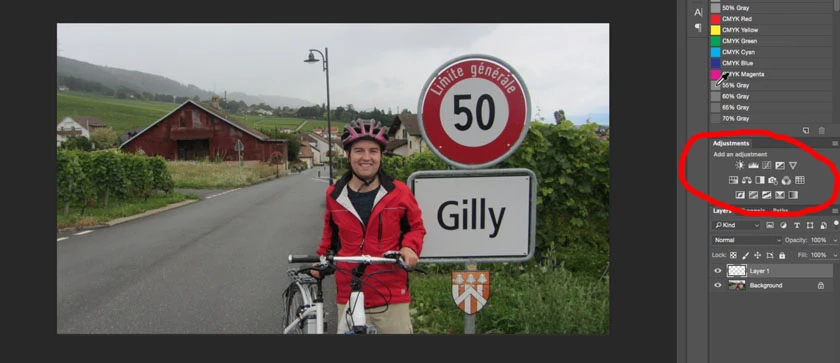
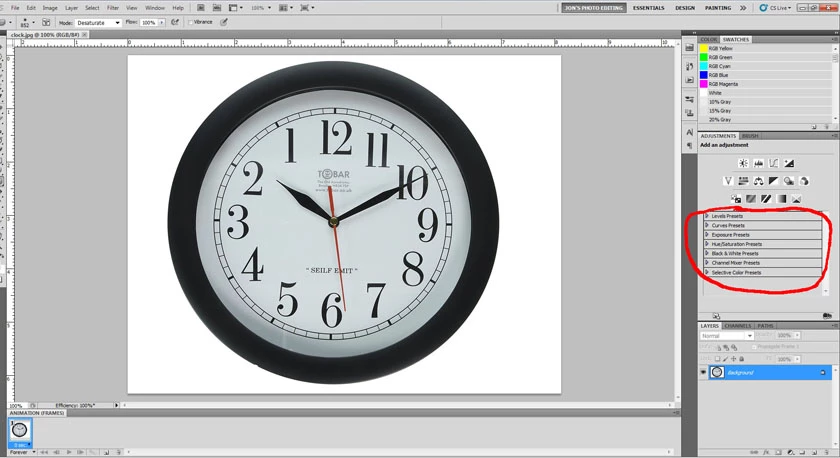
See two attached screenshots. Is there a way to reduce my Adjustment Panel to get rid of the presets sliders so it looks like the screenshot without the sliders? Or is that a function of the Photoshop version? Mine is CS5 (on the left), the online course from which the 2nd screenshot is taken, is a CC version.

Thanks,

Jon
  

    This topic has been closed for replies.

    2 replies

    Jeff Arola
    Community Expert
    Community Expert
    January 25, 2019

    That was a change to the adjustments panel in cs6. In cs5 the adjustments panel changed to show the

    adjustments layer controls when editing an adjustments layer. Cs6 separated the two so the adjustments

    panel always stayed the same and the actual controls to adjust the adjustment layer are in a Properties

    panel like in JJMack"s screenshot above.

    In cs5 you can make the Adjustments panel smaller by clicking on the Standard View Button highlighted below.

    JonnyD14Author
    Inspiring
    January 25, 2019

    Yes, I can make the panel narrower but, it seems, not shorter vertically. My goal was to be able to see more of the layers in the layers panel. Maybe I should put my layers panel at the top of my workspace.

    Thanks everybody

    Jeff Arola
    Community Expert
    Community Expert
    January 25, 2019

    You can dock the Adjustments panel to the left of the Swatches panel.

    JJMack
    Community Expert
    Community Expert
    January 25, 2019

    I think Adobe may have change where Adjustment Preset are in CS6.  I just see them in the properties palette. I can not see any way to add adjustment presets into the Adjustment panel.  It would be good if Adobe would also remove the two bad fly-out options in the adjustment palette fly-out menu. 

    JJMack
    D Fosse
    Community Expert
    Community Expert
    January 25, 2019

    Don't think you can. The adjustment panel was new with CS4 or 5, and they probably thought it was a good idea at the time to have the presets there.

    The whole adjustments panel is a big nuisance. What I want is keyboard shortcuts for adjustment layers - but that just brings up a modal dialog that you have to confirm. I prefer the panel to that.

    The only way to get rid of it is to record actions, and assign F-keys to those.