
Participant
June 13, 2018
Answered

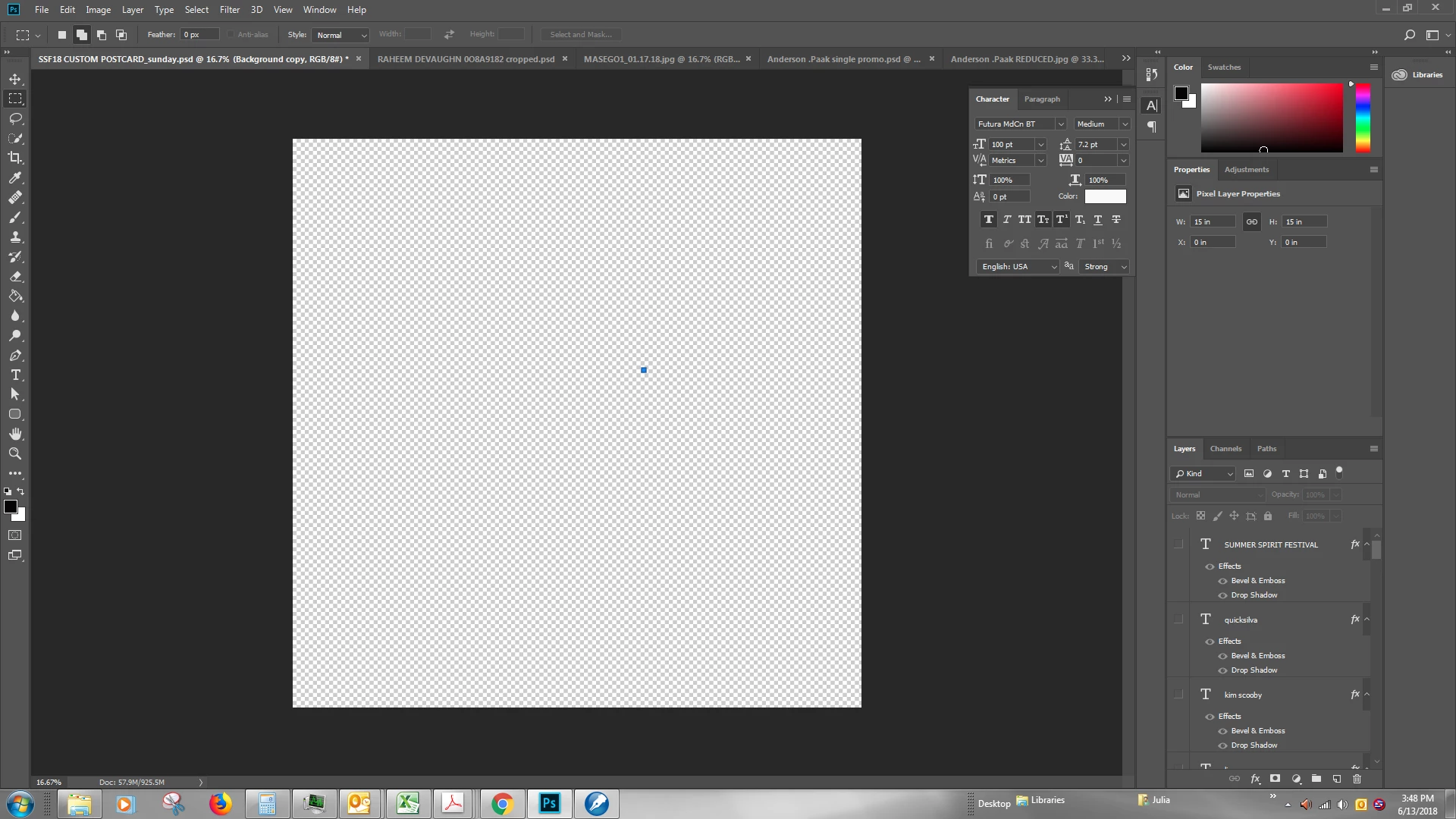
How to remove a mysterious blue box, NOT a layer, that has appeared over my layout?
  • June 13, 2018
  • 2 replies
  • 22843 views

I've been designing a promotional postcard that has dozens of layers and have put a few days into it.  Today, as I'm 80% done, a small blue box has appeared over top my design.  I assumed I'd managed to either corrupt my base layer or to insert a shape unwittingly.  I was surprised because, although I am not a graphics professional, I have using Photoshop for more than a year now and have designed dozens of similar works.  I decided to deselect all the layers trying to find my error.  It is down to blank canvas and the box remains.  I've tried creating a new base layer, in hope it would overlay the box.  Did not work. There are NO layers selected, so I knew that was a long shot, but I'm desperate. Help?  I have searched on here and found info about layer bugs and a variety of  different issues, but not this one.  My other photoshop files are fine.  No blue box.  Including ones of similar size and complexity. 

Correct answer Semaphoric

Sort of looks like a stray path node.

2 replies

Participant
June 13, 2018

Also, if there are any other newer users who come across this looking for an answer.  I apparently inadvertently hit the "Direct Selection Tool."  It is a white arrow located below the T (text) tool in the menu (which I toggle back and forth to constantly).  That created a path anchor point.  I then hit on the empty box trying to figure out what it was, which caused the path marker to be selected and filled it in solid blue.  If you have very recently saved, you can just close and reopen your file.  The actual answer within the program is:  To delete a path: Select the path by using the Path Selection tool and press the Backspace key. You can also select a point on the path by using the Direct Selection tool and pressing Backspace twice.

This is a powerful tool that is beyond my experience, so it baffled me since I didn't create a new layer, rather initiated a process editing a layer (that's my way of thinking of it, perhaps not the technically sophisticated explanation).     

pixxxelschubser
Community Expert
Community Expert
June 13, 2018

juliak66548584  schrieb

…  To delete a path: Select the path by using … 

Do you know the Path Panel? Open the panel and check the possibilities.

Have fun

Semaphoric
Community Expert
SemaphoricCommunity ExpertCorrect answer
Community Expert
June 13, 2018

Sort of looks like a stray path node.

Participant
June 13, 2018

Thank you. I didn't even know what a path was and just being given that phrase to search brought me to my fix and I'm learning something else new and important.  Thank you again! 

Inspiring
February 1, 2023

How did you get rid of it?