
Participant
May 30, 2021
Answered

How to remove breast fat lines created by shadow?

  • May 30, 2021
  • 4 replies
  • 5596 views

Hello, I am really new with photoshop.

I am wondering How to remove breast fat lines created by shadows?

Thanks for your help,

This topic has been closed for replies.
Correct answer barbara_a7746676

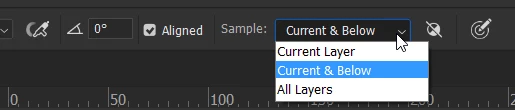
For more flexibility, you might want to do the Clone Stamping on a separate layer. Set the Clone tool to Current and Below.
4 replies

barbara_a7746676
Community Expert
Community Expert
May 31, 2021

Your final looks great!

barbara_a7746676
Community Expert
barbara_a7746676Community ExpertCorrect answer
Community Expert
May 31, 2021

For more flexibility, you might want to do the Clone Stamping on a separate layer. Set the Clone tool to Current and Below.

barbara_a7746676
Community Expert
Community Expert
May 31, 2021

There are usually many ways to do things in Photoshop. One approach would be to use the Clone Stamp tool. Take a sampling point (Alt/Option click on an area you want to copy) then click or drag to copy the pixels. Since the area is small and there's not many pixels to copy, you will probably need to take multiple sampling points and build up the area little by little. Using a lower opacity on the Clone Stamp tool, like maybe 50%, will help fill in the shadow area more slowly, subtly and naturally.

 
Participant
May 31, 2021

Thank you for taking the time in writing the steps out. Sadly, everything is on YouTube nowadays 😞

Thanks a lot.

Nancy OShea
Community Expert
Community Expert
May 31, 2021

It's called cleavage 😉


See Reduce Cleavage in Photoshop.


Hope that helps.


Nancy O'Shea— Product User & Community Expert