jtu50
Inspiring
December 28, 2016
Answered

How to remove custom color profile from dropdown list

  • December 28, 2016
  • 2 replies
  • 3491 views

I have custom color profiles that I no longer use, as the printer for them is no longer available.  I would like to remove them from the dropdown list under View>ProofSetup>Custom.  I have removed the ICC profiles themselves, but the link to them seems to remain in the dropdown.  There seems to be no "delete" for this. I am using Photoshop CC, Win 10.
    This topic has been closed for replies.
    Correct answer jtu50

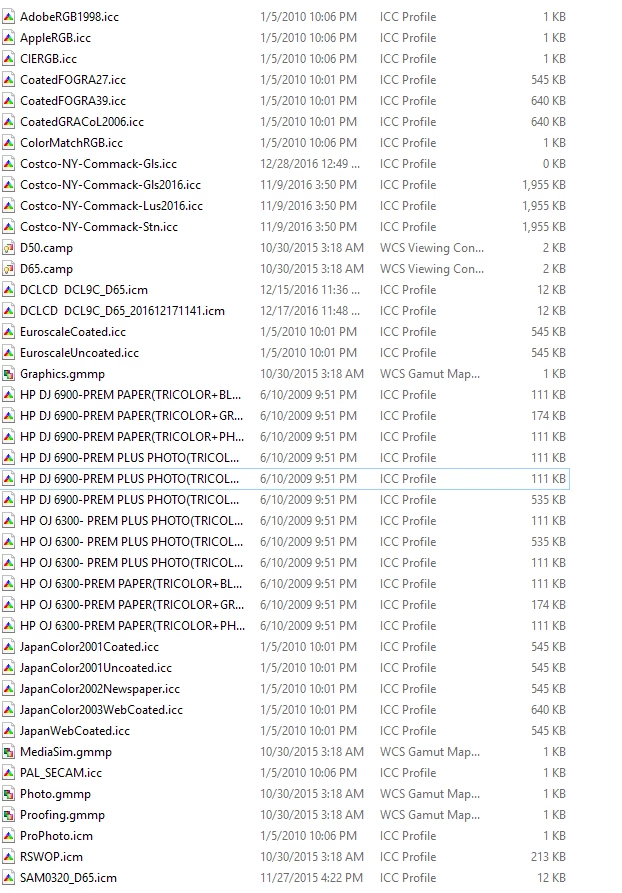
    From C:\ Windows\System32\spool\drivers\color

    From Control Panel>Color Management

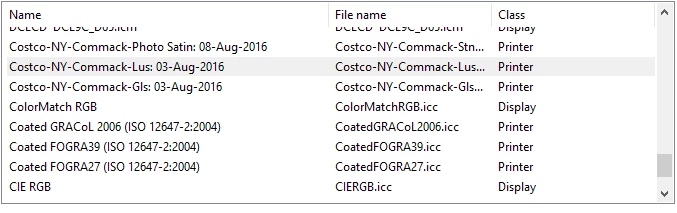
    The Costco profiles are the current ones I want to use.  Just can't get rid of the other Costco options in the dropdowns, or Customize Proof Condition window is PS.  There are also old Epson profiles listed as well, which are not in the system color folder or Control Panel Color management window.  I suspect the only way to get rid of this will be in the registry, which I'm not doing!


    Found the answer!  The psf files were in C:\Program filesx86\common file\adobe\color\proofing.  Removing those files removed them from the menu.  There really should be an easy way to delete old/obsolete profiles!

    2 replies

    JJMack
    Community Expert
    Community Expert
    December 28, 2016

    Are you sure they have been removed from "C:\WINDOWS\System32\spool\drivers\color" and Control Panel Color Management?

    JJMack
    jtu50
    jtu50Author
    Inspiring
    December 29, 2016

    Ronald and JJ, thanks for the replies.  Yes, I checked all the locations you suggested.  The files are not there. This screen grab is from View>Proof Setup>Custom menu.  I want to delete the menu entry for CostcoGlossy and Lustre.  Can't find these entries in any of the locations you suggested.  The only entries there are for the Costco 2016 entries, which I want to keep.

    jtu50
    jtu50Author
    Inspiring
    December 29, 2016

    Show the contents of the system color folder and the control panel color manager profiles


    From C:\ Windows\System32\spool\drivers\color

    From Control Panel>Color Management

    The Costco profiles are the current ones I want to use.  Just can't get rid of the other Costco options in the dropdowns, or Customize Proof Condition window is PS.  There are also old Epson profiles listed as well, which are not in the system color folder or Control Panel Color management window.  I suspect the only way to get rid of this will be in the registry, which I'm not doing!

    Legend
    December 28, 2016

    Assuming Windows did you remove them from C:\WINDOWS\SYSTEM32\SPOOL\drivers\color\   ?

    Look also in

    C:\Program Files\Common Files\Adobe\Color\Profiles

    and

    C:\Program Files(x86)\Common Files\Adobe\Color\Profiles