Participant
September 20, 2024
Question

How to remove text in a connecting Line image without changing background in photoshop

  • September 20, 2024
  • 8 replies
  • 618 views

Hi Guys,


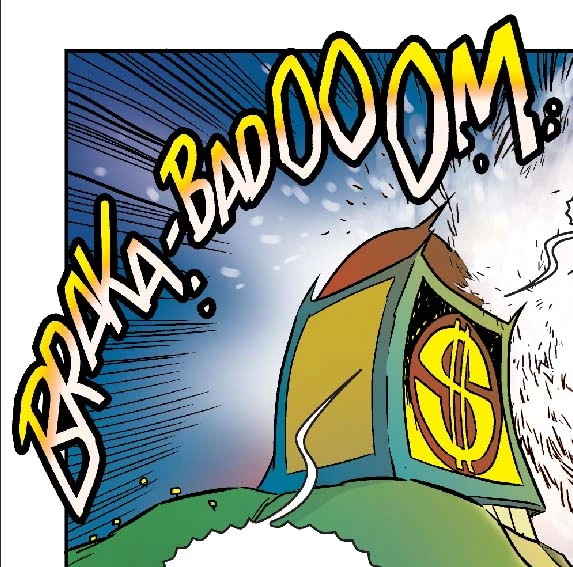
How to remove text in a connecting Line image without changing background in photoshop. Find the below image for reference.

 

This topic has been closed for replies.

8 replies

Legend
September 24, 2024

No. Maybe you could just use your own art?

Derek Cross
Community Expert
Community Expert
September 24, 2024

As I stated, there's no other way to remove the lettering on this image without recreating background, which would be easier and more effective than the way you are trying at present.

ewds_0249Author
Participant
September 24, 2024

It is a tif file not  PSD. Background with text are megred in a single layer. Any other way to delete the text and retain the background color gradiant as it is in background?. Now we doing text removed using lassor and patch tool. After removed the text redraw the background objects. Kindly guide we are doing the correct way or any other easy way to do the process....


Legend
September 23, 2024

You will have to recreate the background or get a copy of the original without the text.

ewds_0249Author
Participant
September 23, 2024

if any option is there without recreating the background for delete the text?. We are facing the recreating the background image for color gradiant issue for delete the text. Kindly response the issue.

Derek Cross
Community Expert
Community Expert
September 23, 2024

To remove that lettering in this image, you will need to recreate the background.

ewds_0249Author
Participant
September 23, 2024

I need to remove the text "BRAKA-BADOOOM". Please help me to delete the text and retain the background.

jane-e
Community Expert
Community Expert
September 24, 2024
quote

I need to remove the text "BRAKA-BADOOOM".

By @ewds_0249


There is no text in your image because you have one flattened layer. There are only pixels.


When you recreate this, be sure to keep a layered file so you don't face this issue again. 


This is not a bug in Photoshop; it's how images on one layer work. I've moved your post from Bugs to Discussions. Your choice is to edit the pixels to replace them or to recreate the image. Simply removing the pixels will leave your Background color, which is white by default. That's not what you want.


Jane


Legend
September 20, 2024

SPECIFICALLY what text do you want to remove? I have never heard of a "connecting line image" before.