Known Participant
February 24, 2025
Answered

How to replicate this effect?

  • February 24, 2025
  • 3 replies
  • 649 views

Hi community, 

I am looking to replicate this effect on the background through Photoshop. It seems to be an overlay with a mix of effects applied to it; I've tried to replicate it using glow, distortion, chromatic aberration, and dithering, but without success.

Does someone know how I could replicate it in Photoshop?

Thanks! 

Correct answer Conrad_C

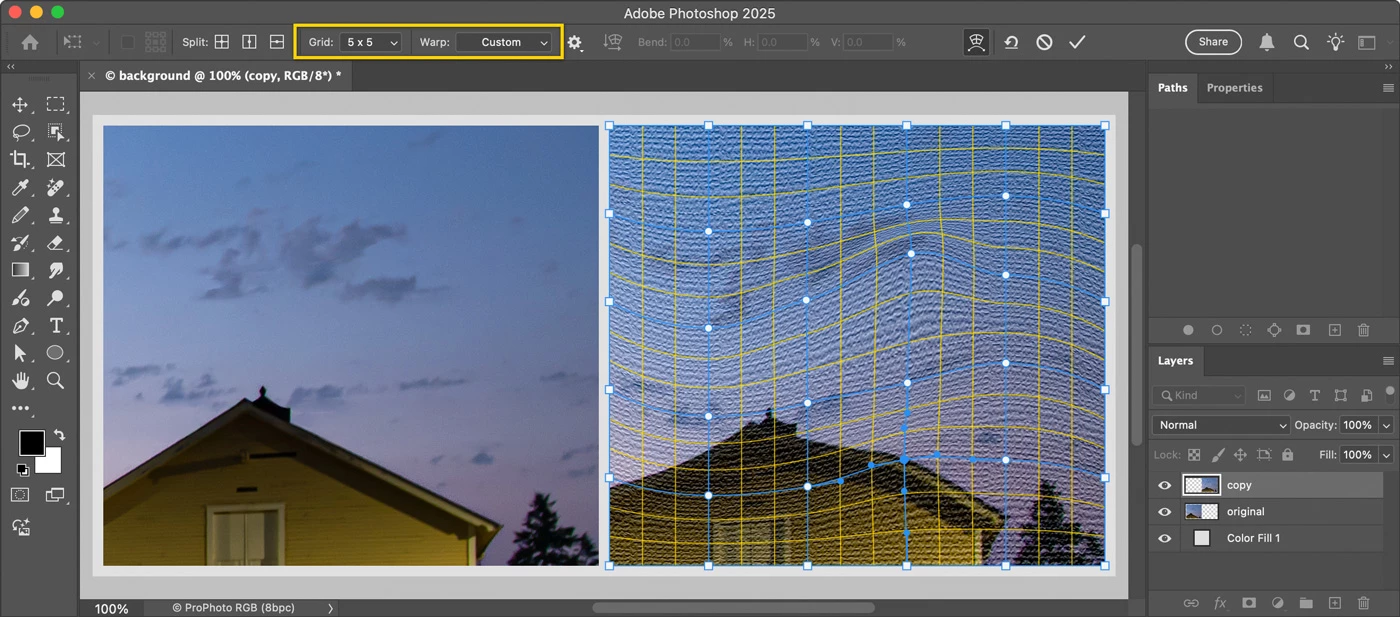
This try has two steps:

1. Choose the command Filter > Filter Gallery, apply Texturizer with Burlap. 

2. Choose Edit > Transform > Warp, apply a Warp type of Wave or Twist. If needed, drag warp handles and use a custom Grid size. 


3 replies

Trevor.Dennis
Community Expert
Community Expert
February 24, 2025

Another approach:

Working on a 50% grey layer set to Overlay

I used Halftone > Line

Distort > Wave (set to Sine)


Hmmm, it doesn't look like that in Photoshop.  I think there is some moire effect going on. I suspect that the moire will disappear if you click to expand.


[EDIT] Yes, that was indeed the case.  The sine wave is regular and repeats, but can be warped to change that.


Conrad_C
Community Expert
Conrad_CCommunity ExpertCorrect answer
Community Expert
February 24, 2025

This try has two steps:

1. Choose the command Filter > Filter Gallery, apply Texturizer with Burlap. 

2. Choose Edit > Transform > Warp, apply a Warp type of Wave or Twist. If needed, drag warp handles and use a custom Grid size. 


Known Participant
February 25, 2025

This is awesome thanks!

melissapiccone
Community Expert
Community Expert
February 24, 2025

Play with the color halftone filter... 

Melissa Piccone | Adobe Trainer | Online Courses Author | Fine Artist