
Known Participant
April 16, 2020
Answered

How to Reverse the "Convert to Smart Object" Preference When Opening a DNG File in Photoshop

  • April 16, 2020
  • 2 replies
  • 876 views

Following some online advice I changed a preference in Photoshop so that a dng file is automatically opened as a smart object in Photoshop. That was not a smart move, as Photoshop becomes kludgy immediately. How to reverse this preference? I cannot find a dialogue that includes this option. Thanks!
This topic has been closed for replies.
Correct answer JJMack

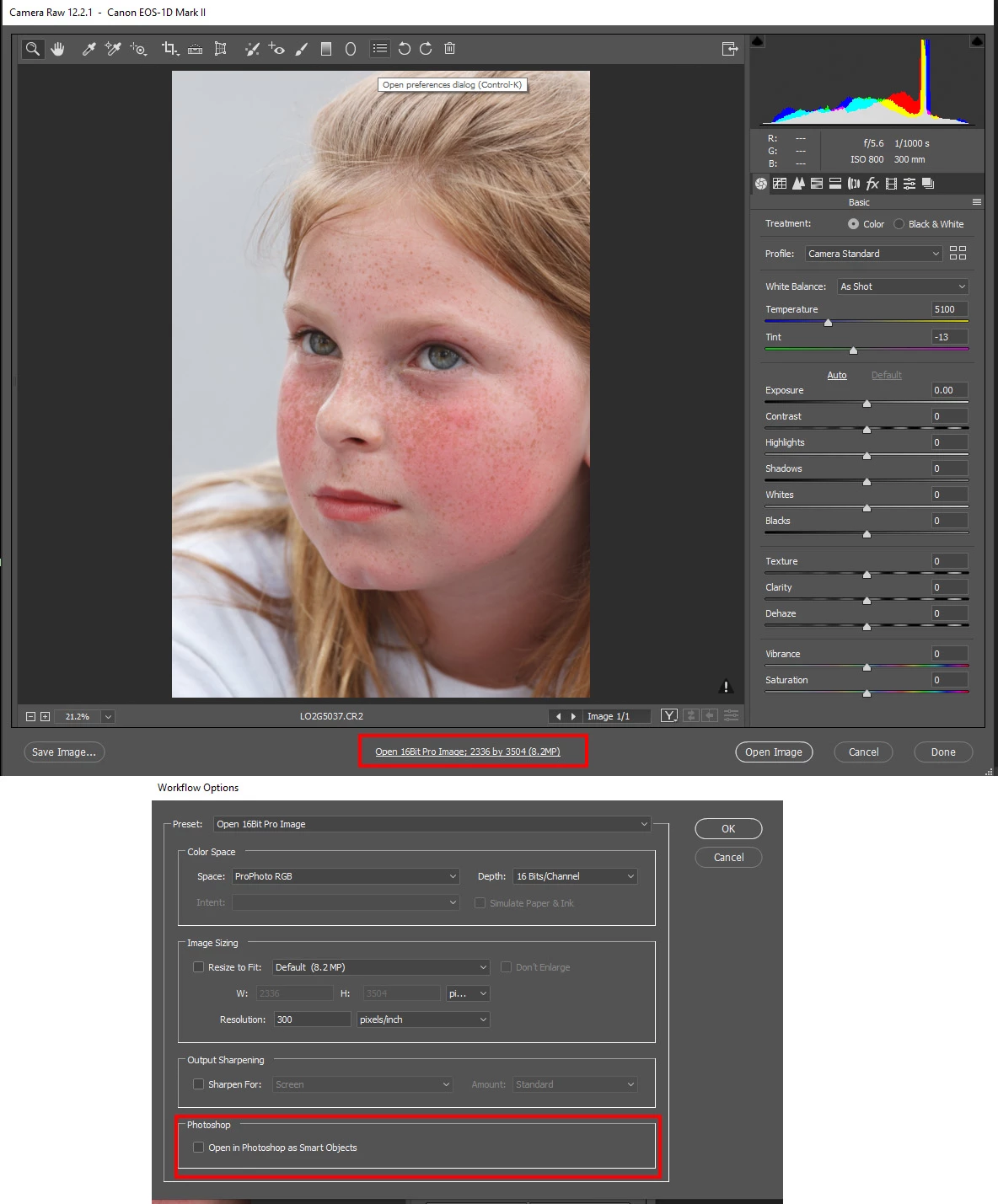
In ACR click in the botton center settings to open workflow options uncheck open as smart object.

2 replies

JJMack
Community Expert
JJMackCommunity ExpertCorrect answer
Community Expert
April 16, 2020

In ACR click in the botton center settings to open workflow options uncheck open as smart object.

JJMack
Known Participant
April 16, 2020

Thanks c_pfaffenbichler and JJMack. Another Photoshop nightmare averted.


c.pfaffenbichler
Community Expert
Community Expert
April 16, 2020

Using Smart Objexts is a smart choice, how your computer performs and what your Performance Prefernces are is another issue. 


When you alt-click the Color Space/Bit Depth/pixel dimensions/… text at the bottom of the Camera Raw dialog the Workflow Options dialog should appear.