
Inspiring
December 13, 2013
Answered

how to select and paint the triangle?

  • December 13, 2013
  • 2 replies
  • 1850 views

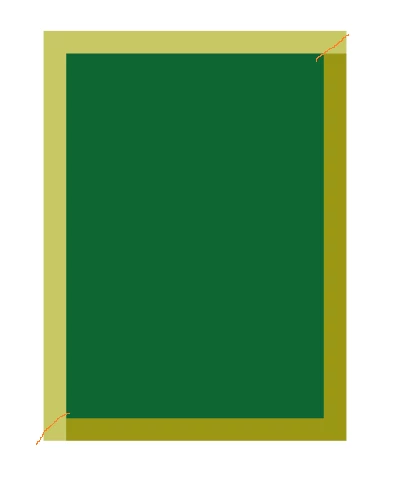
I want to make an imitation cutout mat.

Created and filled two colors 4 rectangular areas - sections mat. Now you need to fill in the corners. I can calculate pixel by pixel rows and fill them, but it seems to me that there must be a simpler solution.In the example script - create a blank document, fill the new layer rectangel area (this will portray the picture) in the Layers palette make this layer active and run the script.

Help me paint 2 color corner number 2 🙂

Thanks !

#target photoshop;


var fillColor1 = new SolidColor()

fillColor1.rgb.red = 255;

fillColor1.rgb.green = 10;

fillColor1.rgb.blue = 10;

var fillColor2 = new SolidColor()

fillColor2.rgb.red = 155;

fillColor2.rgb.green = 50;

fillColor2.rgb.blue = 100;

// you can change this parametr

var widthSrez = 20;

main(0)

function main(type){//---------------------------------------------------------

    var mySelection =new Array(4);

    for(var o=0;o<mySelection.length;o++){

    mySelection = new Array(4)

    }

    var doc =  app.activeDocument;

    var bounds = doc.activeLayer.bounds;

    var newLayer = doc.artLayers.add();

    newLayer.name =  'Срез' ;

switch(type){

    case 0:

    //left

        mySelection[0][0] =bounds[0].value;

        mySelection[0][1] =bounds[0].value+widthSrez;

        mySelection[0][2] =bounds[1].value;

        mySelection[0][3] =bounds[3].value;

        mySelection[0][4] =1;

    //top

        mySelection[1][0] =bounds[0].value;

        mySelection[1][1] =bounds[2].value;

        mySelection[1][2] =bounds[1].value;

        mySelection[1][3] =bounds[1].value+widthSrez;;

        mySelection[1][4] =1;

   //right

        mySelection[2][0] =bounds[2].value - widthSrez;

        mySelection[2][1] =bounds[2].value;

        mySelection[2][2] =bounds[1].value + widthSrez;

        mySelection[2][3] =bounds[3].value- widthSrez;

        mySelection[2][4] =2;

   //bottom

        mySelection[3][0] =bounds[0].value+ widthSrez;

        mySelection[3][1] =bounds[2].value;

        mySelection[3][2] =bounds[3].value-widthSrez;

        mySelection[3][3] =bounds[3].value;

        mySelection[3][4] =2;

    break;

    case 1://other type

    break;

    case 2://other type

    break;

    case 3://other type

    break;

}

            for(var p=0;p<mySelection.length;p++){

            var newSelect = Array(

                Array(mySelection

[0], mySelection

[2]),

                Array(mySelection

[1], mySelection

[2]),

                Array(mySelection

[1], mySelection

[3]),

                Array(mySelection

[0],mySelection

[3]),

                Array(mySelection

[0],mySelection

[2])

                );

doc.selection.select(newSelect);

       if(mySelection

[4]==1)

           doc.selection.fill (fillColor1, ColorBlendMode.NORMAL,100,false);

        else{

            doc.selection.fill (fillColor2, ColorBlendMode.NORMAL,100,false);

            //in this place paint the corners !!

               }

           doc.selection.deselect()

     }

}

This topic has been closed for replies.
Correct answer pixxxelschubser

Hi Andy_Bat1,

here is another way.

Actually you do not need math.

Create a selection. Create a smaller selection and subtract it from the previous one. Fill this with color 1.

Create a triangular selection and subtract it from the previous one.

Fill this with color 2.

#target photoshop

// SelectionAndCreate2coloredFrameBorder.jsx

// http://forums.adobe.com/thread/1357492?tstart=0


var aDoc = app.activeDocument;


var ori_units = app.preferences.rulerUnits;

app.preferences.rulerUnits = Units.PIXELS;

var fillColor1 = new SolidColor()

fillColor1.rgb.red = 255;

fillColor1.rgb.green = 10;

fillColor1.rgb.blue = 10;

var fillColor2 = new SolidColor()

fillColor2.rgb.red = 155;

fillColor2.rgb.green = 50;

fillColor2.rgb.blue = 100;

// you can change this parametr

var Abst = 20;

var newLayer = aDoc.artLayers.add();

newLayer.name =  'Срез' ;

var Br = aDoc.width;

var Ho = aDoc.height;

var nBr = Br-Abst;

var nHo = Ho-Abst;

aDoc.selection.selectAll();  // first

aDoc.selection.select([[Abst,Abst],[Abst,nHo],[nBr,nHo],[nBr,Abst]],SelectionType.DIMINISH);  // second

aDoc.selection.fill (fillColor1, ColorBlendMode.NORMAL,100,false);

aDoc.selection.select([[0,Ho],[Br,0],[Br,Ho],[0,Ho]],SelectionType.DIMINISH); // third

aDoc.selection.fill (fillColor2, ColorBlendMode.NORMAL,100,false);

app.preferences.rulerUnits = ori_units;

Works this for you?

2 replies

pixxxelschubser
Community Expert
pixxxelschubserCommunity ExpertCorrect answer
Community Expert
December 13, 2013

Hi Andy_Bat1,

here is another way.

Actually you do not need math.

Create a selection. Create a smaller selection and subtract it from the previous one. Fill this with color 1.

Create a triangular selection and subtract it from the previous one.

Fill this with color 2.

#target photoshop

// SelectionAndCreate2coloredFrameBorder.jsx

// http://forums.adobe.com/thread/1357492?tstart=0


var aDoc = app.activeDocument;


var ori_units = app.preferences.rulerUnits;

app.preferences.rulerUnits = Units.PIXELS;

var fillColor1 = new SolidColor()

fillColor1.rgb.red = 255;

fillColor1.rgb.green = 10;

fillColor1.rgb.blue = 10;

var fillColor2 = new SolidColor()

fillColor2.rgb.red = 155;

fillColor2.rgb.green = 50;

fillColor2.rgb.blue = 100;

// you can change this parametr

var Abst = 20;

var newLayer = aDoc.artLayers.add();

newLayer.name =  'Срез' ;

var Br = aDoc.width;

var Ho = aDoc.height;

var nBr = Br-Abst;

var nHo = Ho-Abst;

aDoc.selection.selectAll();  // first

aDoc.selection.select([[Abst,Abst],[Abst,nHo],[nBr,nHo],[nBr,Abst]],SelectionType.DIMINISH);  // second

aDoc.selection.fill (fillColor1, ColorBlendMode.NORMAL,100,false);

aDoc.selection.select([[0,Ho],[Br,0],[Br,Ho],[0,Ho]],SelectionType.DIMINISH); // third

aDoc.selection.fill (fillColor2, ColorBlendMode.NORMAL,100,false);

app.preferences.rulerUnits = ori_units;

Works this for you?

JJMack
Community Expert
Community Expert
December 15, 2013

var nBr = Br-Abst; var nHo = Ho-Abst; This is not math looks like math to me..... More math then var frameRef = [ [0,0], [0,height], [dpi,(height-dpi)], [dpi,dpi], ]

JJMack
pixxxelschubser
Community Expert
Community Expert
December 15, 2013

@JJMack,

why are you doing this?

Do we want to help Andy_Bat1 - or do we laugh over each other?

IMHO your frame based on the resolution is nonsense (standalone).

And you need four different calculations for each side of the image in your sample. You have not mentioned.

And yes, I know that each script is pure mathematics.

But please:

Simple, but without flexibility and only with fixed values ​​- as desired:

The way is very simple:

pixxxel schubser schrieb:

… Create a selection.
… Create a smaller selection and subtract it from the previous one. Fill this with color 1.

… Create a triangular selection and subtract it from the previous one. Fill this with color 2 …

#target photoshop;

// SelectionAndCreate2coloredFixFrameBorder.jsx

// http://forums.adobe.com/thread/1357492?tstart=0

var aDoc = app.documents.add (500,500);

var ori_units = app.preferences.rulerUnits;

app.preferences.rulerUnits = Units.PIXELS;

var fillColor1 = new SolidColor()

fillColor1.rgb.red = 255;

fillColor1.rgb.green = 10;

fillColor1.rgb.blue = 10;

var fillColor2 = new SolidColor()

fillColor2.rgb.red = 155;

fillColor2.rgb.green = 50;

fillColor2.rgb.blue = 100;

/*

// omitted, so that "no math is necessary" while script is running

// you can change this parametr

var Abst = 20;

*/

var newLayer = aDoc.artLayers.add();

newLayer.name =  'Срез' ;

var Br = aDoc.width;

var Ho = aDoc.height;

/*

// omitted, so that "no math is necessary" while script is running

var nBr = Br-Abst;

var nHo = Ho-Abst;

*/

aDoc.selection.selectAll();

// create a smaller selection based on your own fixed values

aDoc.selection.select([[20,20],[20,480],[480,480],[480,20]],SelectionType.DIMINISH);

aDoc.selection.fill (fillColor1, ColorBlendMode.NORMAL,100,false);

aDoc.selection.select([[0,Ho],[Br,0],[Br,Ho],[0,Ho]],SelectionType.DIMINISH);

aDoc.selection.fill (fillColor2, ColorBlendMode.NORMAL,100,false);

app.preferences.rulerUnits = ori_units;

Have fun

JJMack
Community Expert
Community Expert
December 13, 2013

Why not make the selection you want in the first place. years ago I create a simple dumb script to be user by action that created  virtual frames about images. The script simply made a 1" selection on the left side with 45degree mitered corners the action filled this with a frame pattern on a new layer.

http://mouseprints.net/old/dpr/Examples/FramingFrames.jpg

// A Script by JJMack used by Framing Actions

// This script set a selection to be used for

// the left side of a 1" mitered frame

// This script is supplied as is. It is provided as freeware.

// The author accepts no liability for any problems arising from its use.

/*

<javascriptresource>

<about>$$$/JavaScripts/OneInchMiteredLeftEdgeSelection/About=JJMack's One Inch Mitered Left Edge Selection.^r^rCopyright 2009 Mouseprints.^r^rScript utility for action.^rNOTE:One Inch Mitered Left Edge Selection!</about>

<category>JJMack's Action Utility</category>

</javascriptresource>

*/

leftsideframeselect();

function leftsideframeselect () {

// validate that a document is open

if (documents.length < 1) {

          alert("No Open Document!");

          return;

          }

// Set the ruler units to PIXELS

var orig_ruler_units = app.preferences.rulerUnits;

app.preferences.rulerUnits = Units.PIXELS;

var doc = activeDocument;

var height = doc.height.value;

var dpi = doc.resolution;

var frameRef = [

[0,0],

[0,height],

[dpi,(height-dpi)],

[dpi,dpi],

]

doc.selection.select(frameRef);

// Reset units to original settings

app.preferences.rulerUnits = orig_ruler_units;

}

Example of action output

http://mouseprints.net/old/dpr/Examples/LastExample.jpg

JJMack
Andy_Bat1Author
Inspiring
December 16, 2013

Good idea. This script is free ? :-)

JJMack
Community Expert
Community Expert
December 16, 2013

All the stuff I hack for Photoshop is free script like that one are included is package like image visualization use this link[ JJMack ]

JJMack