
Participant
April 10, 2018
Question

How to select thousands of holes easily

  • April 10, 2018
  • 1 reply
  • 647 views

Hello

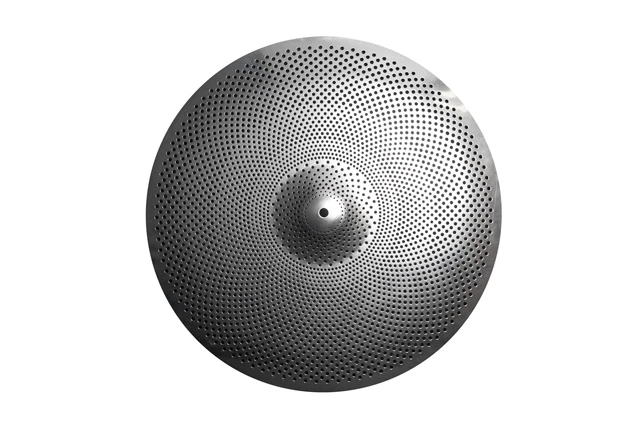
I have this object, and it was shot on a black background. But I need to get rid of all the small black fills, make the actual holes transparent so that a white background will come through.

How can I do that?

I have tried with color range and magic wand in different ways, but I have a feeling that there must be a good way to do it?

Let me know…

Thanks
Gunnar
    This topic has been closed for replies.

    1 reply

    Participating Frequently
    April 10, 2018

    Bonjour,

    I hope you have a version in a higher resolution, than the one you posted. I did color range in two step. First with a selection of a circle, to avoid to select the dark rim, that did select the black dot on the left. At the second step I did a rough lasso selection of the upper right air and with this selection active color range a second time:

    Norman Sanders
    Legend
    April 10, 2018

    The small sample that was posted suggests that the Blend If command may offer the opportunity to reconstruct the disk from selected sections that differ in the amount the Blend If top slider is moved. Place a white layer below the image layer, return to the image layer and slowly slide the top left slider to the right. Experiment with the top right slider, as well. (To bring up Blend If, double click on the top layer in the Layers panel and from Layer Style > choose Blend If)

    My first choice would be to reshoot the object with even illumination. It is best to use Photoshop for enhancement rather than salvage.

    c.pfaffenbichler
    Community Expert
    Community Expert
    April 10, 2018

    My first choice would be to reshoot the object with even illumination. It is best to use Photoshop for enhancement rather than salvage.

    To put it more bluntly: The image is not a good fit for the task.

    There is a possible addition to the Blend if approach:

    One could apply the Filter »High Pass« to try and isolate the dark elements more clearly.