
Inspiring
December 31, 2022
Answered

How to STOP Photoshop and other ADOBE applications to update automatically?

  • December 31, 2022
  • 4 replies
  • 11759 views

Hello
How to STOP Photoshop and other ADOBE applications to update automatically?
This is getting  very annoying to saying  nicely ...
Photoshop update automatically and now I cannot save ANYTHING.
The other day, I  had to  unistalled PremierPro and  installed a latest version for  the  same reason.

Just last week,  I had to unistaaled Phtoshop for  the same reason ...
[moderator deleted due to obscenity]
Yes, yes,  yes ... I  know ,  don't start with your mambo-yambo about that I have to update my laptop or take classes about  how to fix my  laptop ... 
Just if I stop the automatically updates, I will be fine ...
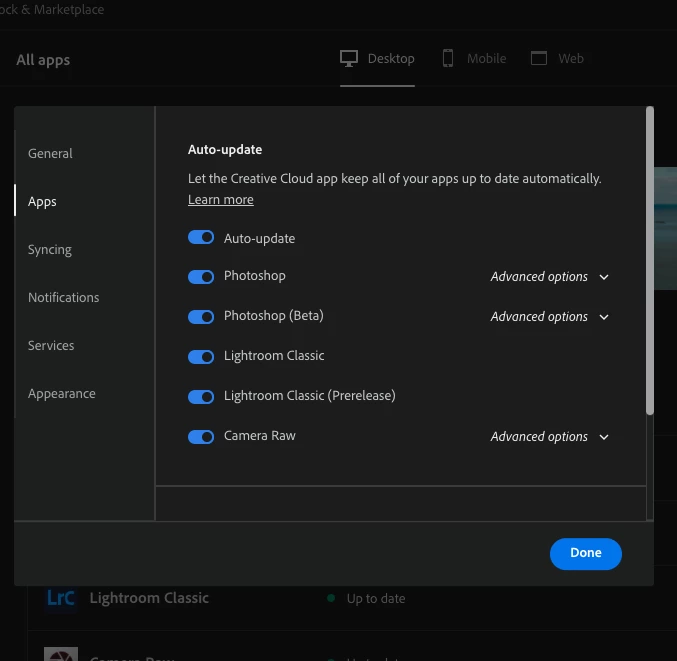
Correct answer TheDigitalDog

Preferences in Adobe Creative Cloud:

Zero  mambo-yambo! 

4 replies

Participant
September 23, 2024

I have auto update turned off, always have, but it still keeps updating Dimension!

Inspiring
January 1, 2023

Ok,  I unistalled Photoshop 24. 1 or something like that and installed 23.5 and did the same thing.
I went all the way to 23.0 and is working (I'm able to save here)
DO NOT UPDATE unlease you  are a wizard with your computer ...
Just saying ...
THANKS ADOBE 😞

TheDigitalDog
Inspiring
January 1, 2023

24.1 runs just fine for me. 🧙

Some others too. 😉

Thanks Adobe. 

Author “Color Management for Photographers" & "Photoshop CC Color Management/pluralsight"
gener7
Community Expert
Community Expert
January 1, 2023

I wanted to wait until his question was settled, but where did you get that particular screen, Digital Dog? I only know the Desktop App.

TheDigitalDog
TheDigitalDogCorrect answer
Inspiring
January 1, 2023

Preferences in Adobe Creative Cloud:

Zero  mambo-yambo! 

Author “Color Management for Photographers" & "Photoshop CC Color Management/pluralsight"
Inspiring
January 1, 2023

Awesome !!!!
Thank You !!!

gener7
Community Expert
Community Expert
December 31, 2022

Go to your Creative Cloud Desktop App,


Click the blue button, and select Preferences


Select Apps in the left pane, turn off Auto-Update and click the blue Done button to make it final.

Inspiring
January 1, 2023

GRACIAS !!!
Thank  you !!!