
martina129
Participant
April 16, 2017
Answered

How to straighten just an area of the image

  • April 16, 2017
  • 2 replies
  • 6993 views

Hello, I can straighten the whole image in CS6 using the crop tool but I only want to straighten part of the image? When I try to do this it wants to crop the image after which obviously I don't want.

It would also be helpful to show have grid lines as when I have straightened the whole image I'm not sure if it is completely straight?

Many thanks
This topic has been closed for replies.
Correct answer Barb Binder

Use View > Show > Grid for grid lines.

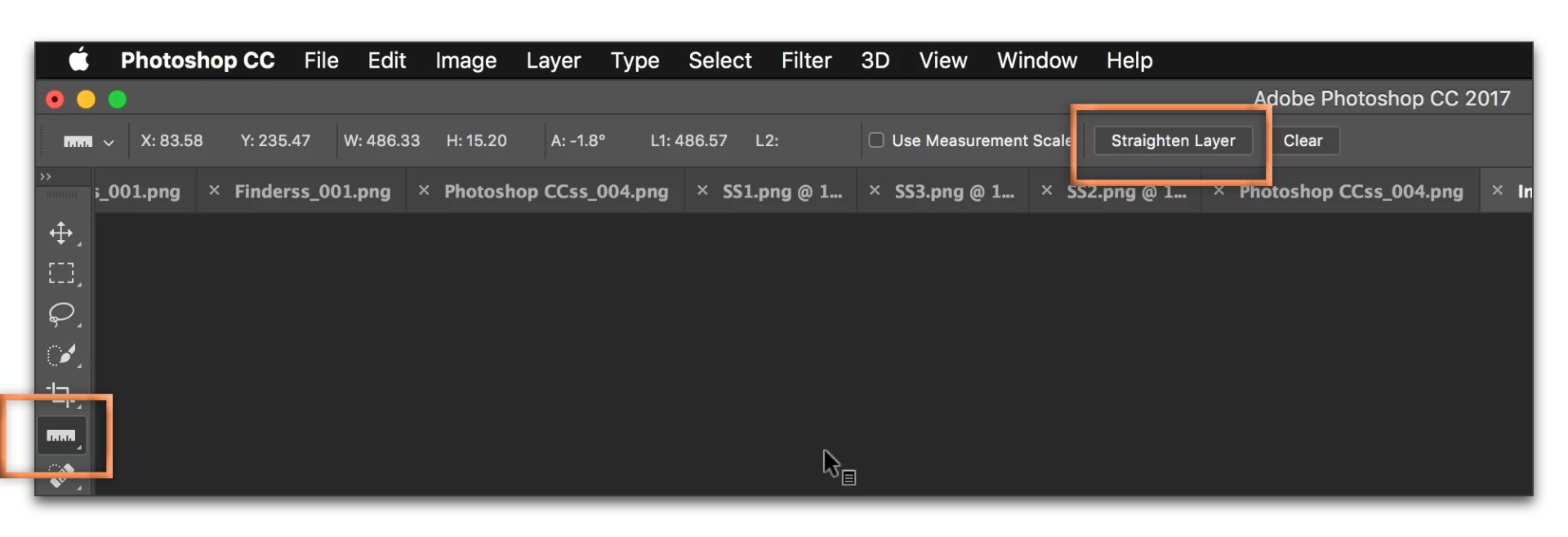
Select the Ruler tool, draw a line along the image, and click Straighten Layer on the Options Bar.

2 replies

c.pfaffenbichler
Community Expert
Community Expert
April 16, 2017
I can straighten the whole image in CS6 using the crop tool but I only want to straighten part of the image? When I try to do this it wants to crop the image after which obviously I don't want.

Why don’t you post the image in question and a screenshot to clarify that exactly you mean?

Have you tried duplicating the affected section to a new Layer, Converting it to a Smart Object and simply transforming it as needed?

Barb Binder
Community Expert
Barb BinderCommunity ExpertCorrect answer
Community Expert
April 16, 2017

Use View > Show > Grid for grid lines.

Select the Ruler tool, draw a line along the image, and click Straighten Layer on the Options Bar.

~Barb at Rocky Mountain Training