Participant
June 11, 2025
Answered

How to Tell If Neural Filters Were Applied in Photoshop?

  • June 11, 2025
  • 2 replies
  • 236 views

Is it possible to identify if an image has been processed using Photoshop Neural Filters? I'm wondering if there are any specific metadata tags or other indicators. Your suggestions would be appreciated.
Thanks

Correct answer Trevor.Dennis

I wondow what information these annoying .c2paws files contain, and how we could access it?

They are to do with Content Credentials and you can read about them here.


I am pretty sure this is the default state, as I don't remember enabling them.
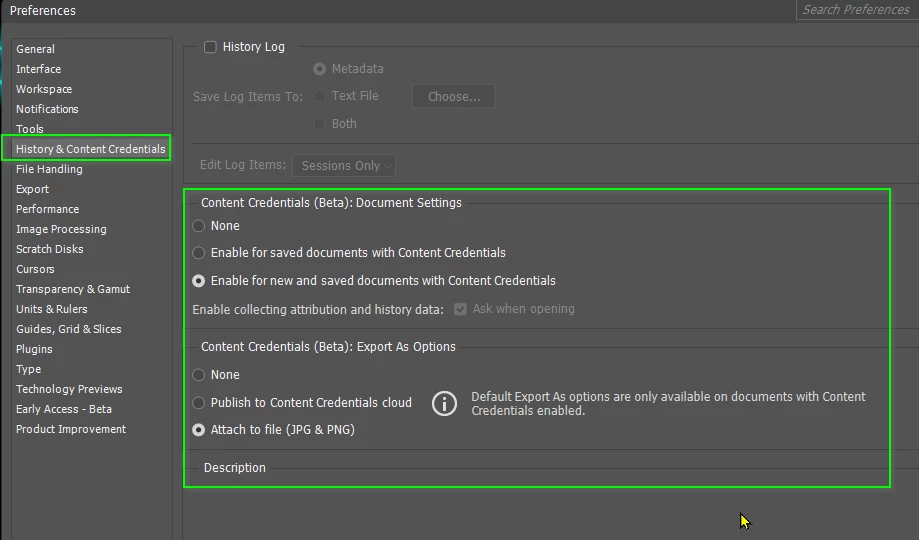
 

However, the .c2paws is a separate file, and if the image is not one of yours, you are unlikely to have it.  There's a CDontent Credentials panel (only in the beta version) that has a Preview tab.  Maybe worth checking out if you are using the beta version, and have .c2paws files to inspect.  I've just turned mine off, because a) I don't care what has been done to my images, and b) the files annoy the heck out of me.  OK, I've calmed down nopw... 😉

2 replies

Trevor.Dennis
Community Expert
Trevor.DennisCommunity ExpertCorrect answer
Community Expert
June 12, 2025

I wondow what information these annoying .c2paws files contain, and how we could access it?

They are to do with Content Credentials and you can read about them here.


I am pretty sure this is the default state, as I don't remember enabling them.


However, the .c2paws is a separate file, and if the image is not one of yours, you are unlikely to have it.  There's a CDontent Credentials panel (only in the beta version) that has a Preview tab.  Maybe worth checking out if you are using the beta version, and have .c2paws files to inspect.  I've just turned mine off, because a) I don't care what has been done to my images, and b) the files annoy the heck out of me.  OK, I've calmed down nopw... 😉

Glenn 8675309
Legend
June 11, 2025

Yes, but it depends on the extent of the edits and whether metadata remains intact. Here are some ways to tell:

  • Metadata Inspection: Photoshop often embeds metadata in saved files, including details about edits. If the metadata is intact, tools like ExifTool or Photoshop's "File Info" panel might show references to Neural Filters.
  • Visual Artifacts: Neural Filters can introduce specific artifacts—like overly smooth skin, unnatural lighting shifts, or exaggerated effects—that might hint at their use.
  • Layer Analysis: If you have access to the original PSD file, examining layer names or Smart Filters might reveal Neural Filter adjustments.
  • Reverse Engineering: Advanced forensic tools can detect manipulations, especially with AI-enhanced features. But if an image is flattened or saved in a format that strips metadata, identification becomes much harder.

If you're looking to verify an image's authenticity or track edits, forensic image analysis tools might be your best bet. Are you investigating a particular image?