
Participant
December 20, 2019
Answered

How to turn off the black box with measurements when using Move Tool [2019]

  • December 20, 2019
  • 4 replies
  • 3382 views

There is a little black window that pops up with the move tool that is making me crazy.
In earlier versions of Photoshop I could turn this off by going to { Preferences -> Interface -> Show Transformation Values: Never } This appears to no longer be an option. Does anyone know how to turn this off? It's SO distracting when I'm working on a new Photoshop piece. Truly making me crazy.
I'm on a Mac, Photoshop CC 2019. 
Thank you in advance
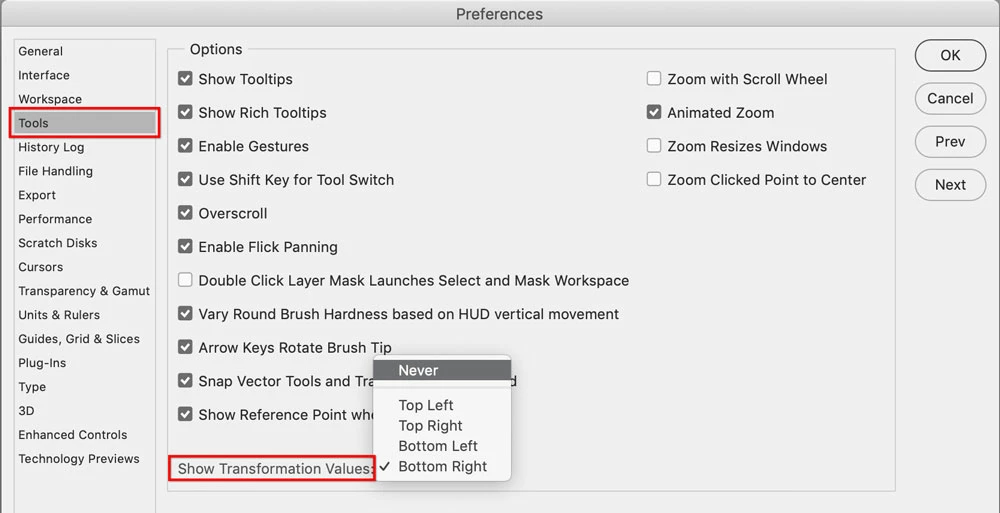
Correct answer Conrad_C

ohdeanna wrote: “In earlier versions of Photoshop I could turn this off by going to { Preferences -> Interface -> Show Transformation Values: Never } This appears to no longer be an option.”


It’s still there, but it isn’t in the Interface pane. It’s in the Tools pane, and that’s true for both Photoshop 2020 and 2019. I didn’t check earlier versions, maybe they moved it.


4 replies

Participant
August 21, 2024

Did you ever find a solution to this ?? I can't seem to get rid of it as well… grrr

Conrad_C
Community Expert
Community Expert
August 22, 2024

If it goes away when you stop hovering the pointer over the canvas, that is normal.


If it does not go away even when you’ve been doing something completely different for several minutes, then that’s a bug. Like if your screen shot means the box never went away, it’s not supposed to do that and it’s something that needs to be fixed in the software.


I recently saw that “dimesions box that won’t go away” happen on my computer too, it stayed even if I switched to another application. The only way I was able to permanently get rid of it was to exit Photoshop. The next time I started Photoshop it was gone.

Conrad_C
Community Expert
Conrad_CCommunity ExpertCorrect answer
Community Expert
December 20, 2019

ohdeanna wrote: “In earlier versions of Photoshop I could turn this off by going to { Preferences -> Interface -> Show Transformation Values: Never } This appears to no longer be an option.”


It’s still there, but it isn’t in the Interface pane. It’s in the Tools pane, and that’s true for both Photoshop 2020 and 2019. I didn’t check earlier versions, maybe they moved it.


Participating Frequently
April 2, 2025

Thank you, i've been trying to remove this for years!

lambiloon
Community Expert
Community Expert
December 20, 2019

Hi can you show us a screenshot of problem so we can help in effective way....regards

Ali Sajjad / Graphic Design Trainer / Freelancer / Adobe Certified Professional
Chuck Uebele
Community Expert
Community Expert
December 20, 2019

That should still work. Try resetting your preferences then set the show transformation value.