LeDucPhuong
Known Participant
December 27, 2022
Answered

How to turn off these guides?

  • December 27, 2022
  • 4 replies
  • 1756 views


It shows up when I open anything. I searched all this, but it only hides temporarily when I use it, it's still there.

My English is not good, hope you understand what I mean.

This topic has been closed for replies.
Correct answer iHemalaya.Com

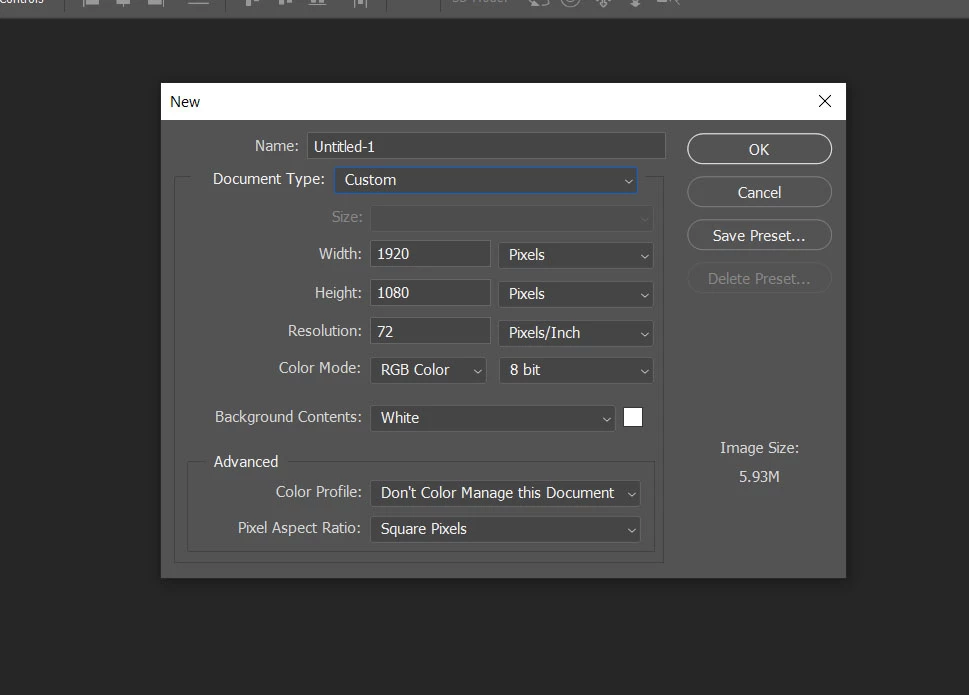
When you make a new document don't choose ( Film & Video ) preset

Make it Custom and enter the size manually


4 replies

Jumpenjax
Community Expert
Community Expert
December 27, 2022

Just drag them off the entire board to the rulers.

Lee- Graphic Designer, Print Specialist, Photographer
iHemalaya.Com
iHemalaya.ComCorrect answer
Inspiring
December 27, 2022

When you make a new document don't choose ( Film & Video ) preset

Make it Custom and enter the size manually


LeDucPhuong
Known Participant
December 27, 2022

thank you so much

iHemalaya.Com
Inspiring
December 27, 2022

View Menu / Clear Guides


LeDucPhuong
Known Participant
December 27, 2022

When I open a new project, it still shows.

Nancy OShea
Community Expert
Community Expert
December 27, 2022

Ctrl/Cmd + H to hide Extras (includes Guides, Grids, etc...).


Nancy O'Shea— Product User & Community Expert
Mylenium
Legend
December 27, 2022

Guides can be "removed" by dragging them off canvas into the rulers.


Mylenium 

LeDucPhuong
Known Participant
December 27, 2022

When I open a new project, it still shows
