


Participating Frequently
December 20, 2017
Answered

How to TYPE a long straight line in Photoshop? And preview changes in REAL-TIME

  • December 20, 2017
  • 1 reply
  • 5092 views

Hi! You know how in Microsoft Word when you type a bunch of dashed lines then hit enter, the dashed lines become one straight line?

I'm trying to do that in Photoshop CC 2018 with the type tool. I want to TYPE the line within a text box, NOT draw it with the line tool. This is because I'd want the line/separator to adjust if I change any text above or below it.

And while I'm at it, I used to be able to preview any changes I make while I adjust things like line spacing, text size, etc in Photoshop CS6, but now it doesn't work in CC? For example, If I scrub along the font size, the text changes size in REAL TIME. Now I have to hit enter on the font size before the change is reflected on the text (same for line spacing, layer opacity, etc). Is there a setting for this?

Thanks!
This topic has been closed for replies.
Correct answer

Hi

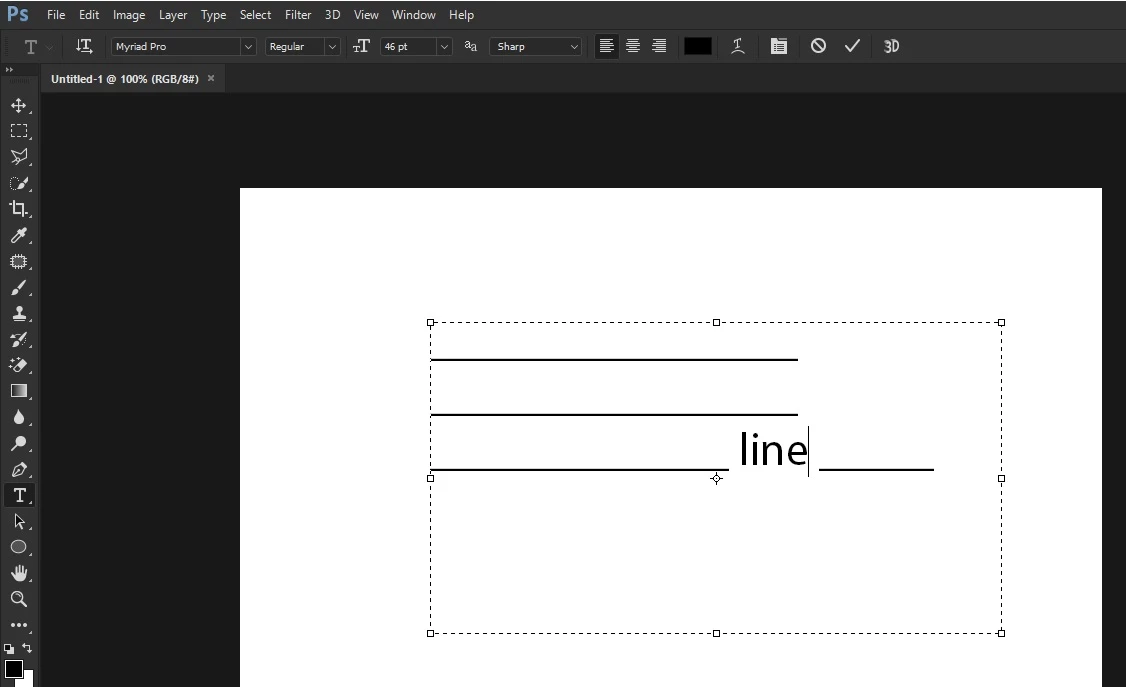
Is this what you're looking to achieve. if so just use the Shift + minus key, not the minus key on the numeric pad

Answer to your second question, this is a bug in CC2018 19.0.1

Photoshop CC 19.0.1: Text Size Scubby Slider and Up Down Arrow no longer gives live updates | Photoshop Family Customer …

1 reply

Correct answer
December 20, 2017

Hi

Is this what you're looking to achieve. if so just use the Shift + minus key, not the minus key on the numeric pad

Answer to your second question, this is a bug in CC2018 19.0.1

Photoshop CC 19.0.1: Text Size Scubby Slider and Up Down Arrow no longer gives live updates | Photoshop Family Customer …

Participating Frequently
December 20, 2017

Thank you! It worked! Though I should add (for anyone with this problem), use default fonts like Myriad Pro for this to work, otherwise you get a dashed line like what I got with the font I was working with:

And about the bug, any news yet on when it would come out?

Thanks again!