
Inspiring
February 2, 2021
Question

How to Ungroup Tools in Toolbar

  • February 2, 2021
  • 3 replies
  • 2560 views

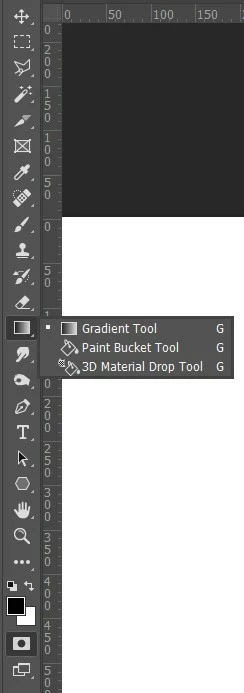
I am looking for a way (perhaps a plugin/mod is needed) to ungroup the tools in the toolbar.  I would like to have the paint bucket tool and the gradient tool both showing at the same time.  Does anyone know how to do this within Photoshop or with a plugin/mod?


Thanks!


(Didn't we used to be able to do this?)
This topic has been closed for replies.

3 replies

Trevor.Dennis
Community Expert
Community Expert
February 2, 2021

If you have the screen space, then it makes sense to double row the tool bar and give all your most used tools their own place.  What makes this particularly powerful is that we can save a custon toolbar along with a custom Workspace as well as custom Menus and — best of all — keyboardshortcuts.  

I take this a tep further by making tiny Actions to switch between Workspaces, (and reset them).  As I have the Brush and Color panels open all the time (I use three large screens) I am free to use F5 and F6 to switch between my two most used workspaces.


How many of these default F Key shortcuts do you use?  They are pure gold IMO as they can be repurposed to provide single key triggers for actions.  If you use a small screen laptop, then they are more useful left as they are, but yyou can still make a custom workspace and chose where those panels are going to open.

Good luck


Inspiring
February 9, 2021

Thanks guys!  I didn't see that could ungroup the tools.  I only saw that you could add/remove them.  All set now!

WAY BETTER!!


Nancy OShea
Community Expert
Community Expert
February 2, 2021

What Conrad said, no plugins needed. 

Customize your toolbar however you like for painting and save the Preset. 

You can also create and load different toolbar presets for different tasks.


Nancy O'Shea— Product User & Community Expert
Conrad_C
Community Expert
Community Expert
February 2, 2021

Go farther down in the Tools panel, then click and hold the ellipsis (three dots) to pop open Edit Toolbar. Then you can group them however you want.