
Exit
  • Global community
    • Language:
      • Deutsch
      • English
      • Español
      • Français
      • Português
  • 日本語コミュニティ
  • 한국 커뮤니티
0

HOW TO USE LINE TOOL TO CREATE HACHURE LINES?

Community Beginner ,
Mar 11, 2017 Mar 11, 2017

I am a mapmaker, and I need PhotoShop to make hachure lines for me automatically. Hachures are the old-fashioned representation of ridges, by means of short, parallel lines, packed close together, which go down each side of a topographic ridge. I have many features which I need to label this way over the top of an airphoto. I would like to use the Line Tool to draw the ridge lengthwise, then have PS create the small, parallel lines across the line I draw. These are sometimes referred to as "caterpillars" because they look like that. Thank you!
3.3K
Translate
Report
Community guidelines
Be kind and respectful, give credit to the original source of content, and search for duplicates before posting. Learn more
community guidelines

correct answers 1 Correct answer

Community Expert , Mar 11, 2017 Mar 11, 2017

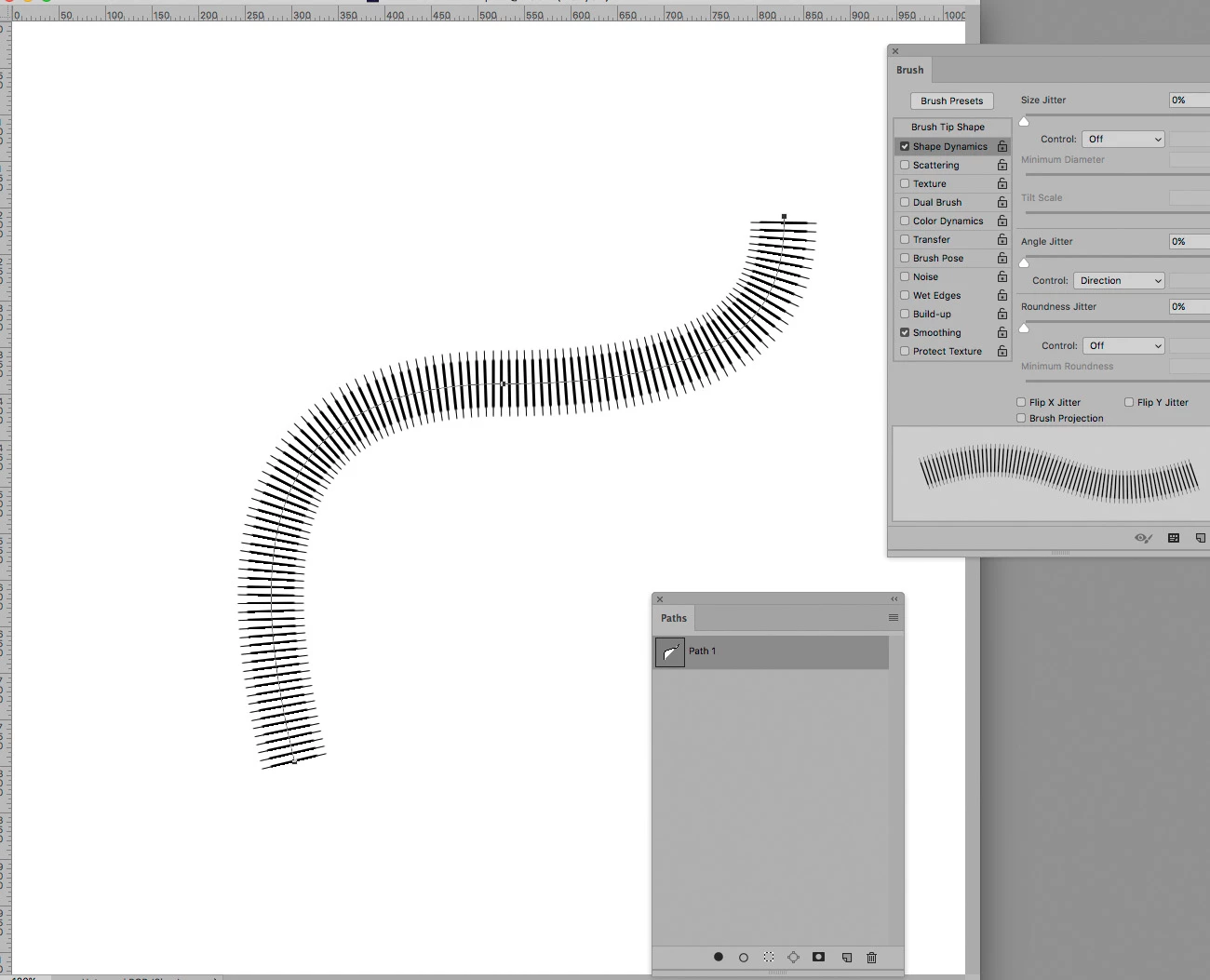
Do you mean something like this?

hachureLinesTestScr.jpg

Translate
Adobe
Community Expert ,
Mar 11, 2017 Mar 11, 2017

Do you mean something like this?

hachureLinesTestScr.jpg

Translate
Report
Community guidelines
Be kind and respectful, give credit to the original source of content, and search for duplicates before posting. Learn more
community guidelines
Community Beginner ,
Mar 11, 2017 Mar 11, 2017

YES! How do I do that? Glen

Translate
Report
Community guidelines
Be kind and respectful, give credit to the original source of content, and search for duplicates before posting. Learn more
community guidelines
Community Expert ,
Mar 11, 2017 Mar 11, 2017

The Shape Dynamics settings are visible in the first screenshot, after you set those and the Brush Tip Shape (see second screenshot) you can select the Path in the Paths Panel and click the »Stroke path with brush-button«.

Should you want a rectangular tip you may have to create a custom Brush tip.

hachureLinesTestScr2.jpg

But have you considered using Illustrator?

With that you may maintain better editability of the strokes.

Translate
Report
Community guidelines
Be kind and respectful, give credit to the original source of content, and search for duplicates before posting. Learn more
community guidelines
Community Beginner ,
Mar 11, 2017 Mar 11, 2017

Thank you! I will try this. I have not yet begun to use Illustrator, and don’t want to stop to learn that now, so I will try to use your suggestions to make it work in PS. Thank you very much! Glen

Translate
Report
Community guidelines
Be kind and respectful, give credit to the original source of content, and search for duplicates before posting. Learn more
community guidelines
Community Expert ,
Mar 11, 2017 Mar 11, 2017

You’re welcome.

I am afraid I forgot to mention you need to select the Brush Tool first … but you would probably have figured that out.

Translate
Report
Community guidelines
Be kind and respectful, give credit to the original source of content, and search for duplicates before posting. Learn more
community guidelines
Community Beginner ,
Mar 11, 2017 Mar 11, 2017

I tried to carry out what you suggested, but did not succeed, and solved the problem in another way. I think the issue is that I’m not yet an Illustrator user at all, and in fact, have only used the Adobe PS drawing capabilities for very simple annotations over airphotos. If you felt like putting together the whole sequence (with more guidance), I could certainly use it next time, but you’ve already done more than your share! Thank you!

From your name, I’m guessing that you may be in Germany. I lived there almost eight years, and loved it!

Glen

Translate
Report
Community guidelines
Be kind and respectful, give credit to the original source of content, and search for duplicates before posting. Learn more
community guidelines
Community Expert ,
Mar 11, 2017 Mar 11, 2017
LATEST

Christophe used one of the Calligraphy brushes which you can 'Append' by clicking on the little cog icon after right clicking to show the brush preset panel.  Note the brush outlined is vertical.

Two settings need to be changed.

1) Angle jitter needs to be set to Direction in Shape Dynamics

2) Spacing needs to set to give the required line density.

It is then a simple matter of drawing the work path with the Pen tool, and Stroking that path.

Right click the work path and make sure Brush is selected, and that the brush size is about right, and click OK.  Note Simulate Pressure should be turned off.

Having done it once, you can repeat this process by clicking on this icon at the bottom of the paths panel

'

Translate
Report
Community guidelines
Be kind and respectful, give credit to the original source of content, and search for duplicates before posting. Learn more
community guidelines
Community Expert ,
Mar 11, 2017 Mar 11, 2017

Illustrator’s Scatter Brush would be another option.

hachureLinesTestScr3.jpg

Translate
Report
Community guidelines
Be kind and respectful, give credit to the original source of content, and search for duplicates before posting. Learn more
community guidelines