
How to work in WHOLE pixels only.
I am blown away that photoshop continues to innovate in ways that leave many people scratching their heads.
From reset of personal preferences (shortcuts) after every months bill, to partial pixel return values when resizing an object like a rectangle... I am just unsure if you are trying to push customers away or is that an unintentional consequence?
So to see what I am talking about.
1. Create a new image.
2. Choose a size of 256px x 256px.
3. Add a rectangle.
4. Set its size to 70px x 15px(for example)
5. Grab the handles, and resize it.
As you resize, you will notice the width changes... as it should... But the lovely floating poing values following the whole number, is NOT acceptable. NOT desirable.
It causes antialiasing on perfect shapes, and requires manual intervention to rectify it.
While I am at it:
Every month, After my bill, I set the quick export to png button to Ctrl + alt + shift + s.
This is a necessity for anyone working with graphics. A shortcut to make things happen fast.
Every month, for the past 2 years without fail, after my bill updates, this shortcut and all other custom shortcuts get erased.
Maybe its an update thing. Maybe not.
But photoshop has been around since I was 10 years old. 26 years later and you still cannot manage to preserve user preferences?
What am I paying for? Why am I paying the cost of food for 10 children in Kenya, when you can't even get the most BASIC graphics processing functions down.
I am going to say this one last time.
Please.
Fix.
This.
Or I will suffer the learning curve to switch to the free and all powerful GIMP. I don't want to.
I just will not tolerate junior level developer mistakes from a world class software company any longer.
Please fix these two issues.
Photoshop 23.1.1 (Release)
Windows 10 Pro(Latest) - all updates
Ryzen 9 32 Core
128GB DDR5
2TB M.2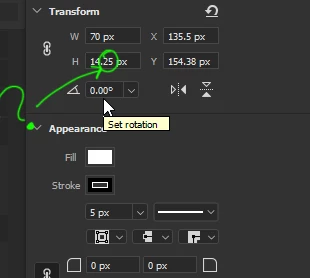
 AdChoices