Known Participant
February 23, 2022
Answered

How to write this script

  • February 23, 2022
  • 2 replies
  • 840 views

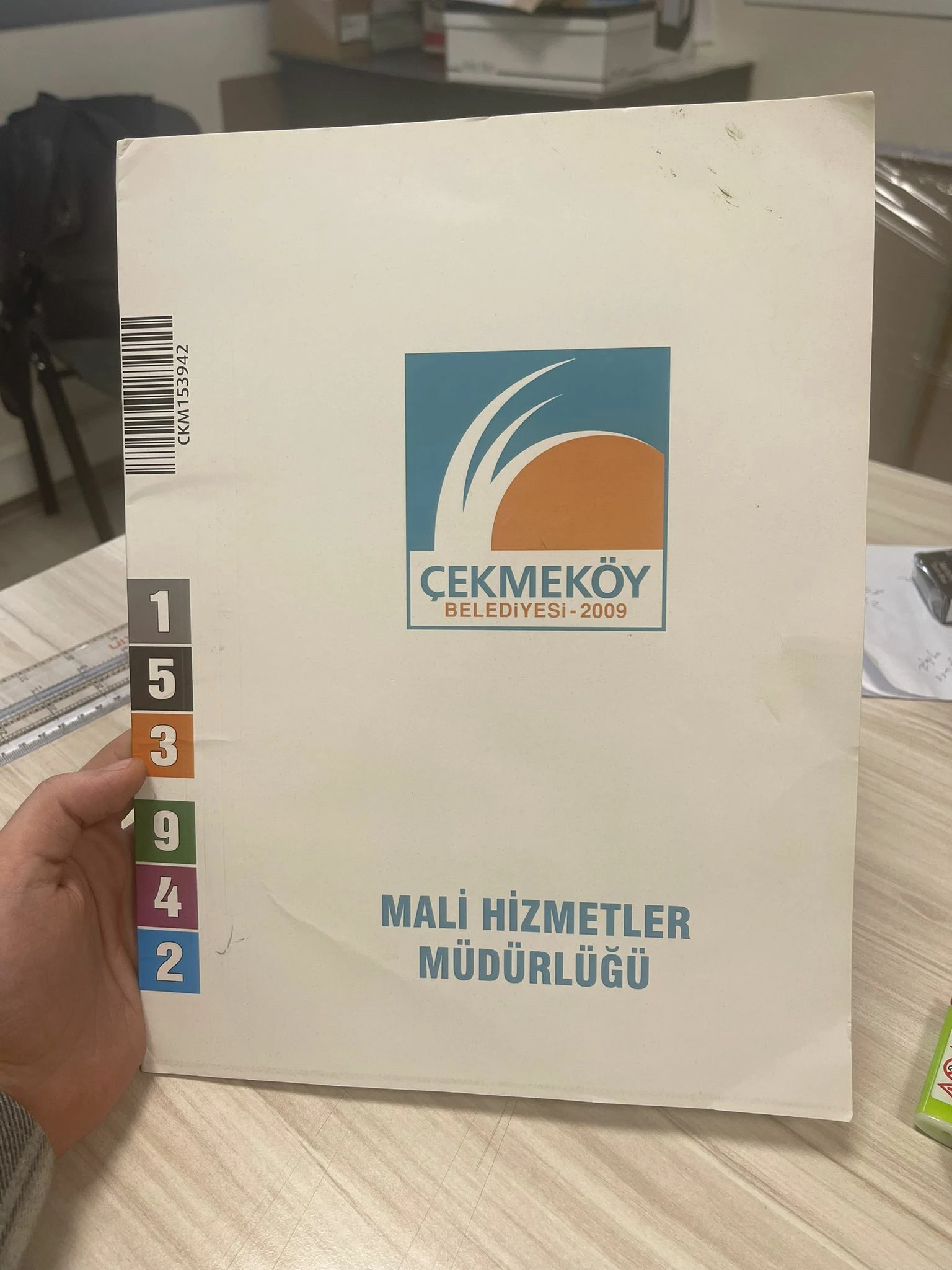
I need a script to export 20.000 pdf. 

Every one of them should be different based on numbers.

Every number has its own color.

It should make an export from 153942 to 173942

How can i make this work ?

Thanks for suggestions.

This topic has been closed for replies.
Correct answer jazz-y

I have no information about what your file requirements are, what version of Photoshop and other things... Therefore, I am writing my own solution, which will definitely work in the latest version of Photoshop. If necessary, you can make changes and adapt it yourself.


Required preparation:

1. Create layout with numbers from 0 to 9. You can use any colors, any shapes, the main thing is that:

a) one layer contains one number

b) the layer is named as the same number that is shown on it (no additional characters)

c) the layers are located one above others
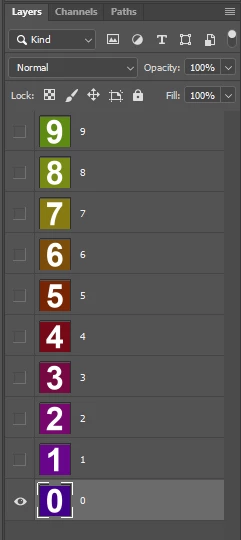
2. Create digit groups. Name the group with ones "1", the group with tens "10", the group with hundreds "100", and so on. Each group should contain inside it layers with numbers from 0 to 9 (the ones you created in step 1)
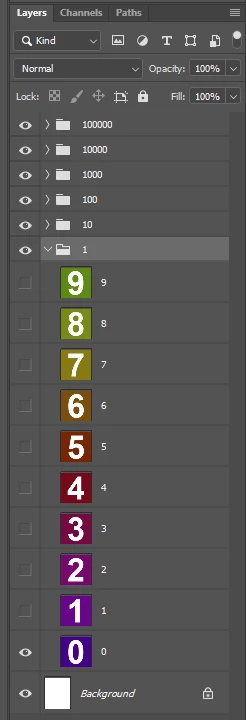
3. Arrange groups with numbers in your layout as you like 4.
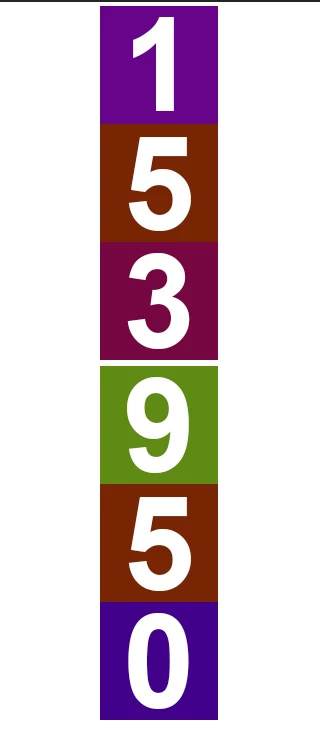
4. BE SURE to select these groups before running the script (the script polls only the selected layers)
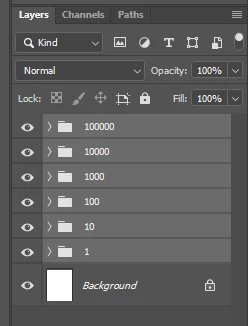
6. Run script


#target photoshop
var apl = new AM('application'),
    doc = new AM('document'),
    lr = new AM('layer');
if (apl.getProperty('numberOfDocuments')) {
    if (doc.getProperty('numberOfLayers')) {
        var targetLayers = doc.hasProperty('targetLayersIDs') ? doc.getProperty('targetLayersIDs') : [],
            pth = (doc.getProperty('fileReference')).path,
            selection = [];
        if (targetLayers) {
            for (var i = 0; i < targetLayers.count; i++) {
                var id = targetLayers.getReference(i).getIdentifier(stringIDToTypeID('layerID'))
                if (lr.getProperty('layerKind', id) == 7) selection.push(id)
            }
        }
        if (selection) {
            var digits = collectLayers(selection);
            for (var i = 153942; i <= 153950; i++) makeFile(i, digits, selection)
        }
    }
}
function collectLayers(s, o) {
    o = o ? o : {};
    for (var i = 0; i < s.length; i++) {
        o[Number(lr.getProperty('name', s[i]))] = getLayersList(s[i]);
    }
    return o;
    function getLayersList(id) {
        var idx = lr.getProperty('itemIndex', id),
            indexFrom = doc.getProperty('hasBackgroundLayer') ? --idx : idx,
            o = {};
        for (var i = indexFrom; i >= 1; i--) {
            var layerSection = lr.getProperty('layerSection', i, true).value
            if (layerSection == 'layerSectionStart') continue;
            if (layerSection == 'layerSectionEnd') break;
            o[Number(lr.getProperty('name', i, true))] = lr.getProperty('layerID', i, true);
        }
        return o
    }
}
function setDigits(o, digit) {
    var ids = []
    for (var a in o) ids.push(o[a])
    doc.visiblity(ids)
    doc.visiblity([o[digit]], true)
}
function makeFile(n, o, digits) {
    var fixed = '';
    for (var i = 0; i < digits.length; i++) fixed += '0'
    var num = (fixed + String(n)).substr(-digits.length),
        len = num.length - 1,
        div = 1;
    for (var i = len; i >= 0; i--) {
        var cur = Number(num.substr(i, 1))
        setDigits(o[div], cur)
        div = div * 10
    }
    doc.saveAsPDF(File(pth + '/' + num))
}
function AM(target, order) {
    var s2t = stringIDToTypeID,
        t2s = typeIDToStringID;
    target = target ? s2t(target) : null;
    this.getProperty = function (property, id, idxMode) {
        property = s2t(property);
        (r = new ActionReference()).putProperty(s2t('property'), property);
        id != undefined ? (idxMode ? r.putIndex(target, id) : r.putIdentifier(target, id)) :
            r.putEnumerated(target, s2t('ordinal'), order ? s2t(order) : s2t('targetEnum'));
        return getDescValue(executeActionGet(r), property)
    }
    this.hasProperty = function (property, id, idxMode) {
        property = s2t(property);
        (r = new ActionReference()).putProperty(s2t('property'), property);
        id ? (idxMode ? r.putIndex(target, id) : r.putIdentifier(target, id))
            : r.putEnumerated(target, s2t('ordinal'), order ? s2t(order) : s2t('targetEnum'));
        return executeActionGet(r).hasKey(property)
    }
    this.descToObject = function (d) {
        var o = {}
        for (var i = 0; i < d.count; i++) {
            var k = d.getKey(i)
            o[t2s(k)] = getDescValue(d, k)
        }
        return o
    }
    this.selectLayerByIDList = function (IDList) {
        var ref = new ActionReference()
        for (var i = 0; i < IDList.length; i++) {
            ref.putIdentifier(s2t('layer'), IDList[i])
        }
        var desc = new ActionDescriptor()
        desc.putReference(s2t('target'), ref)
        desc.putBoolean(s2t('makeVisible'), false)
        executeAction(s2t('select'), desc, DialogModes.NO)
    }
    this.visiblity = function (ids, show) {
        var mode = show ? 'show' : 'hide',
            r = new ActionReference();
        do { r.putIdentifier(s2t('layer'), ids.shift()) } while (ids.length)
        (l = new ActionList()).putReference(r);
        (d = new ActionDescriptor()).putList(s2t("target"), l);
        executeAction(s2t(mode), d, DialogModes.NO);
    }
    this.saveAsPDF = function (fle) {
        (d = new ActionDescriptor()).putObject(s2t("as"), s2t("photoshopPDFFormat"), new ActionDescriptor());
        d.putPath(s2t("in"), fle);
        d.putBoolean(s2t("copy"), true);
        d.putBoolean(s2t("layers"), false);
        d.putEnumerated(s2t("saveStage"), s2t("saveStageType"), s2t("saveBegin"));
        executeAction(s2t("save"), d, DialogModes.NO);
    }
    function getDescValue(d, p) {
        switch (d.getType(p)) {
            case DescValueType.OBJECTTYPE: return { type: t2s(d.getObjectType(p)), value: d.getObjectValue(p) };
            case DescValueType.LISTTYPE: return d.getList(p);
            case DescValueType.REFERENCETYPE: return d.getReference(p);
            case DescValueType.BOOLEANTYPE: return d.getBoolean(p);
            case DescValueType.STRINGTYPE: return d.getString(p);
            case DescValueType.INTEGERTYPE: return d.getInteger(p);
            case DescValueType.LARGEINTEGERTYPE: return d.getLargeInteger(p);
            case DescValueType.DOUBLETYPE: return d.getDouble(p);
            case DescValueType.ALIASTYPE: return d.getPath(p);
            case DescValueType.CLASSTYPE: return d.getClass(p);
            case DescValueType.UNITDOUBLE: return (d.getUnitDoubleValue(p));
            case DescValueType.ENUMERATEDTYPE: return { type: t2s(d.getEnumerationType(p)), value: t2s(d.getEnumerationValue(p)) };
            default: break;
        };
    }
}


At the moment, you see in the script a loop that generates numbers from 153942 to 153950.


for (var i = 153942; i <= 153950; i++) makeFile(i, digits, selection)


Just change them to the values that you need. The file on which I tested this script (with an example of layering) is attached.

2 replies

Legend
February 23, 2022

It may sound strange, but it can be done with the help of actions and a standard batch processor. The script here, perhaps, can only be used to automatically rename files. I tried to make numbers from 1 to 100 - without prior preparation it took a little over 5 minutes.


Yes, with each new discharge, the number of operations in the action will increase, but you will not need much time to prepare. Photoshop will take longer to generate files (maybe it's not the best tool for such tasks and you should find out how this task was solved for the previous 153941 numbers)

Known Participant
February 24, 2022

would like to know also, with the way u showed probally it will take me three days to get files i want,
Firstly i should generate numbers, barcodes

than place them to main file and export. 


Thank you for helping me.

jazz-yCorrect answer
Legend
February 24, 2022

I have no information about what your file requirements are, what version of Photoshop and other things... Therefore, I am writing my own solution, which will definitely work in the latest version of Photoshop. If necessary, you can make changes and adapt it yourself.


Required preparation:

1. Create layout with numbers from 0 to 9. You can use any colors, any shapes, the main thing is that:

a) one layer contains one number

b) the layer is named as the same number that is shown on it (no additional characters)

c) the layers are located one above others

2. Create digit groups. Name the group with ones "1", the group with tens "10", the group with hundreds "100", and so on. Each group should contain inside it layers with numbers from 0 to 9 (the ones you created in step 1)

3. Arrange groups with numbers in your layout as you like 4.

4. BE SURE to select these groups before running the script (the script polls only the selected layers)

6. Run script


#target photoshop
var apl = new AM('application'),
    doc = new AM('document'),
    lr = new AM('layer');
if (apl.getProperty('numberOfDocuments')) {
    if (doc.getProperty('numberOfLayers')) {
        var targetLayers = doc.hasProperty('targetLayersIDs') ? doc.getProperty('targetLayersIDs') : [],
            pth = (doc.getProperty('fileReference')).path,
            selection = [];
        if (targetLayers) {
            for (var i = 0; i < targetLayers.count; i++) {
                var id = targetLayers.getReference(i).getIdentifier(stringIDToTypeID('layerID'))
                if (lr.getProperty('layerKind', id) == 7) selection.push(id)
            }
        }
        if (selection) {
            var digits = collectLayers(selection);
            for (var i = 153942; i <= 153950; i++) makeFile(i, digits, selection)
        }
    }
}
function collectLayers(s, o) {
    o = o ? o : {};
    for (var i = 0; i < s.length; i++) {
        o[Number(lr.getProperty('name', s[i]))] = getLayersList(s[i]);
    }
    return o;
    function getLayersList(id) {
        var idx = lr.getProperty('itemIndex', id),
            indexFrom = doc.getProperty('hasBackgroundLayer') ? --idx : idx,
            o = {};
        for (var i = indexFrom; i >= 1; i--) {
            var layerSection = lr.getProperty('layerSection', i, true).value
            if (layerSection == 'layerSectionStart') continue;
            if (layerSection == 'layerSectionEnd') break;
            o[Number(lr.getProperty('name', i, true))] = lr.getProperty('layerID', i, true);
        }
        return o
    }
}
function setDigits(o, digit) {
    var ids = []
    for (var a in o) ids.push(o[a])
    doc.visiblity(ids)
    doc.visiblity([o[digit]], true)
}
function makeFile(n, o, digits) {
    var fixed = '';
    for (var i = 0; i < digits.length; i++) fixed += '0'
    var num = (fixed + String(n)).substr(-digits.length),
        len = num.length - 1,
        div = 1;
    for (var i = len; i >= 0; i--) {
        var cur = Number(num.substr(i, 1))
        setDigits(o[div], cur)
        div = div * 10
    }
    doc.saveAsPDF(File(pth + '/' + num))
}
function AM(target, order) {
    var s2t = stringIDToTypeID,
        t2s = typeIDToStringID;
    target = target ? s2t(target) : null;
    this.getProperty = function (property, id, idxMode) {
        property = s2t(property);
        (r = new ActionReference()).putProperty(s2t('property'), property);
        id != undefined ? (idxMode ? r.putIndex(target, id) : r.putIdentifier(target, id)) :
            r.putEnumerated(target, s2t('ordinal'), order ? s2t(order) : s2t('targetEnum'));
        return getDescValue(executeActionGet(r), property)
    }
    this.hasProperty = function (property, id, idxMode) {
        property = s2t(property);
        (r = new ActionReference()).putProperty(s2t('property'), property);
        id ? (idxMode ? r.putIndex(target, id) : r.putIdentifier(target, id))
            : r.putEnumerated(target, s2t('ordinal'), order ? s2t(order) : s2t('targetEnum'));
        return executeActionGet(r).hasKey(property)
    }
    this.descToObject = function (d) {
        var o = {}
        for (var i = 0; i < d.count; i++) {
            var k = d.getKey(i)
            o[t2s(k)] = getDescValue(d, k)
        }
        return o
    }
    this.selectLayerByIDList = function (IDList) {
        var ref = new ActionReference()
        for (var i = 0; i < IDList.length; i++) {
            ref.putIdentifier(s2t('layer'), IDList[i])
        }
        var desc = new ActionDescriptor()
        desc.putReference(s2t('target'), ref)
        desc.putBoolean(s2t('makeVisible'), false)
        executeAction(s2t('select'), desc, DialogModes.NO)
    }
    this.visiblity = function (ids, show) {
        var mode = show ? 'show' : 'hide',
            r = new ActionReference();
        do { r.putIdentifier(s2t('layer'), ids.shift()) } while (ids.length)
        (l = new ActionList()).putReference(r);
        (d = new ActionDescriptor()).putList(s2t("target"), l);
        executeAction(s2t(mode), d, DialogModes.NO);
    }
    this.saveAsPDF = function (fle) {
        (d = new ActionDescriptor()).putObject(s2t("as"), s2t("photoshopPDFFormat"), new ActionDescriptor());
        d.putPath(s2t("in"), fle);
        d.putBoolean(s2t("copy"), true);
        d.putBoolean(s2t("layers"), false);
        d.putEnumerated(s2t("saveStage"), s2t("saveStageType"), s2t("saveBegin"));
        executeAction(s2t("save"), d, DialogModes.NO);
    }
    function getDescValue(d, p) {
        switch (d.getType(p)) {
            case DescValueType.OBJECTTYPE: return { type: t2s(d.getObjectType(p)), value: d.getObjectValue(p) };
            case DescValueType.LISTTYPE: return d.getList(p);
            case DescValueType.REFERENCETYPE: return d.getReference(p);
            case DescValueType.BOOLEANTYPE: return d.getBoolean(p);
            case DescValueType.STRINGTYPE: return d.getString(p);
            case DescValueType.INTEGERTYPE: return d.getInteger(p);
            case DescValueType.LARGEINTEGERTYPE: return d.getLargeInteger(p);
            case DescValueType.DOUBLETYPE: return d.getDouble(p);
            case DescValueType.ALIASTYPE: return d.getPath(p);
            case DescValueType.CLASSTYPE: return d.getClass(p);
            case DescValueType.UNITDOUBLE: return (d.getUnitDoubleValue(p));
            case DescValueType.ENUMERATEDTYPE: return { type: t2s(d.getEnumerationType(p)), value: t2s(d.getEnumerationValue(p)) };
            default: break;
        };
    }
}


At the moment, you see in the script a loop that generates numbers from 153942 to 153950.


for (var i = 153942; i <= 153950; i++) makeFile(i, digits, selection)


Just change them to the values that you need. The file on which I tested this script (with an example of layering) is attached.

Legend
February 23, 2022

Not enough information. What are you starting with?