
Participating Frequently
June 28, 2025
Answered

How transform white background of Artboard in transparency background ?

  • June 28, 2025
  • 1 reply
  • 1450 views

Hi ,

I need help, please.

How transform white background of Artboard in transparency background ? 

I don't understand beacause there is no white background in my layers. All layers are transparencies.


Thanks

Vin.
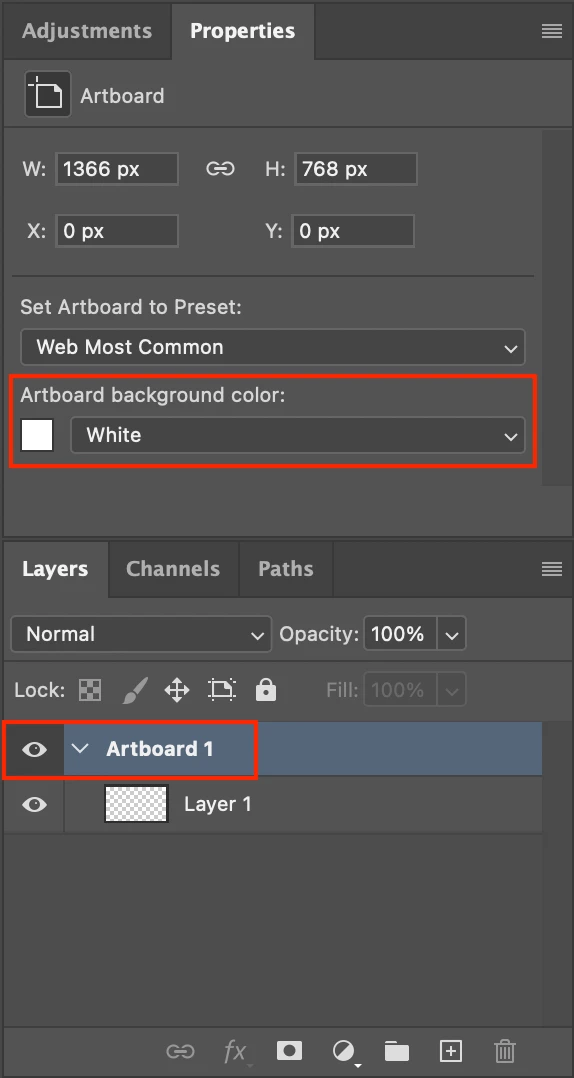
Correct answer Stephen Marsh

My screens

I will be back tomorow. 

thanks a lot for your help


What are your Artboard Properties (Properties panel)?


1 reply

mglush
Community Expert
Community Expert
June 28, 2025

Hi Vin,

Can you show us a screenshot of what you are trying to do? Are you trying to put white or a color into the background? If all of your backgrounds are transparent, where is the white background? We want to help--we just cann't visualize what you are trying to do.

Let us know?

Michelle

Participating Frequently
June 28, 2025

Hi

Thanks for your helping hand

Here , the picture

mglush
Community Expert
Community Expert
June 28, 2025

No just 1 layer and no background.

Is it possible to delete the white of Artboard ?


Yes. Here is what I suggest.

Duplicate the layer and turn off the visibility of the Background layer. Select the layer and double click on the layer (not the image in the layers panel). This should bring up the Layer Styles dialog box. Click on the White side of the "Blend If" section at the bottom and move the slider to the left until you see the white disappear. Close the Layer Styles Dialog and Save your file as a png with transparency.

Let us know if that works or if you have any questions?

Michelle