Exit
  • Global community
    • Language:
      • Deutsch
      • English
      • Español
      • Français
      • Português
  • 日本語コミュニティ
  • 한국 커뮤니티
15

How turn off home screen in Photoshop 2020?

Engaged ,
Nov 04, 2019 Nov 04, 2019

Turned on the Home screen in PS 2020 to see what is new and I can't turn it off. I unchecked Auto-show the Home Screen in preferences but the home screen still appears every time I launch PS. How can I disable the Home screen?


48.0K
Translate
Report
Community guidelines
Be kind and respectful, give credit to the original source of content, and search for duplicates before posting. Learn more
community guidelines

correct answers 1 Correct answer

Community Beginner , Jan 13, 2020 Jan 13, 2020

I've just experienced the same thing with Photoshop 2020. I managed to sort it. I'm not sure which did the fix so perhaps do both. 

Edit - Preferences - General - Uncheck "auto show homescreen" - Then reset preferences on quit - Ok - prompt - ok - then "cancel" out of here

Then Ctr N and create a new canvas. Then close everything down. Reopen Photoshop and hopefully like me, it will finally be gone 🙂

Hope this helps someone out there.

Translate
Adobe
New Here ,
Jun 09, 2023 Jun 09, 2023

Very very strange, but it worked! What a funny bug. Thanks a lot!

Translate
Report
Community guidelines
Be kind and respectful, give credit to the original source of content, and search for duplicates before posting. Learn more
community guidelines
New Here ,
Jan 17, 2020 Jan 17, 2020

What worked for me: Uninstall PS 2020, be sure you DON'T keep the preferences. Download an older version (PS CC2019 version 20.0.x). Uncheck "Autoshow the Homescreen" in Preferences. Then re-install  (update) to PS 2020, be sure to KEEP the preferences of the older version (CC 2019). When opening PS 2020 now it will skip the Home screen. At least in my case it did. Hope this will help...

Translate
Report
Community guidelines
Be kind and respectful, give credit to the original source of content, and search for duplicates before posting. Learn more
community guidelines
New Here ,
Jan 17, 2020 Jan 17, 2020

THIS WORKS!!!

Photoshop/Preferences/General/ Check USE LEGACY "NEW DOCUMENT" INTERFACE.

Translate
Report
Community guidelines
Be kind and respectful, give credit to the original source of content, and search for duplicates before posting. Learn more
community guidelines
Community Expert ,
Jan 28, 2020 Jan 28, 2020

Restart Photoshop and the welcomne screen will go away!

Translate
Report
Community guidelines
Be kind and respectful, give credit to the original source of content, and search for duplicates before posting. Learn more
community guidelines
Guest
Feb 15, 2020 Feb 15, 2020

 After doing theses steps Edit>Preferences>General...uncheck "Auto show homescreen" simply click the large Photshop button and from there on out it will not show.Capture1.JPG

Translate
Report
Community guidelines
Be kind and respectful, give credit to the original source of content, and search for duplicates before posting. Learn more
community guidelines
New Here ,
Jul 17, 2020 Jul 17, 2020

Thanks, This worked for me!!!!

Translate
Report
Community guidelines
Be kind and respectful, give credit to the original source of content, and search for duplicates before posting. Learn more
community guidelines
New Here ,
Jul 27, 2020 Jul 27, 2020

Thank you so much for that it worked for me. So frustrating!

Translate
Report
Community guidelines
Be kind and respectful, give credit to the original source of content, and search for duplicates before posting. Learn more
community guidelines
Participant ,
Mar 11, 2021 Mar 11, 2021

That finally did it! Thank you. 

Translate
Report
Community guidelines
Be kind and respectful, give credit to the original source of content, and search for duplicates before posting. Learn more
community guidelines
New Here ,
Feb 27, 2020 Feb 27, 2020

Try this: go to Edit>Preferences>General and check Auto-Update Open File-based Documents

Restart Photoshop. Yes. it can work.

rita mahato
Translate
Report
Community guidelines
Be kind and respectful, give credit to the original source of content, and search for duplicates before posting. Learn more
community guidelines
Community Beginner ,
Jun 05, 2020 Jun 05, 2020

Thank you so very much

Translate
Report
Community guidelines
Be kind and respectful, give credit to the original source of content, and search for duplicates before posting. Learn more
community guidelines
Guest
Jul 17, 2020 Jul 17, 2020

I agree it is a nuisance everytime you start it up ! I wish I could help with this one..

192.168.100.1 192.168.1.1 jpg to pdf

Translate
Report
Community guidelines
Be kind and respectful, give credit to the original source of content, and search for duplicates before posting. Learn more
community guidelines
New Here ,
Aug 30, 2020 Aug 30, 2020

I just purchased Photoshop Elements 2020 today and I'm getting the home screen also.  There was no option under preferences -> general to uncheck auto home screen.

Translate
Report
Community guidelines
Be kind and respectful, give credit to the original source of content, and search for duplicates before posting. Learn more
community guidelines
Community Beginner ,
Sep 01, 2020 Sep 01, 2020
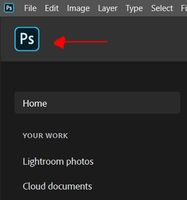
The answer to how to get rid of the home page in PhotoShop (at least for the current version) is ridiculously simple - maybe even useful.
If you have Photoshop opened to the Home Page you'll see under the three color dots in the upper left corner the letters "Ps" in blue. Click on the Ps and voila you will see in front of you a standard PhotoShop work page and the Home Page will be gone! To get back to Home Page, should you really want to use it, you will now see under the color dots a little picture of a house. Click on the house and the Home Page willl come back and the work canvas will be gone. Forget the Prefrences.
That's it. When the Adobe person showed me all that I asked why Adobe has'nt put this info out on the web he said that they were working on it.
Good Luck
Translate
Report
Community guidelines
Be kind and respectful, give credit to the original source of content, and search for duplicates before posting. Learn more
community guidelines
Explorer ,
Sep 02, 2020 Sep 02, 2020

Thank you photomaitre, that's a really straightforward answer to the problem.


But..."...working on it..."?!!  Come on Adobe, how hard can it be??

Translate
Report
Community guidelines
Be kind and respectful, give credit to the original source of content, and search for duplicates before posting. Learn more
community guidelines
Advocate ,
Sep 02, 2020 Sep 02, 2020

Thank you very much for this information! Such a simple soultion to the problem.

Translate
Report
Community guidelines
Be kind and respectful, give credit to the original source of content, and search for duplicates before posting. Learn more
community guidelines
Community Beginner ,
May 18, 2022 May 18, 2022

Ps 23.3.2 here. This is definitely the right answer.

Translate
Report
Community guidelines
Be kind and respectful, give credit to the original source of content, and search for duplicates before posting. Learn more
community guidelines
Community Beginner ,
Sep 04, 2020 Sep 04, 2020

I owe you a cold beverage. Thanks for sharing the tip. That was soooo annoying.

Translate
Report
Community guidelines
Be kind and respectful, give credit to the original source of content, and search for duplicates before posting. Learn more
community guidelines
New Here ,
Sep 07, 2020 Sep 07, 2020

Thank You taniap4893429,

That was driving me mad!!!!

I had a problem with Photoshop 2020 which an amazing person at Adobe fixed with going on my screen and reseting Photoshop altogether, but they left me with the horrable Home Sreen. It's gone now so Thank You Again.

Translate
Report
Community guidelines
Be kind and respectful, give credit to the original source of content, and search for duplicates before posting. Learn more
community guidelines
Community Beginner ,
Sep 17, 2020 Sep 17, 2020

Thanks!!!

Translate
Report
Community guidelines
Be kind and respectful, give credit to the original source of content, and search for duplicates before posting. Learn more
community guidelines
New Here ,
Oct 10, 2020 Oct 10, 2020

Marvellous, it worked for me, thanks. How  ridiculous we should have to waste all this time.

Translate
Report
Community guidelines
Be kind and respectful, give credit to the original source of content, and search for duplicates before posting. Learn more
community guidelines
New Here ,
Oct 31, 2020 Oct 31, 2020

Change your workspace to photography 

Translate
Report
Community guidelines
Be kind and respectful, give credit to the original source of content, and search for duplicates before posting. Learn more
community guidelines
New Here ,
Nov 12, 2020 Nov 12, 2020

This didn't resolve my issue but turning off "application frame" under "windows" did.Screen Shot 2020-11-12 at 8.27.31 AM.png

Translate
Report
Community guidelines
Be kind and respectful, give credit to the original source of content, and search for duplicates before posting. Learn more
community guidelines
Community Beginner ,
Sep 24, 2021 Sep 24, 2021

THANK YOU!!!!! this has buged me for days!! I thought it was called Home Page. Who Knew!!

Translate
Report
Community guidelines
Be kind and respectful, give credit to the original source of content, and search for duplicates before posting. Learn more
community guidelines
Community Beginner ,
May 18, 2022 May 18, 2022

Came here looking to turn off the homepage and my next search was going to be how to get rid of the application frame! Cheers mate, very much obliged.

Translate
Report
Community guidelines
Be kind and respectful, give credit to the original source of content, and search for duplicates before posting. Learn more
community guidelines
New Here ,
Feb 01, 2021 Feb 01, 2021

...and its a thank you from me as well. Crikey-wikey-woo, did we really have to go through that process just to ensure unchecking the auto show home works?

Translate
Report
Community guidelines
Be kind and respectful, give credit to the original source of content, and search for duplicates before posting. Learn more
community guidelines