
Inspiring
August 2, 2022
Answered

How will designs be displayed in a 4k monitor

  • August 2, 2022
  • 2 replies
  • 3909 views

Hi forum.


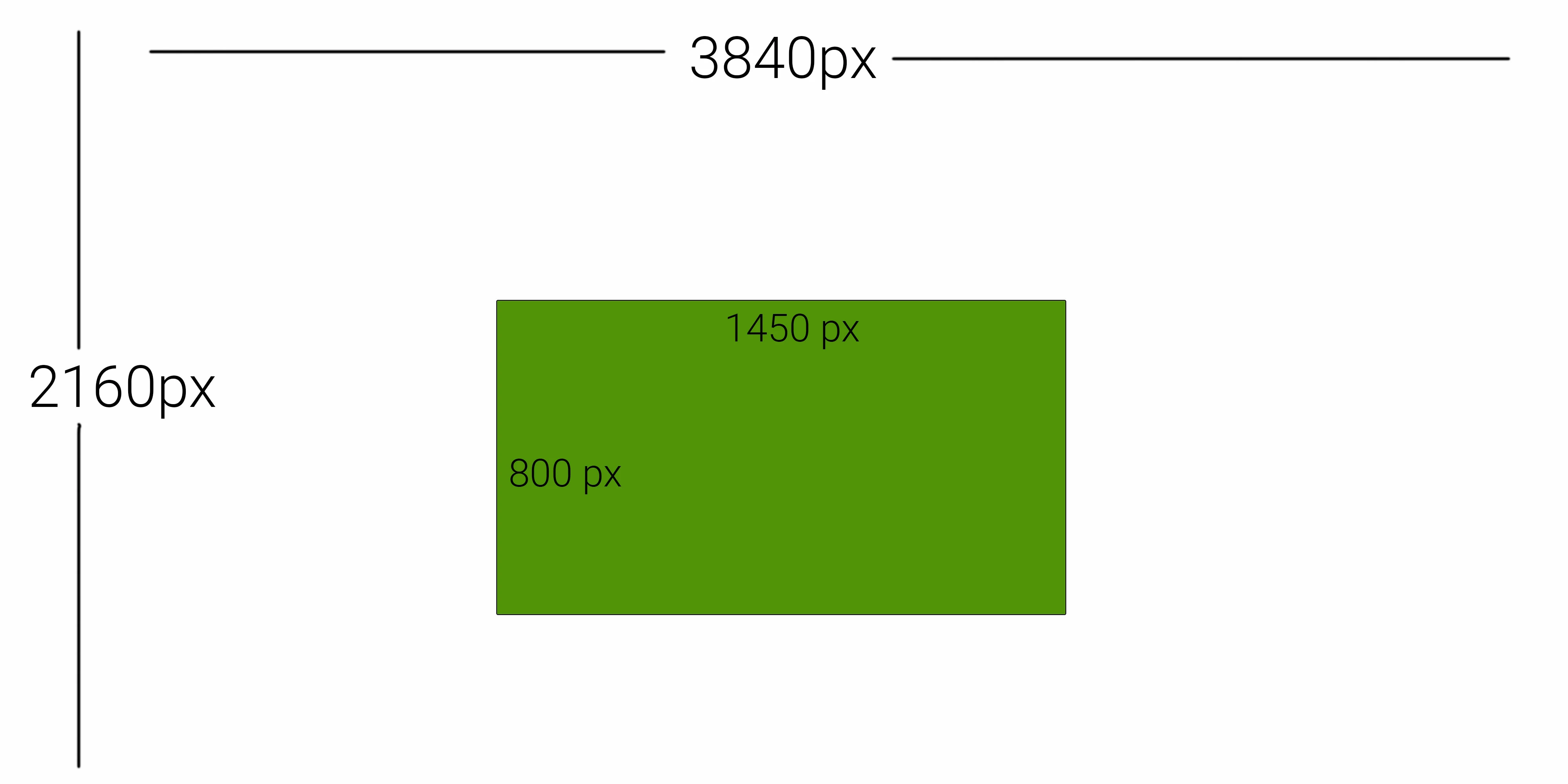
I have a concern regarding 4k monitor displays, I need to purchase a new monitor. All my life I have been working in 1920 x 1080, this is the standard requirement for my everyday tasks. Most designs I do in PS, AI, AE, Adobe software are usually 1500px to 1000px. looks fine at 100%.  We are experiencing dramatic shortages here in Australia in electronics, and monitors are becoming limited on what options to buy. I did an example in PS a dummy canvas 4k resolution, and put a dummy rectangle of one of the usual dimensions I use, and it just seems so small. The canvas was displayed at 23% and I have to zoom in 4 times to get 100%, so my Green rectangle can be displayed at 100%, and be able to work on it. Is there a solution for a 4K monitor to display 1920 x 1080, and the Adobe software interface not be a worrisome issue?
 

This topic has been closed for replies.
Correct answer D Fosse

It'll work as long as you understand the basic concept of screen resolution, which you obviously do. If you invoke View > 200% in Photoshop, the unit will behave just like any other HD 1920 x 1080 unit does. So that's "screen safe" the way you're used to.


And then you can enjoy full 4K resolution for photographic work or vector artwork or whatever else.


Most people panic because they can't understand why Photoshop displays smaller than their web browser, and they think Photoshop is "wrong". But it's just that other applications view at 200% by default with these screens, while in Photoshop you have to click that menu item (or keyboard shortcut) manually.


It's a bit like wide gamut displays. It works splendidly for web work as long as you understand what's going on.


I have to emphasize, if it isn't clear already, that this is very specific to raster (pixel-based) image editing. For vector editing, e.g. in Illustrator, the whole issue is moot and everything will always be rendered at full screen resolution (and this is also where a 4K monitor has the biggest benefits).

2 replies

didiermazier
Community Expert
Community Expert
August 2, 2022

if working on Mac you could use a little extension called SwitchResX. it helps me a lot : https://www.madrau.com/

D Fosse
Community Expert
Community Expert
August 2, 2022

View > 200%.


This uses four screen pixels to display one image pixel - a clean pixel doubling. In effect, it turns the 4K screen into an ordinary HD one.


The Photoshop UI is unaffected by this. It follows the scaling factor you have set in Windows.


This is already what all other consumer-oriented viewers/web browsers will do. They will also use this pixel-doubling when they detect a 4K screen (only they will do it automatically; always). It's the industry standard workaround to ensure that the same material can be used everywhere, regardless of what screen technology the user happens to have.

Inspiring
August 2, 2022

Hi there, thanks for your insight . So is it safe to buy 4k, 2k resolution monitors, without any dramas? 

Conrad_C
Community Expert
Community Expert
March 26, 2023

Using mac os catalina


Yes, of course…you do see that option in macOS 10.15 Catalina and earlier, as your screen shot shows.


But unfortunately, if your Mac was up to date, you would no longer have that option. macOS Catalina is not even supported by Apple any more: Apple provides support and updates for only the last three versions of macOS, and the last three versions are now macOS 13, 12, and 11. That is how old Catalina is now. What it does is outdated, as least as far as Apple thinks.


It is important to plan for is what to do when you need to buy a new Mac, especially an Apple Silicon Mac. A new Mac runs the latest version of macOS, and none of the new Apple Silicon Macs today can run macOS 10.15 Catalina. When it is time for you to buy a new Mac, the Open in Low Resolution option will not be there, and there will be no way for you to restore it. So before you upgrade to a new Mac, it will be a good idea to understand how web graphics and 100% magnification really work on Retina/HiDPI displays.