
Participant
April 19, 2020
Answered

Hue/Saturation Not Working CS6 on Mohave

  • April 19, 2020
  • 1 reply
  • 403 views

I have been using photoshop since before it became CS... In the last few months it has driven me nuts with all the changes. The most irritating is now that Hue/Saturation is not working for whatever reason. I have been able to adjust with no issue for years, but now this is a thing. All software is up to date. Current Mohave in use and CS6 extended.

How to fix please?
This topic has been closed for replies.
Correct answer Jeff Arola

I would reset the photoshop cs6 preferences by holding down the Shift+Cmd+Option keys just

after starting the launch of photoshop cs6.

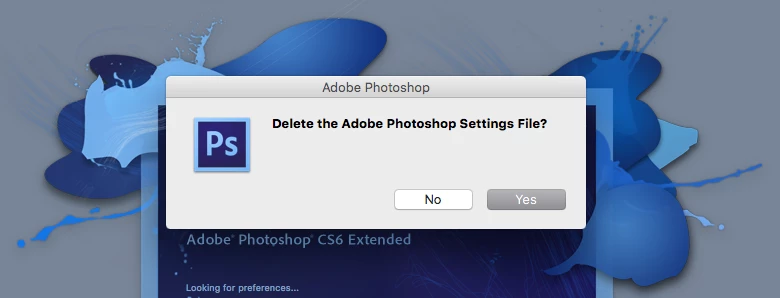
(you have to be quick about pressing the keys or you won't get the below dialog)


Keep holding down the keys until you gett a dialog asking if you want to

Delete the Adobe Photoshop Settings File?


Click Yes


1 reply

Jeff Arola
Community Expert
Jeff ArolaCommunity ExpertCorrect answer
Community Expert
April 20, 2020

I would reset the photoshop cs6 preferences by holding down the Shift+Cmd+Option keys just

after starting the launch of photoshop cs6.

(you have to be quick about pressing the keys or you won't get the below dialog)


Keep holding down the keys until you gett a dialog asking if you want to

Delete the Adobe Photoshop Settings File?


Click Yes


SianRichAuthor
Participant
April 20, 2020

Thank You. This worked right away. Much appreciated.