
Participant
June 15, 2024
Question

İ have 20 photoshop temp file. why ?

  • June 15, 2024
  • 2 replies
  • 167 views

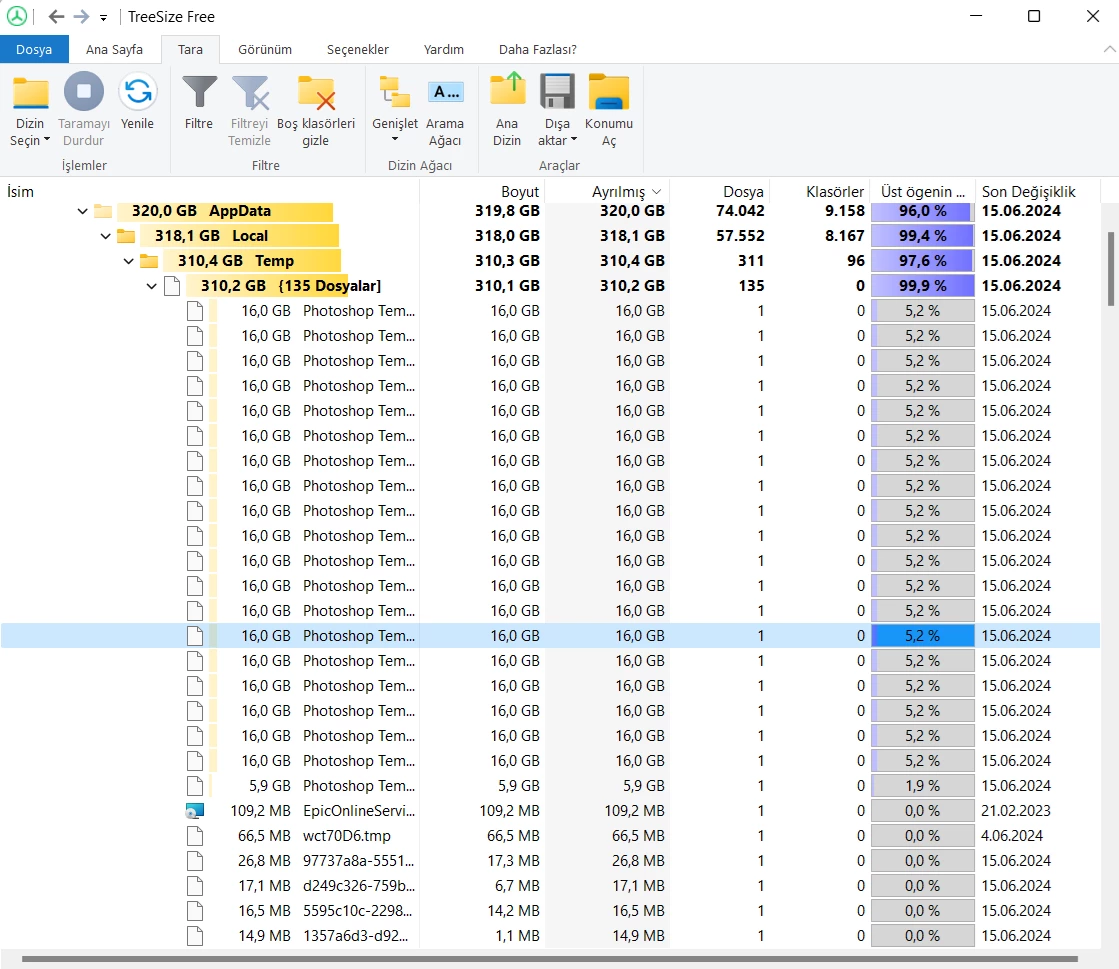
Hello, i dowlanded photoshop new and im just trying a learn. i have 300gb free field on my disk but i got a error when im using a photoshop. it says '' disk is full'' i conroled my disk and realized that photoshop opened 20 temp files(each one is 16 gb). when i open new layer it opens new 4 temp files.  how can i solve this problem, can you help me?
    This topic has been closed for replies.

    2 replies

    kglad
    Community Expert
    Community Expert
    June 15, 2024

    in the future, to find the best place to post your message, use the list here, https://community.adobe.com/

    p.s. i don't think the adobe website, and forums in particular, are easy to navigate, so don't spend a lot of time searching that forum list. do your best and we'll move the post (like this one has already been moved) if it helps you get responses.


    <"moved from using the community">
    D Fosse
    Community Expert
    Community Expert
    June 15, 2024

    That's the Photoshop scratch disk. Scratch files are divided into 16 GB chunks.


    These scratch files should be deleted when you close Photoshop. If they don't, your machine doesn't shut down properly. Orphaned scratch files can just be deleted with Photoshop closed. Don't delete them while Photoshop is still running.


    The size of the scratch file here indicates that you're opening a very big document. Is that intentional? What are the pixel dimensions and number of layers? How many history states?