Tiara3
Participant
March 5, 2018
Answered

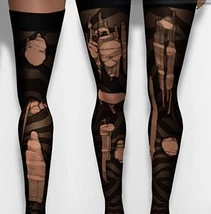
I am trying to mimic this look for torn pantyhose

  • March 5, 2018
  • 5 replies
  • 5142 views

I have the brushes for the torn look, and need to make the nylon part with the holes in it.  I have been trying to figure how to do this with no luck.
This topic has been closed for replies.
Correct answer teachbit

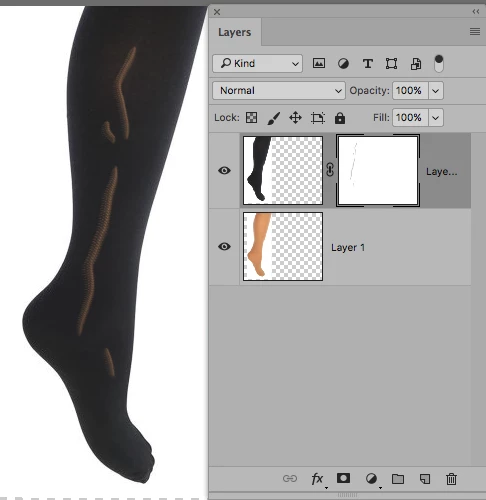
here a screenshot, but I do not have the right brushes:
5 replies

Participant
October 3, 2024

Hi, I saw your post with these wonderful brushes, they are very boring, can you tell me where I can buy or find them?

Participant
October 3, 2024

needed* (not boring)

astrobutch0901
Known Participant
March 5, 2018

So I would create layer masks using the brushes. Open up the nylons above a transparent layer and use the brushes on a layer mask then apply the layer mask to that layer.

Then save as a .png

Give that a go, see how you get on!

Derek Cross
Community Expert
Community Expert
March 5, 2018

Why save it as a PNG (unless it's for web use), more versatility if saved as a PSD.

Tiara3
Tiara3Author
Participant
March 6, 2018

You all have been so kind to take the time to reply, thank you for your suggestions.  I will certainly give it a go as a mask (PS - I will save in png and psd, as I need the texture to be uploaded into a game and it only will take a .png if transparent areas are present.)

astrobutch0901
Known Participant
March 5, 2018

Wouldn't it be simpler, less expensive to find a pair of "pantyhose", tear them up a bit and photograph them on a pair of female legs? Or male, depending on the shot you are trying to achieve!

Or as a suggestion do a google search on "ripped pantyhose brushes" on google. This is just one example of what I turned up:

Ripped Pantyhose 2D Graphics Atenais

Tiara3
Tiara3Author
Participant
March 5, 2018

Thanks for the reply, those are the brushes I have.  I am trying to import the nylons into a game to be worn by avatars and they need to be .png when finished.  The skin of the avatar needs to be able to show through, as many have different skin tones.  Therefore, the holes need to be on a transparent background.

Participating Frequently
March 5, 2018

That is exactly, what I suggested in my first answer.

Sent from my iPad

Derek Cross
Community Expert
Community Expert
March 5, 2018

Shutterstock (and presumably other photo agencies) have royalty free pics of torn pantyhose.

Participating Frequently
March 5, 2018

...but you have to pay...

Participating Frequently
March 5, 2018

You need a photo of nude legs and the same with legs in black nylons, that you put in one layer above the other. You create a layer mask for the layer with the nylons picture and you paint the holes in this mask. The layer with the nude legs will then become visible.

thats it.

teachbitCorrect answer
Participating Frequently
March 5, 2018

here a screenshot, but I do not have the right brushes: