Inspiring
April 27, 2021
Answered

i can’t enhance

  • April 27, 2021
  • 2 replies
  • 2360 views

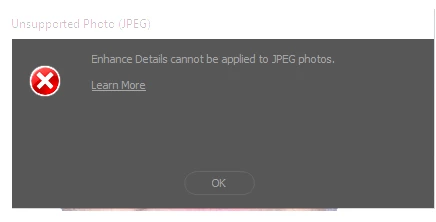
I can't enhance only jpeg files 

in raw files there is no problem it opens them normally

what happen?


[moderator changed "behance" to "enhance" in subject and body]

 

This topic has been closed for replies.
Correct answer AxelMatt


Do you try to use the new function RAW-Details in CameraRAW with JPEG files?

If yes, this doesn't work. As the name already say, RAW-Details can be used only with RAW files.


https://helpx.adobe.com/camera-raw/using/enhance.html


2 replies

jane-e
Community Expert
Community Expert
April 27, 2021

@defaultja4oo25kvkk5 


If English is not your native language, try typing in your native language and we can translate. 


~ Jane

Inspiring
April 27, 2021

Adobe Photoshop Version: 22.2.0 20210202.r.183 2021/02/02: a176e5849fa x64
Number of Launches: 114
Operating System: Windows 10 64-bit

Intel(R) Core(TM) i7-4790 CPU @ 3.60GHz 3.60 GHz

RAM 16,0 GB

χωρίς έξτρα κάρτα γραφικών!

AxelMatt
Community Expert
AxelMattCommunity ExpertCorrect answer
Community Expert
April 28, 2021


Do you try to use the new function RAW-Details in CameraRAW with JPEG files?

If yes, this doesn't work. As the name already say, RAW-Details can be used only with RAW files.


https://helpx.adobe.com/camera-raw/using/enhance.html


My System: Intel i7-8700K - 64GB RAM - NVidia Geforce RTX 3060 - Windows 11 Pro 25H2 -- LR-Classic 15 - Photoshop 27 - Nik Collection 8 - PureRAW 5 - Topaz Photo
AxelMatt
Community Expert
Community Expert
April 27, 2021

You post is a little bit confusing. Please describe your problem/question more detailed.


In addition please give us more informations including the following : 

Adobe product and version number 

Operating system and version number 

The full text of any error message (s) 

What you were doing when the problem occurred 

Screenshots of the problem and/or error messages 

Computer hardware, such as CPU; GPU; the amount of RAM; etc 


To insert screenshots, please use the "Insert Photos" icon in the toolbar, so that we don't have to download them.


My System: Intel i7-8700K - 64GB RAM - NVidia Geforce RTX 3060 - Windows 11 Pro 25H2 -- LR-Classic 15 - Photoshop 27 - Nik Collection 8 - PureRAW 5 - Topaz Photo