Participant
June 17, 2017
Answered

I can't get my psd files to save as pdf? Keeps saying program error? Photoshop CC2015.5 [2017]

  • June 17, 2017
  • 6 replies
  • 78954 views

[Moderator moved from the non-technical Lounge to Photoshop for Beginners​.]


I'm trying to save psd files from photoshop as pdf photoshop files.  My computer keeps having an error.  Can't save because of program error?
Correct answer Nancy OShea

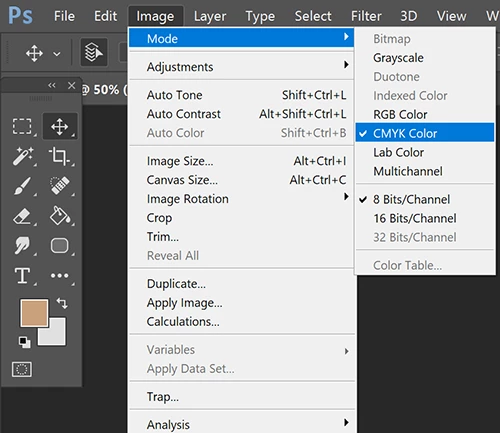
Change the color Mode to CMYK and flatten or merge layers.

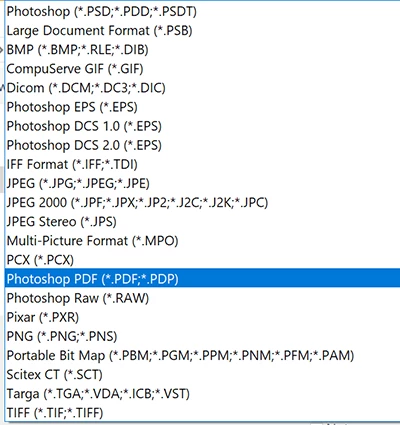
Go to File > SaveAs and select PDF from the list.

Adjust PDF compatibility and quality settings as required.

Nancy

6 replies

Participant
January 2, 2024

I am having the same issue. Image mode is set to CMYK and layers have been merged, but I keep getting the same message saying the file couldn`t be saved whenever I try to save it as a pdf.

Kevin Stohlmeyer
Community Expert
Community Expert
January 2, 2024

@renates19737953 where are you trying to save?

Participant
February 20, 2021

Save As PDF is limited to 30000px by 30000px. In any file above those dimensions, the Save As PDF will be disabled. You can scale down the DPI while maintaning the physical dimensions of the artwork e.g. 6 by 2 meters for example. The wrong image mode can also be a cause (Image menu --> Mode)

QuatroMarketingTeam
Participant
January 11, 2022

Thanks for this comment, I'd tried everything!

Participant
February 28, 2020

Thank you. very helpful

Participant
June 17, 2017

Still comes up with the same error.  I'm going to try reinstalling Photshop.  I've already restarted my pc.  Sooo....

Nancy OShea
Community Expert
Community Expert
June 17, 2017

Before you reinstall, try Restoring Preferences. 

Nancy O'Shea— Product User & Community Expert
Participant
June 17, 2017

Oooooh!  Let me try. Thank you!

Nancy OShea
Community Expert
Nancy OSheaCommunity ExpertCorrect answer
Community Expert
June 17, 2017

Change the color Mode to CMYK and flatten or merge layers.

Go to File > SaveAs and select PDF from the list.

Adjust PDF compatibility and quality settings as required.

Nancy

Nancy O'Shea— Product User & Community Expert
February 20, 2020

thanks, it worked for me!