
kimb98084150
Participant
October 17, 2021
Answered

I can't not find some options

  • October 17, 2021
  • 2 replies
  • 347 views

when I select the quick selection tool,

I can find anti-alias,contiguousm, sample all layers. They don’t exist in the top bar.

This topic has been closed for replies.
Correct answer Ged_Traynor

Hi

That's the Magic Wand Tool you've selected not the Quick Selection Tool

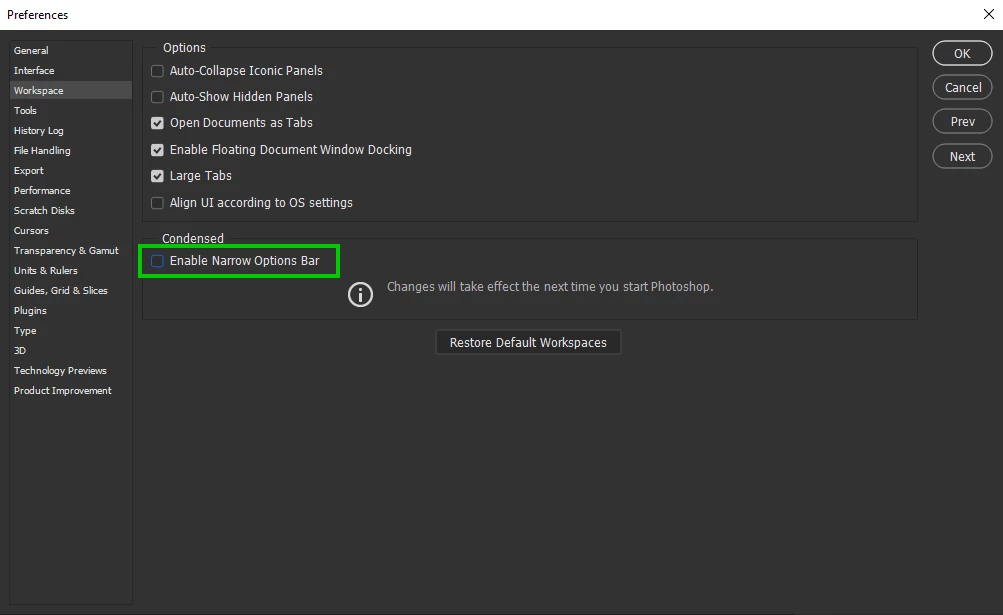
Disable this option in preferences and restart Photoshop
2 replies

Ged_Traynor
Community Expert
Ged_TraynorCommunity ExpertCorrect answer
Community Expert
October 17, 2021

Hi

That's the Magic Wand Tool you've selected not the Quick Selection Tool

Disable this option in preferences and restart Photoshop

kimb98084150
Participant
October 17, 2021

when I select the quick selection tool,

I can find anti-alias,contiguousm, sample all layers. They don’t exist in the top bar.

Ged_Traynor
Community Expert
Community Expert
October 17, 2021

Hi

Can you post a screenshot to highlight the issue, these are the options available for the Quick Selection Tool