
Participating Frequently
October 27, 2023
Question

I can't open Remove Tool (After I cut and paste my adobe to another drive)

  • October 27, 2023
  • 1 reply
  • 110 views

So recently I cut and past my adobe apps in my C drive to an external drive to clear extra room on my desktop, and since then for whatever reason I can't access my remove tool in Photoshop

In 2023 it says this message
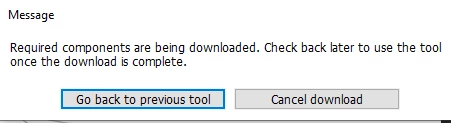
 

In 2024 it says this
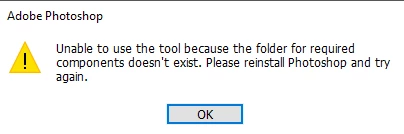


Is this because of my attempt to move my adobe products to another drive?! Does this mean everything must be saved in the original drive at all times or else a feature you want to use won't work?


This topic has been closed for replies.

1 reply

Trevor.Dennis
Community Expert
Community Expert
October 27, 2023

You can't cut and paste Windows applications to a different drive.  There are components of the app in the Windows Registry, in the hidden AppData folders, and lots of other stuff (technical term).  You need to uninstall it from thge C: drive, and then you MIGHT be able to install to another drive.


The thing is, you are almost certainly going about this in the wrong way.  There are lots of legitimate ways to save space on a Windows boot drive.  


You can turn of Hibernate 

Relocate My Documents and Desctop

Right click Documents in File Explorer and choose Properties, and click on the Location tab

Do the same thing with Desktop.  

You can clean up temporary files.

Do you use One Drive?  If yes, you can set it to only store online and not locally.

There are lots of information online on how to do this, and it is WAY better than trying to relocate programs.  You might have damaged your filing system now, but if you are very lucky, you might be able to reverse what you have done and have it working again.  Worst case, you are going to have restore Windows.


Participating Frequently
October 27, 2023

I was afraid it'd come to this. Thanks for the feedback