Exit
  • Global community
    • Language:
      • Deutsch
      • English
      • Español
      • Français
      • Português
  • 日本語コミュニティ
  • 한국 커뮤니티
5

I can't print in color from Photoshop

New Here ,
Nov 07, 2023 Nov 07, 2023

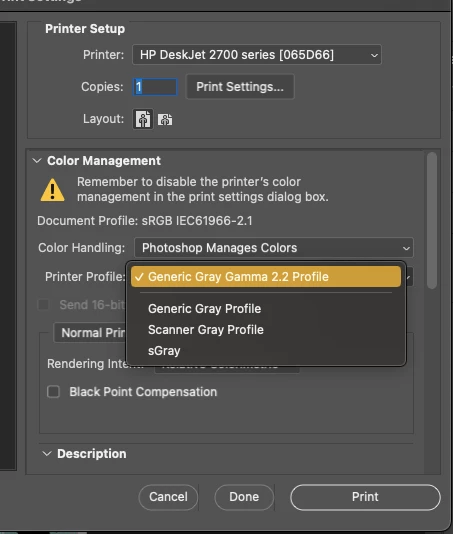
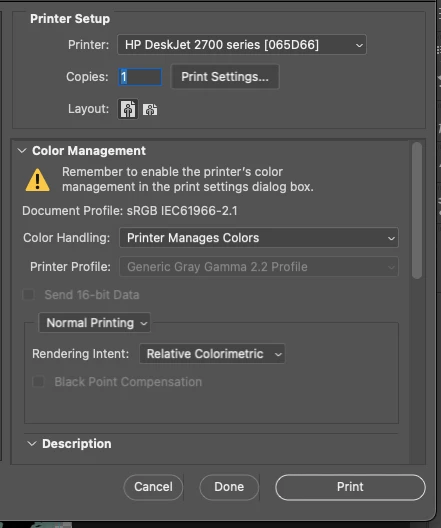
I can't print in color from Photoshop (I can from other applications such as Word, etc.). In the print window, it doesn't matter if I click on "Printer Manages Colors" or "Photoshop manages colors". The printer profile only shows "Gray Profile" options and prints in grayscale.


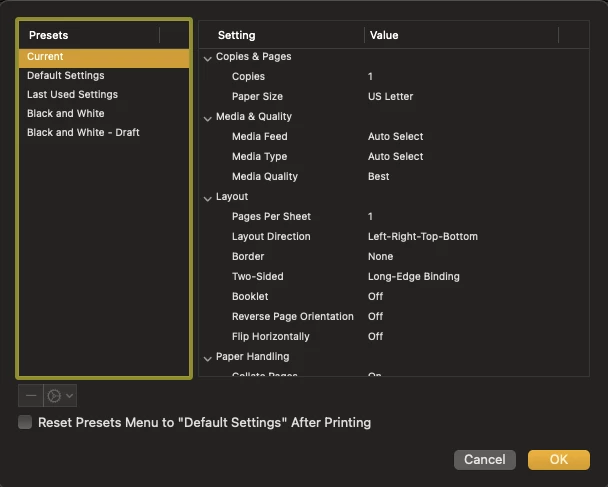
And in Print Settings, I don't have any option to change the color settings or anything like that.


I include the screenshots of what I get on the screen: 


**I am using macOS***
Screen Shot 2023-11-07 at 4.52.32 PM.png


Screen Shot 2023-11-07 at 4.47.22 PM.png


Screen Shot 2023-11-07 at 4.46.32 PM.png


TOPICS
macOS
113
Translate
Report
Community guidelines
Be kind and respectful, give credit to the original source of content, and search for duplicates before posting. Learn more
community guidelines
Adobe
New Here ,
Nov 08, 2023 Nov 08, 2023
LATEST

***UPDATE***


I kept looking in other discussion posts and found the solution to connect the printer directly to the computer with the USB cable.


So far it worked for me, and I hope it stays that way.

Translate
Report
Community guidelines
Be kind and respectful, give credit to the original source of content, and search for duplicates before posting. Learn more
community guidelines