
Participant
September 22, 2021
Answered

I can't see "Marks and Bleeds" while saving my file into PDF. What do I do?

  • September 22, 2021
  • 3 replies
  • 1959 views

I need help, anyone?

As I was saving my file in PDF for print, I can't find the Marks and Bleeds section for me to be able to create trimmarks on my file. (this is on Photoshop.)
THIS IS WHAT IT  LOOKS LIKE ON MY SIDE.


I can't find the Marks and Bleeds  section I used to have it here, I don't know why it disappear.
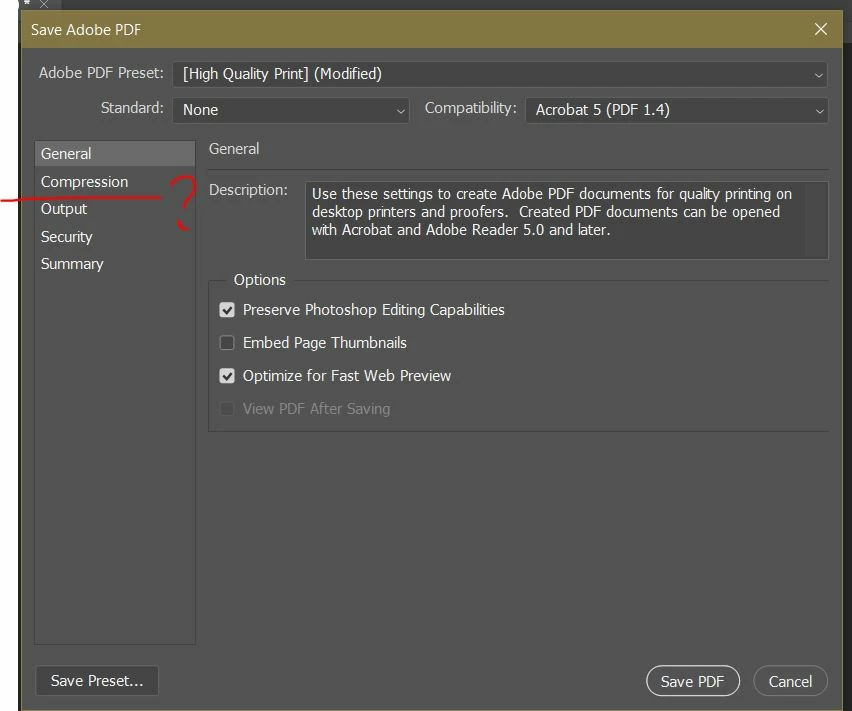


Is anyone experiencing the same thing? Can anyone help me?
I would really appreciate it! Thanks!


This topic has been closed for replies.
Correct answer Bojan Živković11378569

Are you sure there was such option to check? Perhaps you was working with Illustrator or InDesign previously?

3 replies

Participant
September 25, 2021

(this issue has been resolved)
Oh, I'm so sorry guys! My bad.
I'm so used working in InDesign
,

that I mixed up both programs and was confused when I tranferred and started working in Photoshop.
Thank you for all the warm replies. You guys are the best! 🙂

lambiloon
Community Expert
Community Expert
September 22, 2021

Hi there is no such option in Photoshop check the video that can help you...regards


https://youtu.be/1BB_30T-u2M

Ali Sajjad / Graphic Design Trainer / Freelancer / Adobe Certified Professional
Bojan Živković11378569
Community Expert
Community Expert
September 22, 2021

Are you sure there was such option to check? Perhaps you was working with Illustrator or InDesign previously?

Jumpenjax
Community Expert
Community Expert
September 24, 2021

I agree with Bihar and lambiloon, I don't recall seeing it in photoshop. Only in Illustrator and InDesign. 

Lee- Graphic Designer, Print Specialist, Photographer