
July 10, 2021
Question

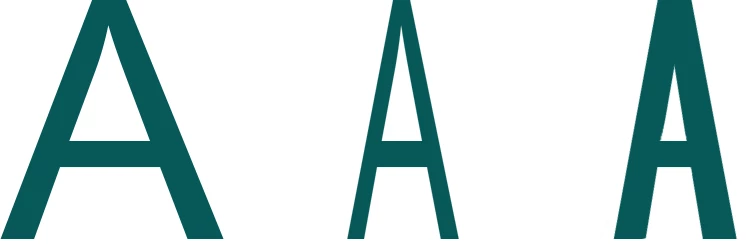
I'd like to decrease width of a letter but keep width of colored part of letter

  • July 10, 2021
  • 2 replies
  • 263 views

Can't explain well. E. g. only upper angle should be decreased if i wanted to decrease width for letter A. In these 3 examples you see default A, decreased width of A in transform. The thirt part is that what i want. I used parts of rasterized default A, rotated them, modify a little bit in order to show you.
This topic has been closed for replies.

2 replies

Jumpenjax
Community Expert
Community Expert
July 10, 2021

Is the font rasterized? If it is text you use the tool just above the color tool the little arrow below that T  can be used a a slider or you can change the percent.


Lee- Graphic Designer, Print Specialist, Photographer
July 10, 2021

If type isn't rasterized then this works like transform. If type is rasterized then this doesn't work. I use photoshop 19.0. 

jane-e
Community Expert
Community Expert
July 10, 2021

Can you also try changing the horizontal scale in the Character panel (Window menu) for comparison?


~ Jane


jane-e
Community Expert
Community Expert
July 10, 2021

@Tedo0101 


I should add that using the Horizontal scale is a workaround. The proper way is to use a Condensed or Narrow version of the typeface IF the type designer created it and it exists. In the example below, the "A" on the left is Avenir Next and the one on the right is Avenir Next Condensed. Both are available in Adobe Fonts. You can see it does exactly what you are looking for without any effort.


Note: don't pay attention to the interface, as this is in PS for iPad. Using a Condensed version works in all applications.


Adobe also makes variable fonts and you might explore those.

https://creativecloud.adobe.com/cc/discover/article/variable-fonts-are-the-future-of-web-type

https://blog.adobe.com/en/publish/2018/01/12/can-variable-fonts-illustrator-cc.html


~ Jane