
Participant
September 25, 2022
Answered

I dont know where the paint tin tool is

  • September 25, 2022
  • 2 replies
  • 256 views

I been paying a subscription for two weeks and getting nowhere.  I'm a total beginner. I draw and want to use PS to digitize and clean up my drawings. I cannot follow tutorials I need to follow because I don't have a paint tin tool on my tool tab/section, column.  The menu on the left side of the panel.  Do I need to pay extra for it?  If so, where will I get it.  What is the name of the extra program I need to buy?  Where do I find it?  Many thanks.
This topic has been closed for replies.
Correct answer davescm

Hi

Go to Edit > Toolbar and click Restore defaults

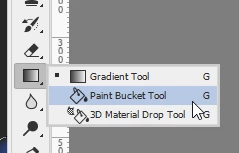
The paintbucket shares the same slot as the Gradient tool (shortcut G).  So if you see that tool instead, click and hold then change it to the paintbucket.


Dave


2 replies

AxelMatt
Community Expert
Community Expert
September 25, 2022

Here you'll find informations about configuring the tool bar in Photoshop:

Photoshop tool galleries (adobe.com)

Can't find the Object Selection Tool or the Frame Tool in the toolbar (adobe.com)

and here infos to the pen tool:

Draw with Pen tools in Photoshop (adobe.com)


My System: Intel i7-8700K - 64GB RAM - NVidia Geforce RTX 3060 - Windows 11 Pro 25H2 -- LR-Classic 15 - Photoshop 27 - Nik Collection 8 - PureRAW 6 - Topaz Photo AI
davescm
Community Expert
davescmCommunity ExpertCorrect answer
Community Expert
September 25, 2022

Hi

Go to Edit > Toolbar and click Restore defaults

The paintbucket shares the same slot as the Gradient tool (shortcut G).  So if you see that tool instead, click and hold then change it to the paintbucket.


Dave


Participant
September 25, 2022

Hi Dave.  Thank you so much.  I did it!  Unfortunately, I can't change the background back to white.  I'm doing what I did to change it to black, but in reverse.  for some reason the layer is remaining black but showing up on the 'forground/background' icon as being white.  Is this a software problem do you think?  I'm using a new PC  with Windows 11 OS.

Jane

Ged_Traynor
Community Expert
Community Expert
September 25, 2022

Can you post a screenshot of the Photoshop interface with all the pertinent panels opened to highlight the issue