
Participant
April 25, 2023
Answered

I downloaded a graphic template. How do I replace an image in it?

  • April 25, 2023
  • 1 reply
  • 1370 views

I'm still very new to content creation so I purchased a subscription to Envato Elements.  I have found a lot of templates that I could use for making YouTube thumbnails.  The learning curve even with a template is ruff...

This one that I will show in the example has a layer marked "replace me". 
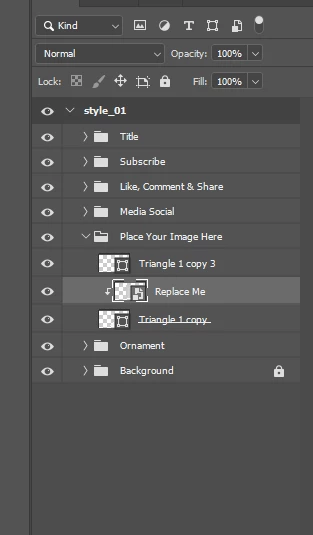
Cool, so I can put my own photo in and drag it around to show what I want.  I just can't figure out how to do it.  If I drag the photo over it just creates a new layer instead of replacing it; no matter where I put it.  Please help.

This topic has been closed for replies.
Correct answer Myra Ferguson

In your screenshot, the Replace Me layer is a Smart Object (you can tell by the icon in the lower left of the thumbnail). If you double-click that thumbnail, Photoshop will open the Smart Object where you can replace the image. When you save that Smart Object, then the content in the original file will update.

1 reply

Myra Ferguson
Community Expert
Myra FergusonCommunity ExpertCorrect answer
Community Expert
April 25, 2023

In your screenshot, the Replace Me layer is a Smart Object (you can tell by the icon in the lower left of the thumbnail). If you double-click that thumbnail, Photoshop will open the Smart Object where you can replace the image. When you save that Smart Object, then the content in the original file will update.

Participant
April 25, 2023

Oh wow that was easy...  Thank you!

Myra Ferguson
Community Expert
Community Expert
April 25, 2023

I'm so glad that helped! 🙂


Would you mind marking my answer as correct to help others who might have the same question? Thanks!


Oh, nevermind. I saw that you just did. 🙂