

WernerJB
Known Participant
July 13, 2020
Answered

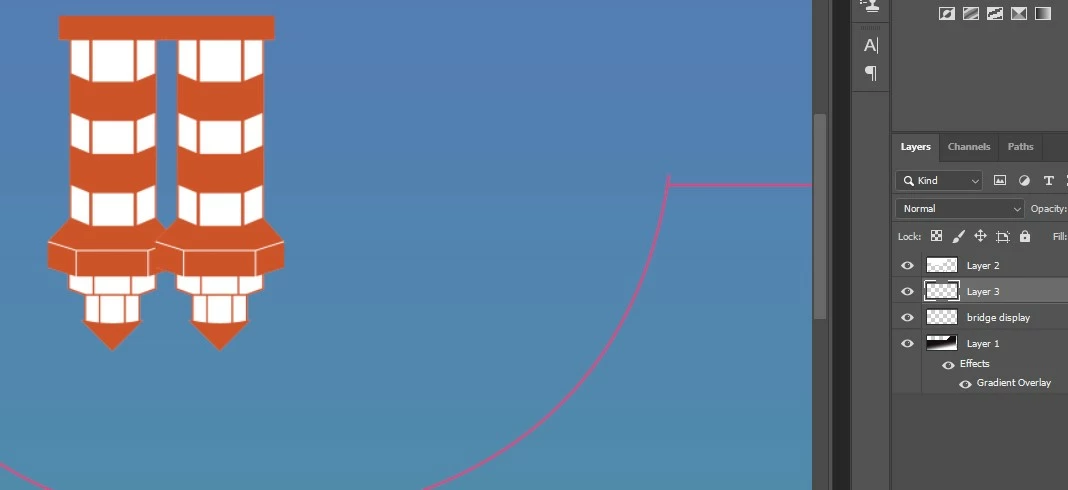
I get the image twice when moving a layer

  • July 13, 2020
  • 1 reply
  • 378 views

I have a layer and want to move to the right. Photoshop will duplicate the image in the same layer.

This happenes with every image or text file. As soon as I move it it, the old image will stay where it was and a new image (on the same layer) will appear.

By the way it works fine in PS  CS6.

Win 10, 64 bit, GeForce GT 710, DirectX version 12 and the newest PS.
This topic has been closed for replies.
Correct answer davescm

Hi

Go to Preferences >Performance and uncheck Legacy Compositing. Then close and restart Photoshop.


Dave

1 reply

davescm
Community Expert
davescmCommunity ExpertCorrect answer
Community Expert
July 13, 2020

Hi

Go to Preferences >Performance and uncheck Legacy Compositing. Then close and restart Photoshop.


Dave

WernerJB
WernerJBAuthor
Known Participant
July 13, 2020

Great - it worked. I did not even have to restart PS