

Sister Sabina
Inspiring
July 5, 2020
Answered

I'm stumped and looking for some advice as to how to achieve the following

  • July 5, 2020
  • 2 replies
  • 864 views

I have been using Photoshop on and off for some years now - but not all that seriously.  No real formal training.  Anyway, I now have some time to devote to learning the ins and outs more thoroughly. I have a youtube tutorial I'm working on "How to Create a Gold Foil Effect in Photoshop" from Spoon Graphics on youtube 

and I have gotten to the point where it shows the following: all was good to that point
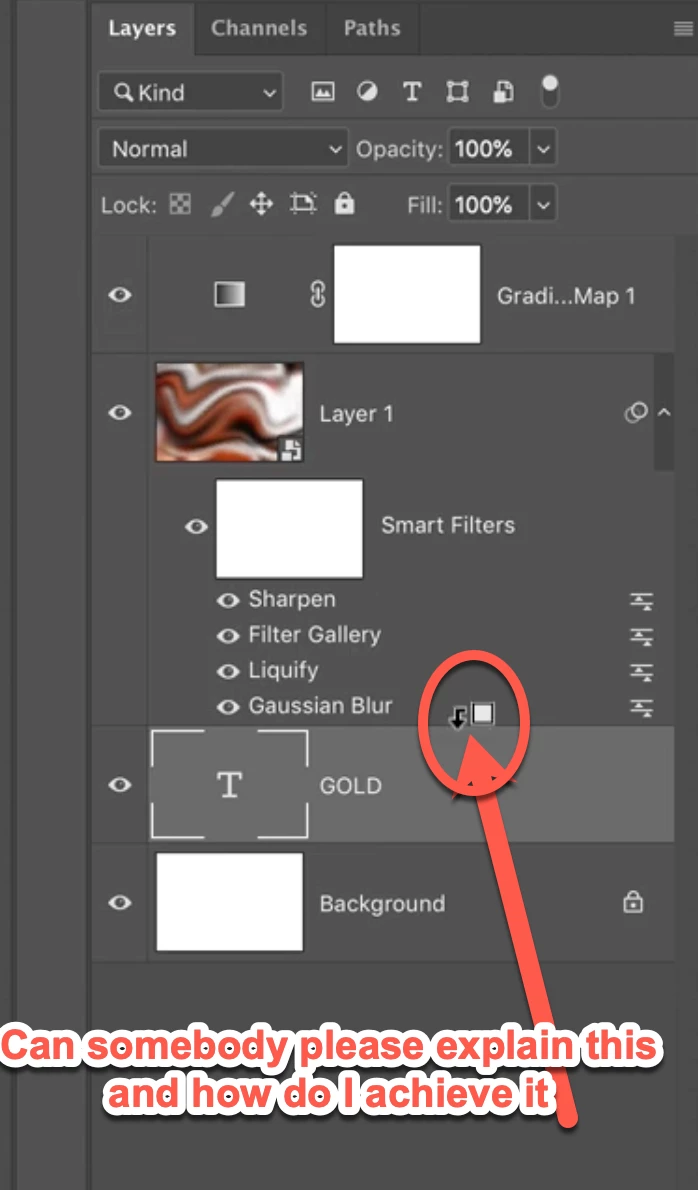
but no matter what I do I can't work out how or what that means or how I am supposed to achieve it.  Can somebody please explain to me what am I supposed to do with this.  All under the "Smart Filters" are unclickable.

Also, since it would seem that I am missing lots of basic knowledge of photoshop - if I have had a problem in the past I have resorted to youtube tuts to get a solution, can anybody suggest a good learning series please that would take me from "beginners-advanced"

Thanking you in advance

Sister Sabina

Tokyo

p.s. whilst I live here in Tokyo I would prefer to stay on the English-speaking forum please.

This topic has been closed for replies.
Correct answer davescm

Hi

To see that icon hold down Alt, hover over the border between the text layer and the layer above (in the layers panel). Then click and the layer above (with its added filters) will be clipped so that it only appears on the text.


I would recommend the training courses for Photoshop on LinkedIn learning or Lynda.com. They are comprehensive.


Dave

2 replies

davescm
Community Expert
davescmCommunity ExpertCorrect answer
Community Expert
July 5, 2020

Hi

To see that icon hold down Alt, hover over the border between the text layer and the layer above (in the layers panel). Then click and the layer above (with its added filters) will be clipped so that it only appears on the text.


I would recommend the training courses for Photoshop on LinkedIn learning or Lynda.com. They are comprehensive.


Dave

Sister Sabina
Inspiring
July 5, 2020

Thank you for that information.  I will certainly look into those courses.  One question, do they allow you to ask questions during the course should you get stumped? 

Sr. Sabina
davescm
Community Expert
Community Expert
July 6, 2020

They are video courses rather than tutor led. You can always ask questions on this forum


Dave

JJMack
Community Expert
Community Expert
July 5, 2020

That icon you show is shown when you hold down the alt key and hovers  the cursor between two layers in the layers Palette. When you see the ICON you use a left click to Clip the upper layer to the lower Layer.  The lower layer becomse a clippinf mask foe the upper layer.  So when it come to smart filters you will not see that icon for the filters.  Smart Filters are not layers, they are Filter that filter the smart object layer's object  masked by a single filter mask that masks the object for all the smart filters attached to the smart Object layer  If you see the Icon it will be for the Smart Object layer which is above the attached smart filters the Upper Layer. You can see here that the upper Smart object Layer and all its Smart filters were off set to the right in the layers palette  when I left clicked. Its now clipped the the shape layer. Look a bit like an old mobile Phone 


In your Case the Gold smart object texture you created with the smart filters with a left will be chipped to your text layers. It  has be touched by what his face that guy that turns things gold.

JJMack
Sister Sabina
Inspiring
July 5, 2020

Thank you so much.  Hopefully this will save me another day in struggling with this problem.  I wonder why I never got an email notifying me of your reply.  I just popped by by chance and found it.  Thankfully I did

Sr. Sabina