
i setup action key 'ctrl+F3'. but...
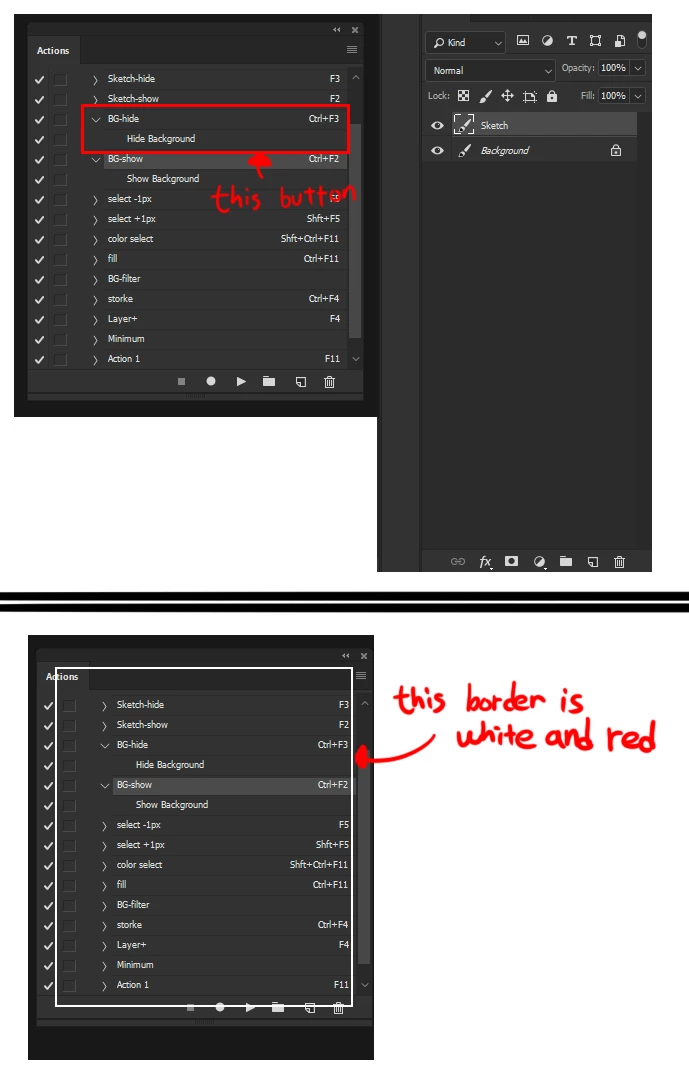
Like the screenshot, I made action keys to hide the background layer in 'ctrl+F3'.
When using the mouse to hide the background layer, press 'ctrl+F2'(in keyboard) to use the action key to show the background layer,
Designating 'ctrl+F3' with another key such as 'ctrl+F7' will hide the background layer without problems.
But! Pressing the 'ctrl+F3' does not work.
If you look at the bottom of the screen shot, you can see the action key window with a white border. That's it! When I press the 'ctrl+F3' key, the activated window blinks like that white and red border. And nothing happens.
I just formatted my hard disk and used the cc2017 version before. At this time, there was no problem with the same setup, and this problem occurred after the format was upgraded to cc2018.
What am I to do?
 AdChoices