Participant
July 30, 2015
Answered

I would like to batch process psd files to pdf files with Photoshop 2015 CC

  • July 30, 2015
  • 2 replies
  • 25668 views

Have Photoshop 2015 CC would like to batch process psd files to pdf files, NOT in bridge, can not get output module to work in bridge tried everything to get bridge to work, it wont.
    This topic has been closed for replies.
    Correct answer Benjamin Root

    You could combine the Batch script and a simple Save As PDF action. Open a file and create the action.

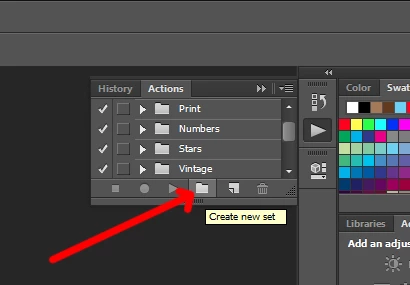
    Make a new set:

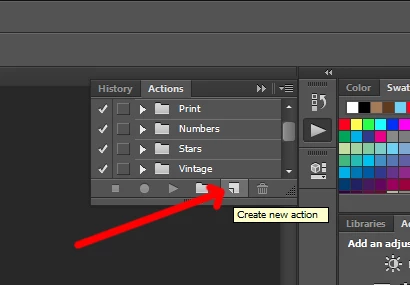
    Make new action:

    The action should be recording. Now save your file as a PDF and stop the action.

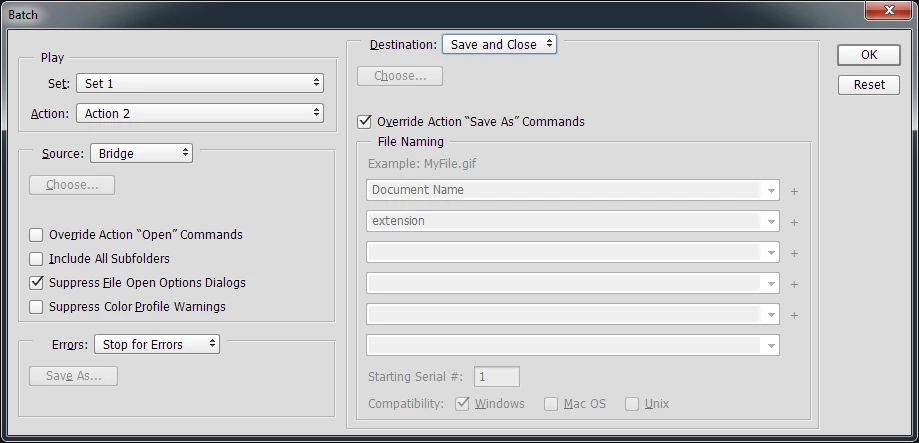
    Go to Bridge and select the files you'd like to convert, then go to Tool>Photoshop>Batch. Set as the screen shot shows:

    Benjamin

    2 replies

    Jill Orr
    Participating Frequently
    July 16, 2020

    Still valid 5 years later 🙂 

    Thank you for this!

    Benjamin Root
    Benjamin RootCorrect answer
    Legend
    July 30, 2015

    You could combine the Batch script and a simple Save As PDF action. Open a file and create the action.

    Make a new set:

    Make new action:

    The action should be recording. Now save your file as a PDF and stop the action.

    Go to Bridge and select the files you'd like to convert, then go to Tool>Photoshop>Batch. Set as the screen shot shows:

    Benjamin

    Participant
    July 30, 2015

    Thank you so much....IT WORKED. You are a genius....

    I have tried for hours trying to google a procedure to

    batch psd to pdf with no luck what so ever.

    The output module DOES NOT WORK in bridge cc.

    I installed output module (not installed from beginning?????)

    It just wont show up and

    tried all the fixes from the web, the output module will not

    show up in bridge cc. Adobe has not fixed it...Why do they

    think people don't batch convert from psd to pdf??

    Most print houses now want pdf files, not psd.

    Adobe has dropped the ball on this. It seems it should

    be so simple, but is not. You are the only one that has

    given me a solution....Thanks again a lot!!

    Benjamin Root
    Legend
    July 30, 2015

    You're very welcome, glad to help! Also, consider posting a bug report over at feedback.photoshop.com

    Benjamin