
Question
I would like to create an Text Action / Template / Shortcut
Hi Guys,
This is my first post in this Adobe Community
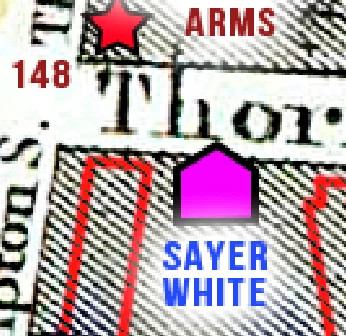
below is a Screengrab of a couple of layers in Photoshop,
A text layer with FX -> (SAYER WHITE as a Text Layer with a Glow)
a Polygon Layer -> (a Magenta House Shape, with Black Stroke)
I would like to have these 2 Layers as an Action or preferably an item within the Library
so I can just click anywhere in the image, and the item of the House / Name are pasted there and the name is editable with the Glow.
and the text can be moved / rotated in relation to the House,
rather than recreate them every time I add a new House/name
and have this Action / Template / Shortcut available in my Library.
sorry if my description is unintelligible or complex !
(I am using the latest PS)
sorry if my description is unintelligible or complex !
(I am using the latest PS)
 AdChoices