
Participating Frequently
April 27, 2025
Question

ICC profiles from Calibration Spyder5 Express Issue with Adobe softs

  • April 27, 2025
  • 3 replies
  • 1490 views

Hello, here is my problem :
I calibrated my HP z24x old monitor with the Spyder 5 Express in sRGB colorspace.
This calibration created an ICC profile used by default from Windows.
A friend of mine has all the same softwares as me without calibration done and using the basic icc sRGB profile in windows.

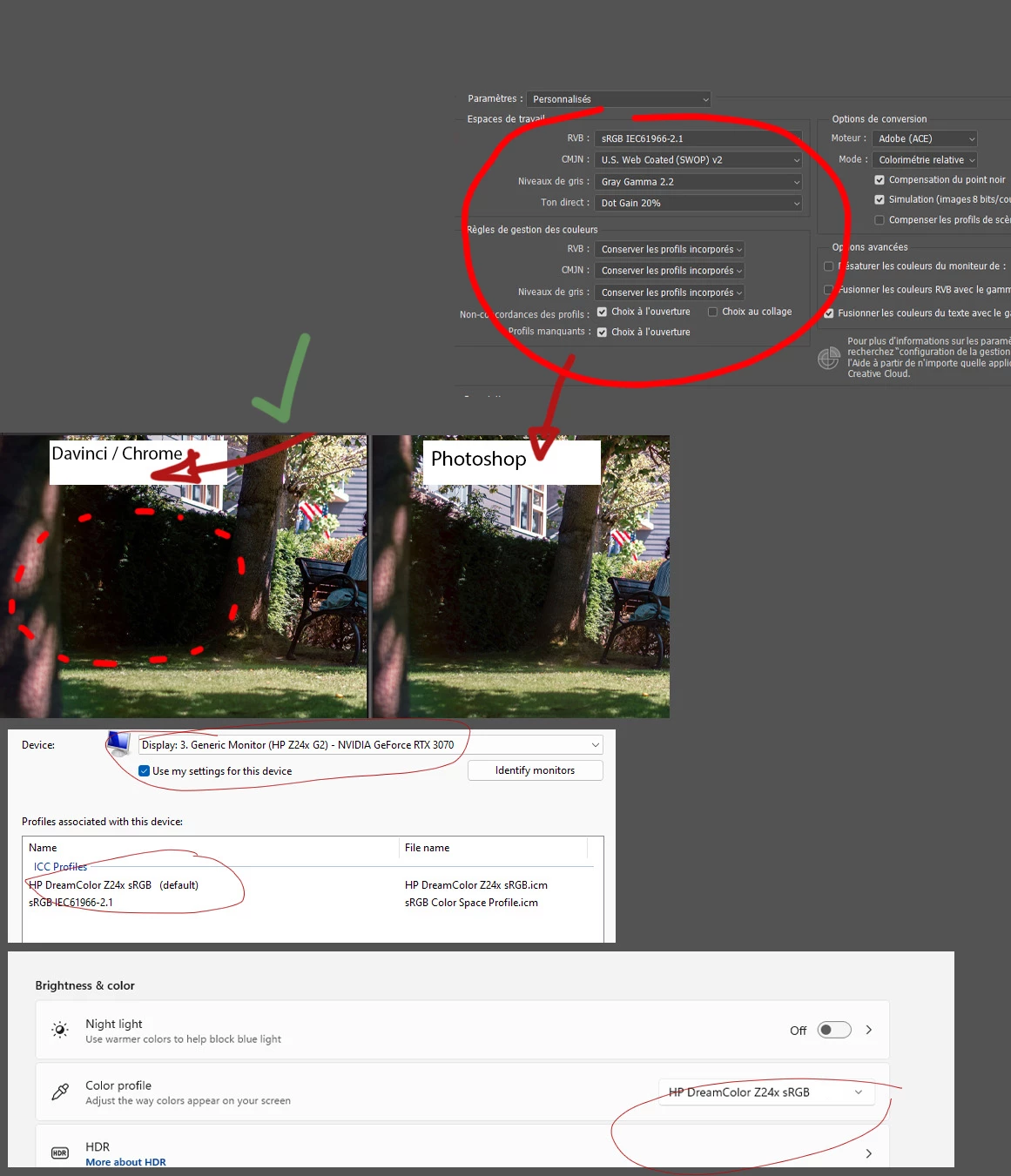
The picture attached displays Dark in the bushes for him on Chrome / Davinci / Photoshop 
Whereas for me it displays Dark in the bushes only on Chrome and Davinci.
if I disable my icc profile created from the calibration, it displays correctly in all software.
I also have a mac on the side to check how the picture appears on web + apps + photoshop and it s supposed to be dark.

So my problem comes from the ICC profile and Adobe softwares that seem to display correct srgb picture but without understanding the Display transform from the monitor.

For exemple when I switch from the classic sRGB IE61966-2.1 ICC profile to the one created by the calibration, I can see photoshop quickly applying a change and lifting the dark but the other color managed apps not.

I ve read many post about this and I m displaying in sRGB on Photoshop and all the other softwares like DaVinci and chrome which are color managed too and display sRGB and I don t have any option for LUT or matrix when I calibrated with the Spyder5 Express.
My friend who has a LG ultra gear 32 without calibration done see a darker image like it should be so I think the problem comes from the color shift done to the monitor from the calibration saved in the ICC profile that is not understood correctly from adobe softwares.
How can I fix this, I borrowed the calibration system from a friend, should I change to a new one if the profile is corrupted ? why does it work correctly for other non adobe color managed app ?
Thank you and sorry for my English (not native speaker).
    3 replies

    sachagAuthor
    Participating Frequently
    May 13, 2025

    Hello Again, 
    So after Investigating on my side I figured the wide gamut monitor on windows is not the easiest thing to set up because of the OS..
    I learned quite a lot and what gives me the best result was :
    First changing to Calibrite device to do calibration more accurately than Spyder and using Display Cal.
    I made sure to calibrate my monitor in Custom RGB in the OSD to have the biggest range of colors and transform in sRGB gamma 2.2 (Display Cal) to match as much as possible most of the device I use and what we see on the web.
    After having this profile done I generated a 3D LUT in gamma 2.2 from my ICC settings + last calibration from Display Cal.
    I used the software DWMLUT gui to then apply the 3d LUT in my OS so all applications are having this new correction even non color managed one.
    Then I made sure to switch back to the default windows sRGB ICC profile to not apply twice the correction (Icc for color managed app and the monitor color shift overall).
    Now all my app match + my edits and grading match the web and other people devices.
    My delta E is bellow 2.5 max and i have an average of 0.3-0.4
    I have a better result than if I would have previously cut my range of color by setting the OSD to sRGB preset and calibrating from there but instead I limit the color range in my graphic card after having the correct profile from the Native space.
    I just don t understand why adobes product were showing me this slightly lifted shadows before when I was in sRGB OSD and with the 2.2 gamma sRGB calibrated profile from display Cal as it should ve been less accurate but not so different.
    It s like the ICC was well understood by the adobe app but the graphic card messed up overall because of the wide gammut..
    Windows in general seem to be a huge pain when it comes to color management

    D Fosse
    Community Expert
    Community Expert
    May 14, 2025

    I think you're overcomplicating this. Essentially, you're trying to impose color management on applications that don't support color management.


    Just a quick rundown on how color management works, when the application supports it:

    • The monitor profile describes the measured behavior of the monitor, in its current and actual (calibrated) state. An icc profile is a description of a color space. It doesn't do anything; it's just a map. But like any map, it needs to correspond to the actual terrain.
    • This profile is used in a standard profile conversion, from the document profile and into the monitor profile. This conversion is performed by the application, on the fly, as you work. The corrected numbers are sent to screen.
    • Photoshop loads the monitor profile it gets from the operating system at application startup. This profile is used for the remainder of the session. If the default profile is changed in the operating system, the application needs to be relaunched to pick that up.


    Color management in Windows isn't difficult, and you can use wide gamut monitors without any problems. I've done that for more than fifteen years. All you need to do, is use applications that actually support color management.


    Yes, there are slight complications like the fact that the actual profile conversion is executed in the GPU, so that needs to work without problems. And HDR monitors are an obvious paradigm shift that changes a lot of rules. For the moment, Photoshop doesn't support HDR in Windows, so that's moot (but ACR and Lightroom do).


    davescm
    Community Expert
    Community Expert
    May 14, 2025

    Hello Dave,

    Thank you for taking the time to help me on this.

    So if I understand correctly:

    Photoshop Runs in wide gamut mode from OSD and uses ICC color management to display color precisely based on your monitor profile for a 2.2 calibration.


    So it shows very accurate sRGB.

    But :


    3D app (non-color-managed):

    Doesn’t read ICC profiles.

    Just outputs raw RGB.

    Requires you to limit the monitor physically (via sRGB OSD mode) to "fake" a standard sRGB display.

    And that sRGB emulation is not perfect because often slightly clipped and chromatically off.


    So at the end, even if you :

    Calibrate your monitor in sRGB OSD mode,

    Assign sRGB profile in Photoshop to the file, you’ll still see slight mismatches in saturation, contrast, or tone compared to your full native OSD profile well calibrated in 2.2 when using color managed app.

    Because the sRGB OSD profile you used and calibrated to get the calibration shift is already limited in color range from the OSD before the calibration compared to the OSD native mode with a proper 2.2 calibration understood by PS from ICC.

    In a short, it will never match between 3D soft or other video grading soft and Photoshop or Premier.

    Let me know If I misunderstood what you explained.

    Thank you again !


    Hi,

    You are getting it, but don't over exaggerate the differences between a well calibrated monitor and a well profiled monitor. I get visibly acceptable results between the two methods.


    In short:

    A ICC colour managed application requires a monitor profile that describes the monitor accurately in its current state of adjustment. It does not have to match the document colour space - translating between the two is the purpose of ICC colour management.  We do calibrate monitors first though so that we can set the black and white points, before profiling. In the better monitors, I use Eizo monitors, the calibration data is uploaded directly to the monitor rather than being used within the GPU.

    In a video system, which does not have ICC profiled colour management, then the reliance is on monitors set up and calibrated to specific video standards, an example being Rec.709. The assumption is that when working to a video standard the monitor is calibrated to display the data sent to it as required by that standard. That includes colour, gamma, black and white points.


    One is not more accurate than the other IF it is capable of being calibrated accurately. That depends on the monitor itself.  There are some very high end, and very expensive,  video monitors which can be calibrated extremely accurately for colour grading. 
    The ICC version of colour management though makes it very flexible and it is easy to switch between document standards without having to recalibrate the monitor, so you can have documents open in Adobe RGB, sRGB and ProPhoto at the same time and all will display correctly alongside each other on the same monitor. It also integrates with CMYK spaces and printer profiles which makes it ideal for an image to print workflow.


    There are also other methods such as OpenColorIO colour management and ACES colour encoding which can be enabled in Photoshop and are geared toward motion picture workflows.


    Dave

    kglad
    Community Expert
    Community Expert
    April 27, 2025

    in the future, to find the best place to post your message, use the list here, https://community.adobe.com/

    p.s. i don't think the adobe website, and forums in particular, are easy to navigate, so don't spend a lot of time searching that forum list. do your best and we'll move the post (like this one has already been moved) if it helps you get responses.


    <"moved from using the community">
    sachagAuthor
    Participating Frequently
    April 27, 2025

    Thank you kglad !
    Sorry for this confusion, I thought this was the suitable place to post it.

    kglad
    Community Expert
    Community Expert
    April 27, 2025

    (no problem)

    D Fosse
    Community Expert
    Community Expert
    April 27, 2025

    First of all, you need to repeat the test and relaunch Photoshop when you have changed the monitor profile in the OS.


    Photoshop loads the monitor profile at application startup, and continues using this profile for the remainder of the session. Any change is not picked up until next launch.


    ----


    And some general remarks just to make sure we're all on the same page:


    You mention sRGB a lot in relation to the calibration/profiling. Maybe I misunderstand you, but I just want to emphasize that sRGB is irrelevant to the monitor profile. The monitor has its own native color space, which may or may not be close to sRGB, but it will not be a match, and it doesn't need to be. Don't set the monitor to emulate sRGB, just let it run at native response.


    The whole purpose of the monitor profile is to describe the monitor in its current state, whatever that state happens to be. The monitor profile is a map, used by Photoshop to correct the numbers it sends to screen, and like any map, it has to correspond to the actual terrain.

    sachagAuthor
    Participating Frequently
    April 27, 2025

    Hi D Fosse,

    Thank you for replying !

    Yes what I mentioned before with Photoshop switching his display while I switch to another ICC was a test I did among many other but of course I first started to restart my computer after enabling the new sRGB ICC profile from calibration so I have a fresh Photoshop starting with this ICC. But the results are the same, all apps are consistent when I have the native profile (no calibration done just factory settings) but when I start to enable the calibration profile then all Adobe software mismatch the rest of my other grading app + chrome after restarting and relaunching Photoshop.

    Also my monitor itself has sRGB, Rec709, Adobe RGB display transform built in and I made sure to select the sRGB as I work in this color space most of the time for grading. So the calibration I did just make it more accurate.

    I think Photoshop is doing the great mapping but somehow the extra color shift done to the all monitor from the calibration baked in the ICC must confuse the Adobe software cause they seem to not send the correct numbers to screen compare to other color managed apps.

    D Fosse
    Community Expert
    Community Expert
    April 27, 2025
    quote

    all apps are consistent when I have the native profile (no calibration done just factory settings)


    By @sachag


    The "native" profile in Windows - the default if no profiling is done - is sRGB IEC61966-2.1.


    If your files are also sRGB IEC61966-2.1, that means what you see on screen is not color managed at all. If the two profiles are the same, nothing changes, and the RGB numbers in the file are sent directly to screen without any correction. That is the definition of no color management.


    In other words, this will make Photoshop behave just like any non-color managed application, and all of them will match perfectly. They won't be correct, but they will match.


    Chrome is supposed to be color managed, but it has a long history of buggy and failing color management. Check with a different browser. IME, both Firefox and Edge are very reliable.


    Long story short - I'm not convinced there is anything wrong here. I don't know what other applications you're using and whether they support color management - but to me it sounds like Photoshop is the only application that color manages correctly.


    Important note: calibration and monitor profile are two different things! The calibration is irrelevant here. That's an adjustment to the monitor that affects everything equally. The monitor profile is written when the calibration is done, describing the monitor's behavior in its calibrated state, with much higher precision.The monitor profile is used only by color managed applications.


    There are more advanced ways to test the accuracy of the monitor profile, by taking screenshots, assign the monitor profile and then convert back to the document color space. The two histograms should then be identical. But sRGB isn't very good for this because it has a very abrupt falloff and clipping in the shadows. Adobe RGB is much better for this test.