
Inspiring
September 15, 2019
Answered
ICC Profiles not showing in Photoshop
- September 15, 2019
- 2 replies
- 14654 views

Hi Paul
First check you put the file where icc profiles should go, easiest to find on a mac is the "hard disk name"System/Library/Colorsync/Profiles
However, the screeenshot showing you seem to have put them in the 'recommended' folder looks OK too. That’s where Adobe keeps its "kinda favorite" profiles. So that shouldn’t be the issue.
Profiles can be corrupted, but lets leave that posibility for now - unless you can redownload.
I suggest you also check the internal profile names, sometimes the listed name difffers to the filename
thatcould be the problem
Colorthink software does this best, but you can check it like this too:
double click one of the profiles, it will open in the mac Colorsync Utility
there click on 1 "desc" "localised description strings"
the title bar of the open window shows the filename, the ASCII name is the internal name.
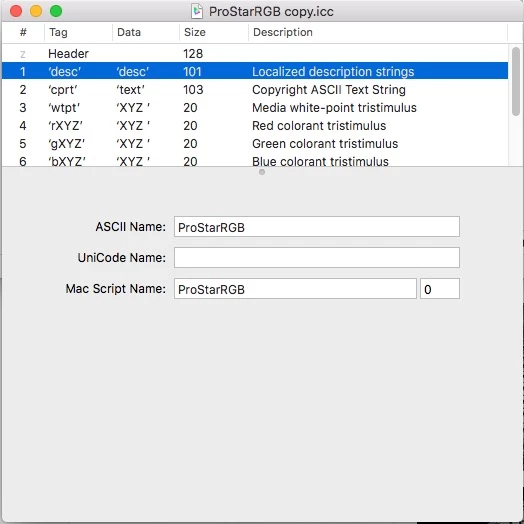
That's the name you'll see listed in aplications like Photoshop [in this case "ProStarRGB.icc"]
editing the filename does not change the internal name,
that’s what I did here, changed ProStarRGB.icc to ProStarRGB copy.icc
I hope this works for you
if so, please do mark my reply as "helpful" and if you're OK now, please mark it as "correct" below, so others who have similar issues can see the solution
thanks
neil barstow, colourmanagement
Already have an account? Login
Enter your E-mail address. We'll send you an e-mail with instructions to reset your password.
 AdChoices