Participant
February 25, 2020
Answered

Illustration

  • February 25, 2020
  • 3 replies
  • 1213 views

Hi all,


I would like to know how do this illustration ?
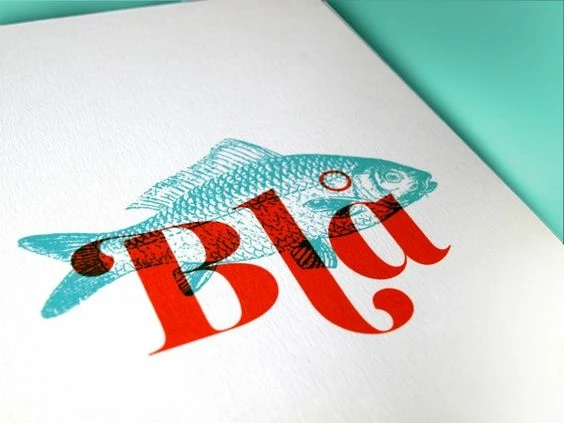
 

I'm blocked and I don't know if this is possible ?


Many thanks in advance, I really do appreciate any help!


Charlie



This topic has been closed for replies.
Correct answer Leslie Moak Murray

What @warunicorn said is how I would also do it. I would add that setting a layer to Multiply can darken the color, so you might want to adjust the opacity and/or color (Image>Adjustments>Hue/Saturation or maybe >Color Balance etc.) of that layer.

3 replies

Participant
November 10, 2021

There are few things you need to clarify.


1) You want the exact copy of this picture or

2) You want something like this.


I am assuming the first one.

So yes, you can simple take this picture to illustrator and multiply it to darken the photo and then Click on Image Trace and Click Low - Fidelity and then expand it. and then, adjust according to your needs 


you can also use pen tool to create the text written on the image. 

I have also created some vectors using this technique which are posted Link removed by Moderator on my website

Participating Frequently
November 10, 2021

thanks for great guide. I tried it to make something like this. many thanks

Leslie Moak Murray
Community Expert
Leslie Moak MurrayCommunity ExpertCorrect answer
Community Expert
February 25, 2020

What @warunicorn said is how I would also do it. I would add that setting a layer to Multiply can darken the color, so you might want to adjust the opacity and/or color (Image>Adjustments>Hue/Saturation or maybe >Color Balance etc.) of that layer.

Cha748Author
Participant
February 25, 2020

Hello thanks for your answer. I would like to know if the fish is an image worked with Photoshop or Illustrator ( if yes, could you explain them to me ?) or if it is a handmade illustration ? I'm sorry if my question was not clear


dianer_macperson
Inspiring
February 25, 2020

The fish is from photshop, the type could be illustrator or indesign or even photoshop. Type is in multiply mode on fish. very simple. 

(The type will remain vector in a photoshop pdf. as long as it's not rasterized before saving the pdf.)

The fish should be at least 300dpi at 100 percent size or smaller. if you blow it up larger it'll start to look pixely.


War Unicorn
Community Expert
Community Expert
February 25, 2020

You asking about how the text blends with the fish? Looks like a simple blend mode. ("Multiply" would be my guess.) This is done via the blend mode option in the Layers panel. (Target the type layer first, which should be layered above the fish.)

Cha748Author
Participant
February 25, 2020

Hello thanks for your answer. I would like to know if the fish is an image worked with Photoshop or Illustrator ( if yes, could you explain them to me ?) or if it is a handmade illustration ? I'm sorry if my question was not clear