
Answered
Image DPI
Hi,
I am designing a 12 by 3 billboard. My printer said it needs image res at 300 ďpi.
My images are more than 2000 px w h. But at 72 ďpi. How to I change that?

Hi,
I am designing a 12 by 3 billboard. My printer said it needs image res at 300 ďpi.
My images are more than 2000 px w h. But at 72 ďpi. How to I change that?
120 x 30 cm at 300 ppi (pixels per inch) gives you 14173 x 3543 pixels.
That seems 7 x the 2000 pixels needed. You simply can't blow up pixel based artwork that artwork up that far. You would have to create it at those dimensions.
I don't have experience in poster printing, but if you are in Europe, this may help.
The designer's guide to printing a poster | Creative Bloq
Then talk to your printer again, especially if your images are too small.
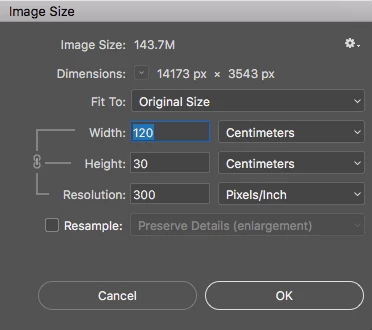
There are two things here.
First, the PPI that your printer has requested. That is easy - you use Image Size - with resample to give that resolution. That way you can send the printer the file he has requested.
The second, which does not affect any vector parts of the image (i.e. text or shapes) but does affect the pixel image, is how many pixels does your image need to be acceptable for viewing. Unless your billboard will be viewed from a few cm away with a magnifying glass then you don't need to start with 300ppi. The ppi needed depends on viewing distance. Our eyes can only resolve so much detail.
As a rule of thumb - the viewing distance is about 1.5 x the diagonal so in your case - about 10-12 metres (approx. 480 inches)
There is a formula in the link below for working out the ppi required at a given viewing distance. In your case it suggests around 15 ppi. So your 12 metre length needs to be around 7000 pixels - anything else is a waste, because you won't see it at the normal viewing distance.
What print resolution works for what viewing distance?
In short get your image looking good at 100% zoom and 7000 x 1750 pixels. Then do a final increase in size to the dimensions required by your printer.
Dave
Already have an account? Login
Enter your E-mail address. We'll send you an e-mail with instructions to reset your password.
 AdChoices