
annaj67681122
Participant
August 19, 2020
Answered

Image loses quality when scaling a pattern fill

  • August 19, 2020
  • 2 replies
  • 2180 views

Hello, 


I have a problem with image quality when I make a new pattern fill layer and try to scale down the pattern. The quality shifts massively from 100% to 99%. I have my images in 300ppi and it is only recently that this has been happening. Anyone having a similar issue?

PS. I thought initially it was a graphics card issue but I fixed the graphics problem and it is still the same. I've attached images to show what a difference 1% makes.

Thanks! 
This topic has been closed for replies.
Correct answer Semaphoric

Yeah, Pattern Fill scaling is pretty worthless. Better results are obtained by converting the Pattern Fill to a Smart Object, and scaling that.

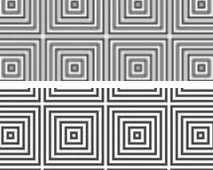
The Legacy Optical Squares, at 99%. Top is scaled Pattern Fill, bottom is scaled Smart Object (Bicubic).


2 replies

Semaphoric
Community Expert
SemaphoricCommunity ExpertCorrect answer
Community Expert
August 19, 2020

Yeah, Pattern Fill scaling is pretty worthless. Better results are obtained by converting the Pattern Fill to a Smart Object, and scaling that.

The Legacy Optical Squares, at 99%. Top is scaled Pattern Fill, bottom is scaled Smart Object (Bicubic).


annaj67681122
Participant
August 19, 2020

Thanks! This might work. How do you scale the smart object?

Semaphoric
Community Expert
Community Expert
August 19, 2020

Just use Free Trnasform. One thing to note is if the SO is scaled down, it will no longer extend to the edges of the doc, so you may want to Edit Contents (via the Layers Panel menu) to resize it so it will fit.

lambiloon
Community Expert
Community Expert
August 19, 2020

Hi are you pressing alt key to scale it down ?

Ali Sajjad / Graphic Design Trainer / Freelancer / Adobe Certified Professional
annaj67681122
Participant
August 19, 2020

In the pattern fill dialogue box there is an option to change the scale. I make the changes to the % by clicking on the number on the scale tab and scrolling with my mouse. I tried holding down the alt key but it makes no difference. Thanks