
Participant
December 2, 2022
Answered

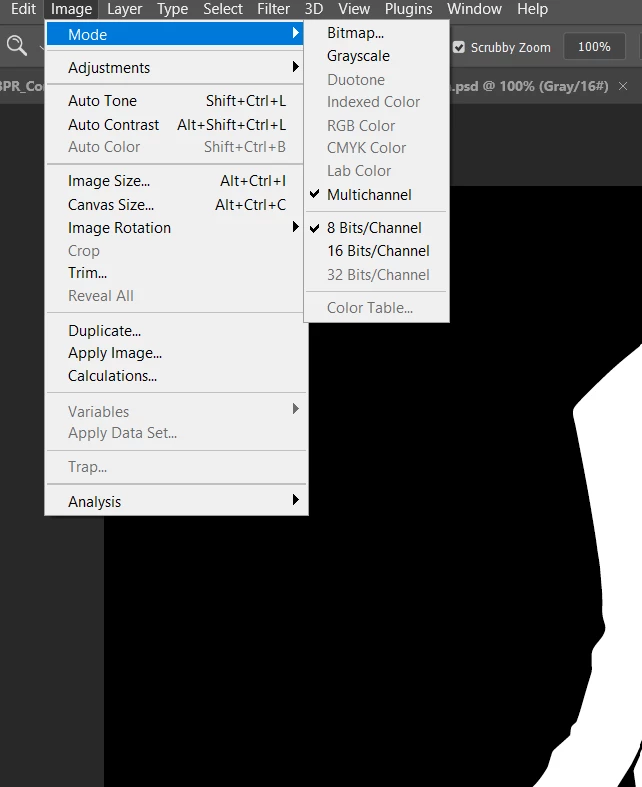
image mode stuck in multichannel mode
  • December 2, 2022
  • 4 replies
  • 1867 views

The layer in uneditable, even though it's called "Background", I need to copy paste it into another project, how can I make it editable?


[subject edited by moderator for clarity — was "image mode stuck to m"]

[actions and scripting tag removed]


This topic has been closed for replies.
Correct answer c.pfaffenbichler

Try

Image > Mode > Grayscale 

4 replies

jane-e
Community Expert
Community Expert
December 2, 2022

@basiccomponents 


Can you show your Layers and Channels panels (Window menu) so we can better assess your issue?


Jane

c.pfaffenbichler
Community Expert
c.pfaffenbichlerCommunity ExpertCorrect answer
Community Expert
December 2, 2022

Try

Image > Mode > Grayscale 

Participant
December 2, 2022

this solved it, thank you!

Kevin Stohlmeyer
Community Expert
Community Expert
December 2, 2022

Your document shows that you are selected/in a Gray/16# Channel not on the background layer.

c.pfaffenbichler
Community Expert
Community Expert
December 2, 2022

Why is it Multichannel and not RGB or CMYK (edit: or Grayscale or Lab)?