fabianlujan1
Participant
May 30, 2021
Answered

Image Size dialog always displays in centimeters

  • May 30, 2021
  • 1 reply
  • 926 views

I can't find a way to force PS to display images in pixels when accesing Image Size dialog.
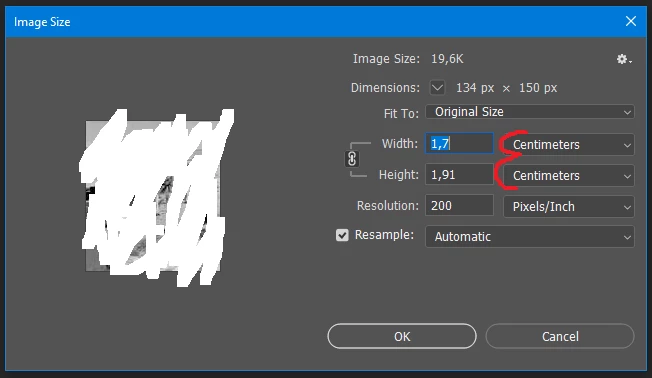
The thing is, I set pixels in Preferences > Units & Rulers. Check image:
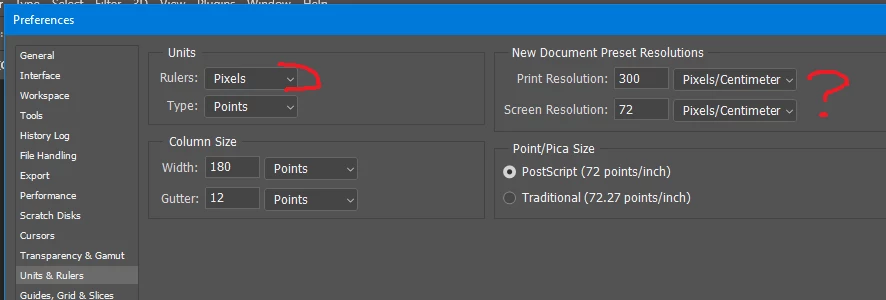
 

Where else can this be set?

Thanks!

PS. I know that I can change it by using the drop-down options, but I want pixels as default.

This topic has been closed for replies.
Correct answer barbara_a7746676

After opening an image in Photshop, if you change the Image Size dialog box to pixels, it will stay with pixels, at least until you shut down your computer.

I don't think there is a preference setting anywhere for that.

1 reply

barbara_a7746676
Community Expert
barbara_a7746676Community ExpertCorrect answer
Community Expert
May 31, 2021

After opening an image in Photshop, if you change the Image Size dialog box to pixels, it will stay with pixels, at least until you shut down your computer.

I don't think there is a preference setting anywhere for that.

fabianlujan1
Participant
May 31, 2021

Thank you for your answer!

It works as descripted.

Regards,