
Known Participant
September 24, 2018
Question

image size if it exceeds the size exits warning

  • September 24, 2018
  • 1 reply
  • 742 views

I have a folder with 100 images with different pixel sizes

I have to use image size

to adapt images to 5000px

as you can see from the image I have seen the voice of ont enlarge
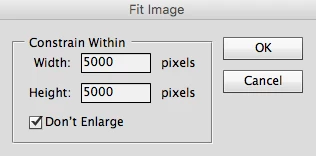
I would like a warning if the image below 5000px

how to insert an alert to this script generated by ScriptingListener

// script

var idthreecaathreefourthreefourcbsixsevenoneonedonebcfourthreezerozerosixzerobzeroaonethreedcfour = stringIDToTypeID( "3caa3434-cb67-11d1-bc43-0060b0a13dc4" );

    var desc1 = new ActionDescriptor();

    var idMsge = charIDToTypeID( "Msge" );

    desc1.putString( idMsge, """Fit Image action settings""" );

    var idHght = charIDToTypeID( "Hght" );

    var idPxl = charIDToTypeID( "#Pxl" );

    desc1.putUnitDouble( idHght, idPxl, 5000.000000 );

    var idWdth = charIDToTypeID( "Wdth" );

    var idPxl = charIDToTypeID( "#Pxl" );

    desc1.putUnitDouble( idWdth, idPxl, 5000.000000 );

    var idlimit = stringIDToTypeID( "limit" );

    desc1.putBoolean( idlimit, true );

executeAction( idthreecaathreefourthreefourcbsixsevenoneonedonebcfourthreezerozerosixzerobzeroaonethreedcfour, desc1, DialogModes.NO );

This topic has been closed for replies.

1 reply

JJMack
Community Expert
Community Expert
September 24, 2018

You would need to add logoc to test the size. Thay code is just as action step to use the IFit Image Plug-in  to resize images overe 5000 px in  width or height to down size so the longest side will be 5000px not to upsize small image to fit 5000x5000. you need to test the document size after the Fit Image step if both width and height are less than 5000 PX you would alert the user to that fact. The Alert will pause the script till the user acknowledges it.

JJMack
Known Participant
September 24, 2018

Thanks for the JJMack pass

I do not know how to do such a thing

I would like images that are less than 5000px are not resized

and an alert must be issued for this

do you think you can do?

JJMack
Community Expert
Community Expert
September 24, 2018

If the script is going to be used to batch resize your 100  image files and alert would not be a good thing to add it would pause the batch operation.  You could if the script is processing a file list collect the names of the files that have both sides smaller than 5000x5000 and have a single alert at the end of the batch process. However what you posted is a single Action step that use Adobe Plug-in Script "Fit Image.jsx"  not a Script that batch processes a file list.

var orig_ruler_units = app.preferences.rulerUnits;

app.preferences.rulerUnits = Units.PIXELS;

if ((activeDocument.width<5000)&(activeDocument.height<5000)) alert("Document size is small Width=" + activeDocument.width + " Height=" + activeDocument.height);

app.preferences.rulerUnits = orig_ruler_units;

JJMack