Participant
October 11, 2022
Answered

Images Lose Sharpness when viewed in any other program

  • October 11, 2022
  • 2 replies
  • 449 views

Images look sharp in Photoshop. After saving, the saved image appears slightly blurred in every image viewer I try. The file type doesn't matter. I've tried saving as PNG, TIFF, and Jpeg with the same result - It always appears slightly blurred after saving.

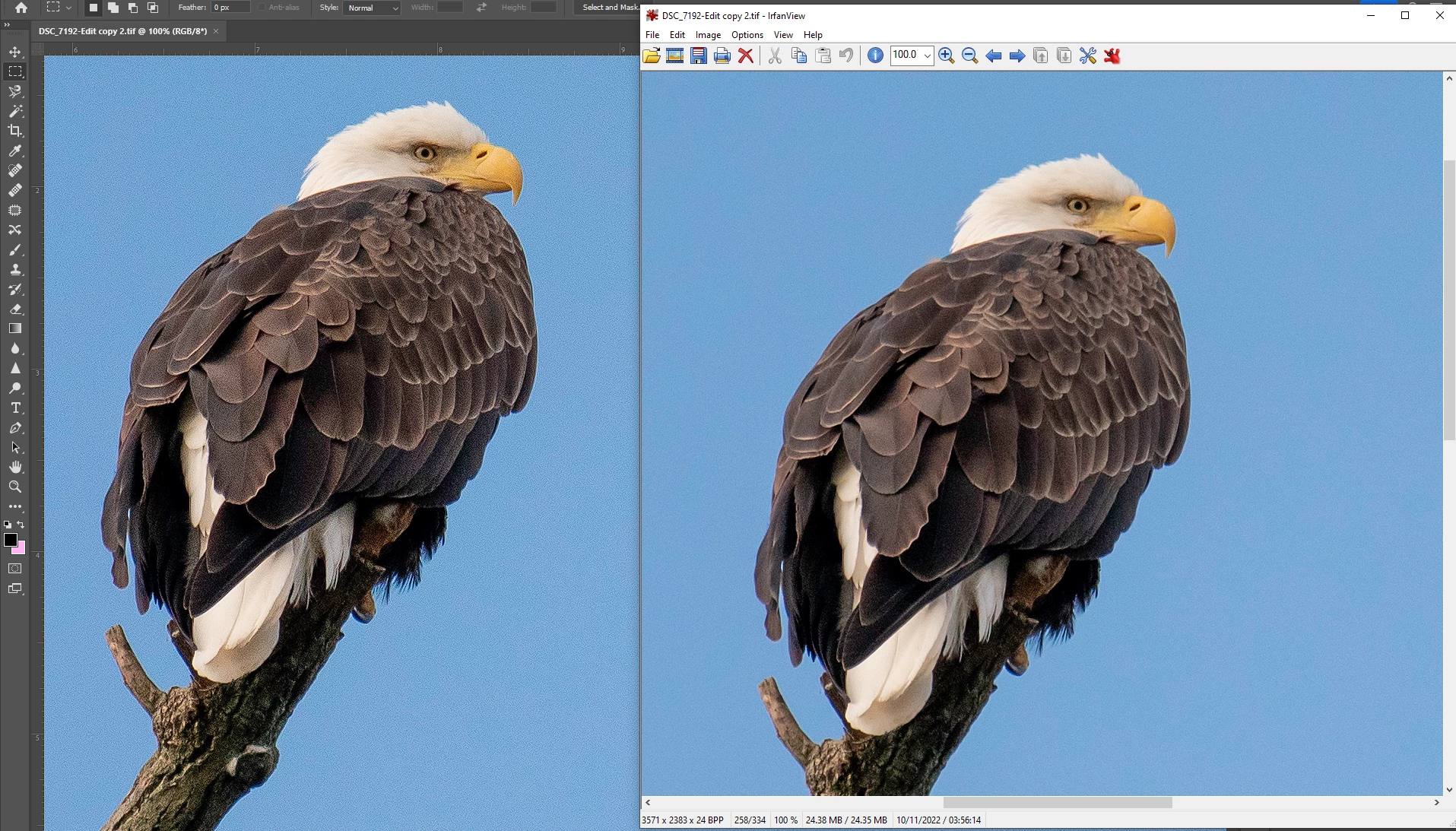
If I open the saved file in photoshop again, it appears sharp. Here's a screenshot of the same image opened in photoshop and irfanview at 100%.

This topic has been closed for replies.
Correct answer Per Berntsen

Irfanview is color managed (as long as color management is enabled), and even if it wasn't, it would not affect sharpness and noise at 100% view. 

All applications should display the same sharpness and noise level at 100%, although those without color management will display wrong colors.


The Photoshop images are not only sharper than Irfanview, but also have a lot of noise.

I suspect that Photoshop is wrong here, and that Irfanview displays correctly. 

@First_Person : First of all, make sure that Cache levels is set to at least 4 in Preferences > Performance.

If that's not the issue, try unchecking Use graphics processor, also in Preferences > Performance.

If this makes Photoshop display like Irfanview at 100%, update your graphics driver, then try to enable the GPU again.


When posting screenshots, please use the Insert Photos button in the toolbar.


2 replies

Per Berntsen
Community Expert
Per BerntsenCommunity ExpertCorrect answer
Community Expert
October 11, 2022

Irfanview is color managed (as long as color management is enabled), and even if it wasn't, it would not affect sharpness and noise at 100% view. 

All applications should display the same sharpness and noise level at 100%, although those without color management will display wrong colors.


The Photoshop images are not only sharper than Irfanview, but also have a lot of noise.

I suspect that Photoshop is wrong here, and that Irfanview displays correctly. 

@First_Person : First of all, make sure that Cache levels is set to at least 4 in Preferences > Performance.

If that's not the issue, try unchecking Use graphics processor, also in Preferences > Performance.

If this makes Photoshop display like Irfanview at 100%, update your graphics driver, then try to enable the GPU again.


When posting screenshots, please use the Insert Photos button in the toolbar.


Participant
October 11, 2022

Thank you! Unchecking Use graphics processor fixed the problem. 

There was a box checked by default in AMD Adrenalin that sharpens images in games. With that unchecked, the problem is fixed. 

Mylenium
Legend
October 11, 2022

Nopthing to do with sharpness. PS simply brings out more noise and produces a more contrasty image, which indicates that your system does not use color management and/ or you have set it up wrongly, so the results don't match. As a start you should therefore read the respective sections of the online help and check your settings:


https://helpx.adobe.com/photoshop/using/understanding-color-management.html


Mylenium